Multicast – Suresh
Multicast
Multicast traffic is sent using UDP
Concept of OIL / OIF and Incoming interfaces are that the routers in the path should only forward the stream if there are interested receivers downstream. If no one has joined the multicast group on a given path, the routers should not send traffic that way
When a switch sees Broadcast MAC address of FF:FF:FF:FF:FF:FF, it knows the frame is a broadcast and floods it out of all ports in the same VLAN, “except the port it was received on”.
Multicast handling
If routers see destination address is a multicast address, routers treat it as multicast traffic and not like unicast traffic
Similarly if switches look at the ethernet frame and detect it to be multicast mac address then they treat it differently
Multicast IP address is never used as source address and it is always used as destination address, source IP will be the unicast IP address of the sender.
Simiarly the destination MAC on layer 2 will be a Multicast MAC address starting with “01:00:5E”
Multicast ranges
224.0.0.0 to 224.0.0.255 – Reserved for local network control traffic and TTL of 1
232.0.0.0 to 232.255.255.255 – Reserved for Source Specific Multicast (SSM).
239.0.0.0 to 239.255.255.255 – These addresses are meant to be used inside an organization
Multicast Forwarding with PIM-DM first
PIM-SM has mandtory requirement for RP so to keep things simple we will start learning from PIM-DM first, even though we never deploy PIM-DM due to high control plane footprint
Source starts sending traffic to a multicast IP address
Any number of receivers can choose to subscribe to that group
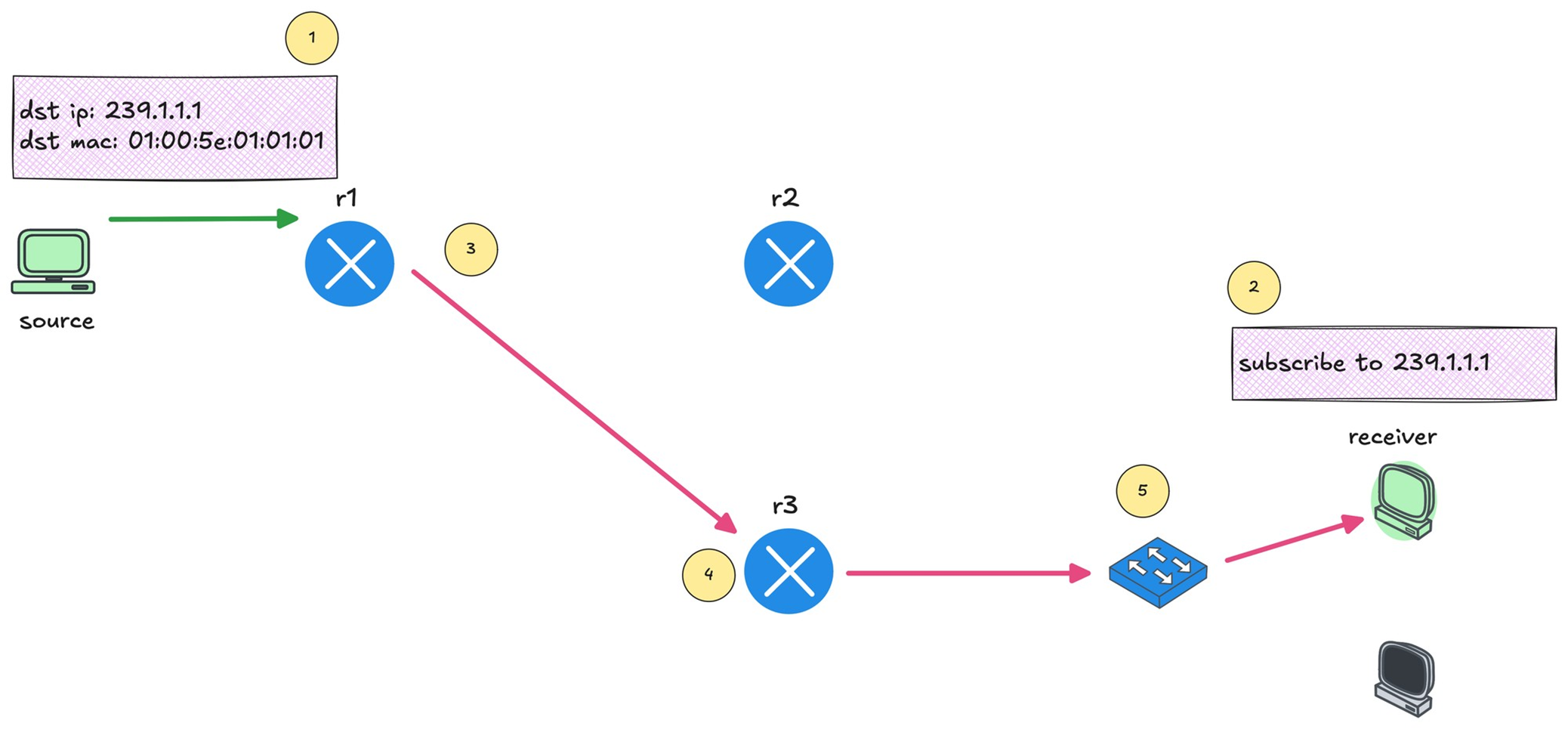
You can see that r1 forwards the multicast traffic toward r3 because there is an interested receiver behind it.
Multicast Reverse Path Forwarding (RPF)
This is required to prevent duplicate packets arriving,
RPF checks “source IP address” of that packet in unicast routing table
If multicast packet arrive on the interface it would use to reach the source?’ If the answer is yes, the RPF check passes, and that multicast traffic is accepted
If the packet arrived on any other interface, the RPF check fails, and the packet is dropped
IGMP – Internet Group Management Protocol
IGMP (Layer 2) playes key role in multicast on LHR and FHR’s LAN side
Switches have to perform IGMP snooping
Part of IGMP also runs on host
Host uses IGMP to signal their interest in multicast traffic
Host sends IGMP Membership Report, also known as an IGMP join to the multicast group address
if PIM neighborship is established on LHR then (PIM-DM will start forwarding traffic right away) in case of PIM-SM LHR will send join towards RP
IGMPv1 is the original version. It allows hosts to join a multicast group but does not support leaving a group explicitly, Routers rely on timeouts to figure out when receivers are no longer interested
IGMPv2 improves on this by adding an explicit leave message.
IGMPv3 adds support for Source Specific Multicast. With IGMPv3, receivers can specify not only the multicast group they want to join, but also which source they want to receive traffic from
IGMPv2
IGMP messages are carried inside IP packets using IP protocol number 2, IP because it is the router that initiates using General Membership query / Group specific query and also the Membership report or IGMP join has to come from end host inside IP
They are always sent with a TTL of 1
IGMPv2 General Membership query
As soon as PIM is enabled on router interface, IGMP is also enabled automatically
Router immediately starts sending IGMP General Membership Queries with source as the interface IP and destination is 224.0.0.1 (All hosts)
The router periodically sends IGMP General Membership Queries to check if receivers are still interested. As long as reports continue to arrive, the router keeps forwarding the multicast stream.
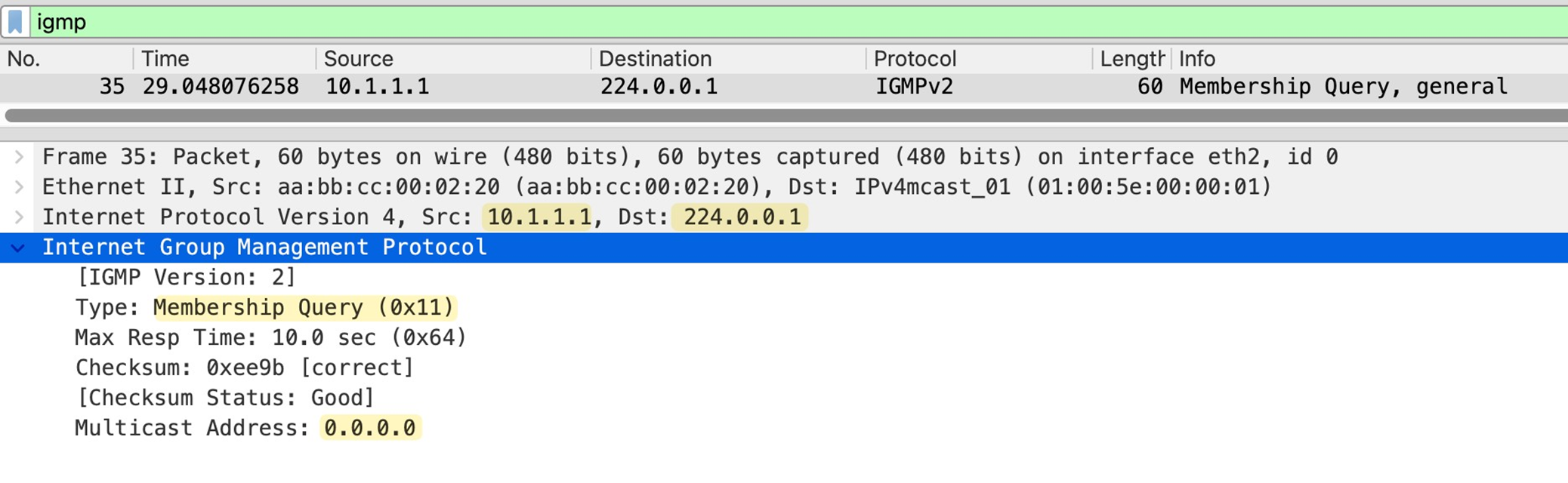
in General Membership Query multicast address is set to 0.0.0.0
As a result all the hosts still interested in even one Multicast group will respond with IGMP Membership report or IGMP join with their randomzied Max response time among themselves
Host whose max response timer expires first, responds to the General Membership query with an IGMP membership or IGMP Join to 239.1.1.1 and other host also see that because they are also listning for 239.1.1.1, If those other hosts are listening for same group and see that IGMP join then they do not send their membership report and suppress it
This report suppression mechanism is to keep IGMP traffic low, otherwise hundreds of hosts can respond at the same time or different times and burden the router’s CPU
IGMPv2 Join or IGMPv2 Membership Report
Host sends Memership report to the Multicast group address and not to 224.0.0.2 or 224.0.0.13
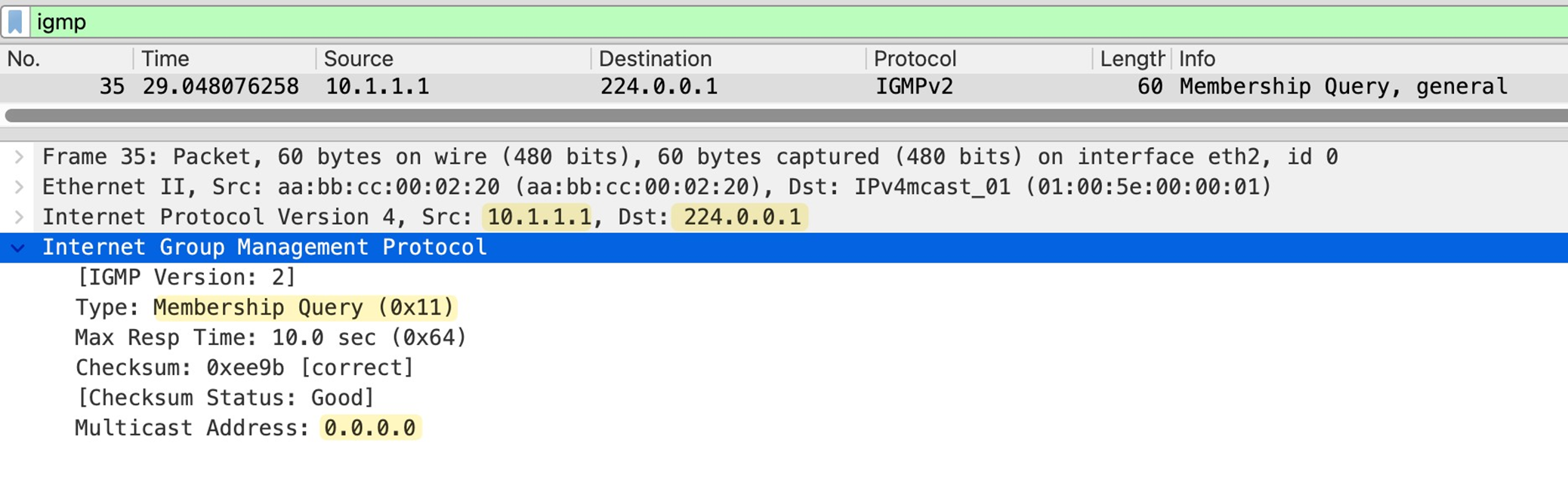
IGMP Leave Message
When a host no longer wants to receive a multicast stream, it sends an IGMP Leave Group message
The source IP of this message is the unicast IP of the host, and the destination IP is the all routers multicast address 224.0.0.2.
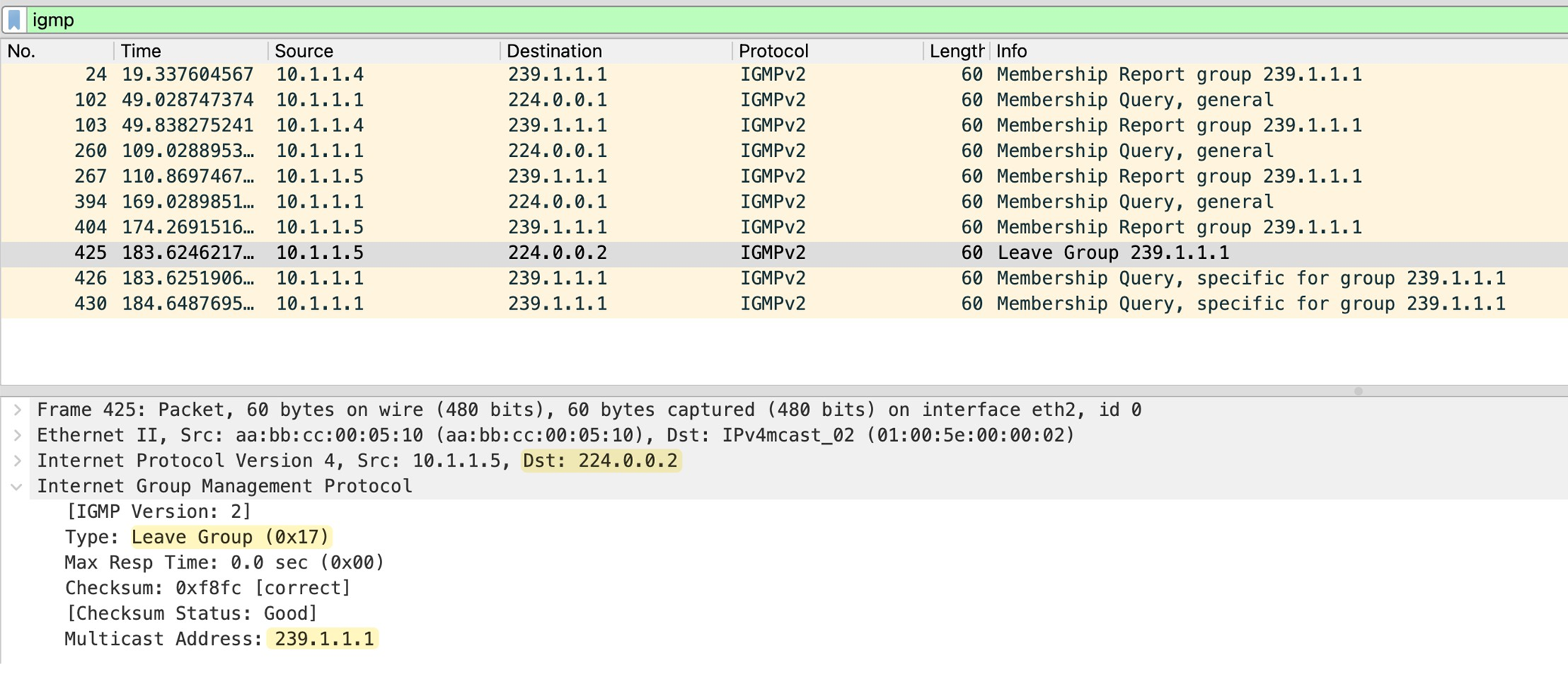
The router sends two group-specific queries, one second apart, and if no membership report is received within 0.5 seconds after the last query, the router removes the multicast group from that interface.
IGMP Snooping
Switch gleans or snoops into the IGMP exchange between router and the hosts to map the Multicast group to ports mapping, this whole mechanism exists because of the way switch performs forwarding using source based learning, once a mac is learned by switch, frames with that destination address it is not flooded but unicasted according to mac table on switch
But multicast mac address is never used as source address so its entry is never built
By default, the switch has no idea which ports actually have interested receivers, so the safest option is to flood multicast traffic out of all ports in the VLAN which is very ineffecient subjecting all connected hosts to the multicast traffic.
When IGMP snooping is enabled, It watches for IGMP membership reports from receivers and notes which ports those reports came in on
From this, the switch builds a table that maps multicast groups to specific switch ports
When multicast traffic starts flowing, the switch no longer floods it everywhere. Instead, it forwards the multicast frames only out of the ports where it has seen joins for that multicast group. Ports with no interested receivers do not get the traffic
Switch also learns which port is connected to the routers by listening on IGMP and PIM messages
The switch also listens for IGMP leave messages. When a receiver leaves a group, the switch updates its table and stops forwarding multicast traffic to that port
IGMP Behvaiour deviation from standard
Remember earlier we talked about how, when a router sends an IGMP query, only one receiver replies due to the report suppression mechanism. This behaviour creates a challenge for the switch.
With this approach, sometimes the switch would not know which ports actually have active receivers for the multicast group, and it would have no way to build an accurate multicast forwarding table.
Switch changes the beahviour and forwards the first IGMP membership report toward the router, but it does not flood that report to other hosts. This way other receivers on different ports get delay timers expire and then send their own reports. The switch sees these reports locally and learns that there are multiple interested ports for the same multicast group even though only one report was forwarded upstream to the router.
Similarly, when the switch receives an IGMP Leave message on a port, the switch only forwards a leave message to the router when the leaving host is actually last host
For example, if two receivers are joined to the same multicast group and one of them sends a leave, the switch does not forward that leave to the router. Only when the last receiver leaves does the switch forward the leave message upstream.
Also worth mentioning that when the switch receives IGMP leave message on a port, it does not immediately assume that there are no receivers left on that port. It sends an IGMP query out of that same port to check if there are any other interested receivers. This is important in cases where multiple hosts exist behind a single port or when that port connects to another switch.
If you enable IGMP immediate leave, the switch skips this verification step and removes the port from the multicast group as soon as it sees the leave message.
Using Cisco routers as hosts for Multicast send and Multicast receive
no ip routing
ip default-gateway x.x.x.x
Basic PIM-DM configuration
no ip pim autorp
!
ip multicast-routing
!
interface Ethernet0/1
 description r1 -> sender
 ip address 10.1.0.1 255.255.255.0
 ip pim dense-mode
!
interface Ethernet0/2
 description r1 -> [receiver_01,receiver_02]
 ip address 10.1.1.1 255.255.255.0
 ip pim dense-mode
!
As soon as we enable PIM, IGMPv2 is automatically enabled on those interfaces.
The router immediately starts sending IGMP General Membership Query messages out of the interfaces, effectively asking, ’Is there any interested receiver on this segment?’
You can check the
-IGMP enabled
-Timers like 60 seconds query interval
-10 seconds max response time
-IGMP querier router
-Multicast designated router
-R1 is the only router on the segments
r1#show ip igmp interface
!
Ethernet0/1 is up, line protocol is up
 Internet address is 10.1.0.1/24
 IGMP is enabled on interface
 Current IGMP host version is 2
 Current IGMP router version is 2
 IGMP query interval is 60 seconds
 IGMP configured query interval is 60 seconds
 IGMP robustness-variable is 2
 IGMP querier timeout is 120 seconds
 IGMP configured querier timeout is 120 seconds
 IGMP max query response time is 10 seconds
 Last member query count is 2
 Last member query response interval is 1000 ms
 Inbound IGMP access group is not set
 IGMP activity: 0 joins, 0 leaves
 Multicast routing is enabled on interface
 Multicast TTL threshold is 0
 Multicast designated router (DR) is 10.1.0.1 (this system)
 IGMP querying router is 10.1.0.1 (this system)
 No multicast groups joined by this system
!
Ethernet0/2 is up, line protocol is up
 Internet address is 10.1.1.1/24
 IGMP is enabled on interface
 Current IGMP host version is 2
 Current IGMP router version is 2
 IGMP query interval is 60 seconds
 IGMP configured query interval is 60 seconds
 IGMP robustness-variable is 2
 IGMP querier timeout is 120 seconds
 IGMP configured querier timeout is 120 seconds
 IGMP max query response time is 10 seconds
 Last member query count is 2
 Last member query response interval is 1000 ms
 Inbound IGMP access group is not set
 IGMP activity: 0 joins, 0 leaves
 Multicast routing is enabled on interface
 Multicast TTL threshold is 0
 Multicast designated router (DR) is 10.1.1.1 (this system)
 IGMP querying router is 10.1.1.1 (this system)
 No multicast groups joined by this system
IGMP Snooping Switch Configuration
Debugs
debug ip igmpmore…
coming soon
Leave a Reply