QoS
QoS
Why QoS?
Even in the presence of 10G links or 100G links we still need QoS since we could have 100Mbps internet link

Some oversubscribed topologies have a need for QoS (just in case all servers start transmitting at the same time)
QoS only works when there is congestion at times of the day, if your network is congested all the time then you need to increase more bandwidth
2 types of QoS models
Best Effort – FIFO queuing , first packet that comes into the router is the first packet that will exit the [queue + interface] without any preferential treatment in a straight line
DiffServ – means “differentiated” “services” which means different treatment for different services
QoS Tools
Classification and Marking (tagging at IPv4 level)
Congestion Avoidance via Policing / Dropping (it is best to “avoid” first by cutting)
Congestion Management via Queueing | Scheduling | Shaping (delaying only as cutting / policing has been done earlier) – at this stage you can only manage as avoidance was earlier (tried to avoid but can only manage now)
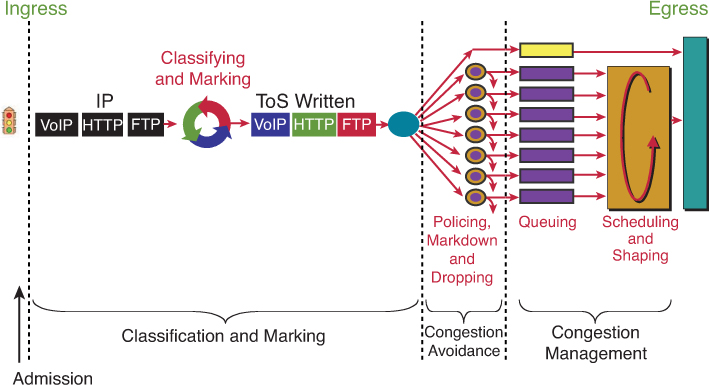
CMPQS – Classification , Marking , Policing , Queueing , Shaping

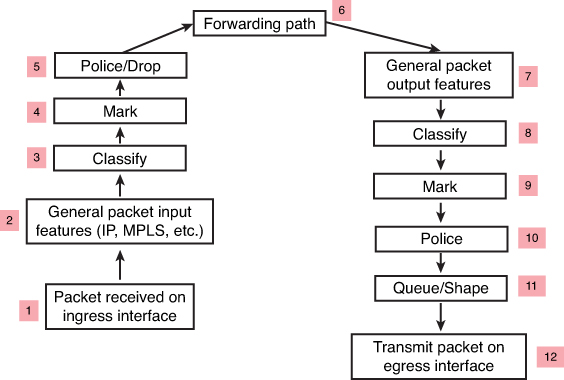
CMP — <ROUTER> — CMPQS
Classification may happen on ingress (3) and egress (8) in the packet path
but classification should be done as close to the source on ingress
but sometimes the attributes for classification are not known until the exit interface has been chosen. This is true for locally generated packets and even some transit packets,
If exit interface has service policy applied and that interface is chosen based on destination IP and routing table, Classify on Egress (8) is for those scenarios
Similarly, a packet may be marked on ingress (4), but perhaps requires to be re-marked on egress (9). For example, a policer may re-mark a nonconforming packet on egress rather than drop it—the fact that the packet is nonconforming is not known until the packet reaches the egress interface (where non conformance is determined by filling up queues and congestion) that has service policy applied and that interface is chosen based on destination IP and routing table, Mark on Egress (9) is for those scenarios
Classification and Marking
We want to save on processing for all nodes in the network and classify only once and best way to do is for edge nodes to classify once but tag or mark for it to be used forever through the network
All other tools in the list also use marked packets such as queueing , congestion avoidance and policing / shaping etc
IPv4 packet carries an 8-bit Type of Service (ToS) byte
IPv6 header carries an 8-bit Traffic Class field
first 3 bits in both IPv4 and IPv6 are for IP Presedence
DSCP first 6 bits offer a maximum of 64 possible classes of service
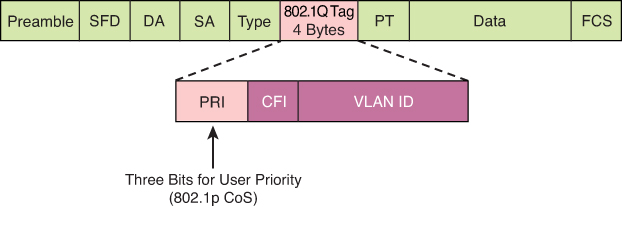
There is also layer 2 marking called Ethernet 802.1p CoS bits
General marking guidance
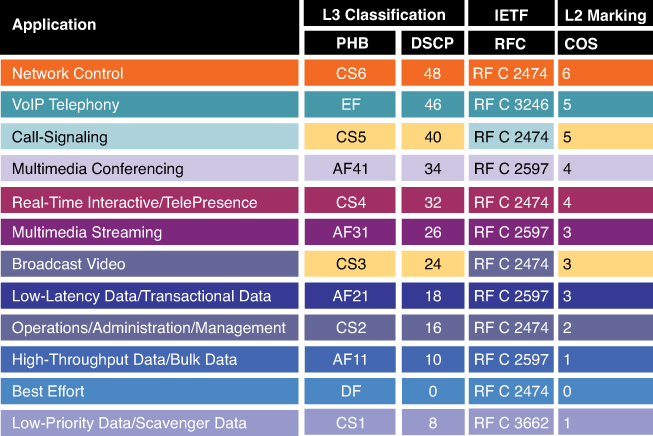
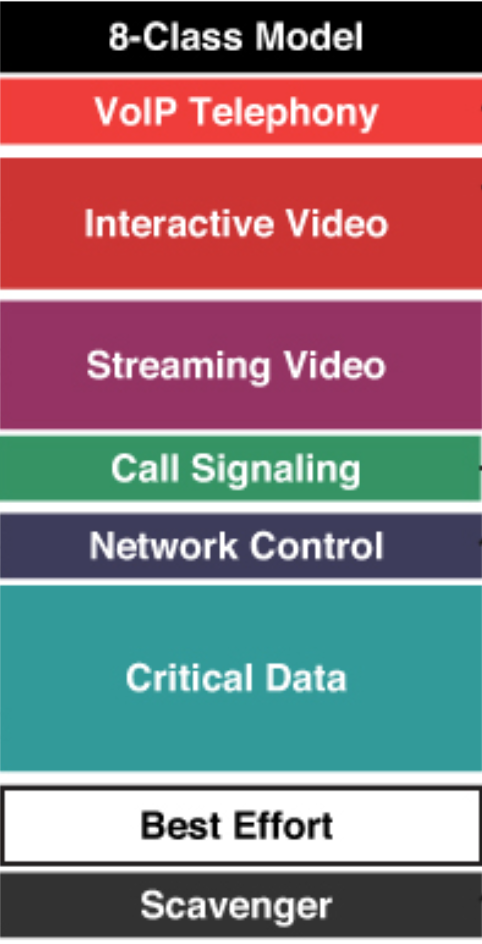
but in reality only 8 classes traffic model is implemented instead of 12 shown above
Marking can be new marking or even remarking such as marking down the class of non conforming or violating traffic
Class-based marking occurs after classification of the packet (in other words, set happens after the match criteria). Therefore, if used on an output policy, the packet marking applied can be used by the next-hop node to classify the packet but cannot be used on this node for classification purposes. However, if class-based marking is used on an ingress interface (blindly without going through match purely based on interface the traffic is coming from) as an input policy, the marking applied to the packet can be used on the same device on its egress interface for classification purposes.
On output policies both classification and marking can happen before or after tunnel encapsulation, depending on where the service policy is attached. Therefore, if a policy is attached to a GRE or IPsec tunnel interface, the marking is applied to the original inner packet header. However, if the policy is attached to the physical interface, only the tunnel header (the outer header) is marked, and the inner packet header is left unchanged.
CoS is usually used at Ethernet Layer 2 frames, contains 3 bits and can only be done at trunk, it makes sense to have it only on trunk since trunk is the only place where multiple VLANs traffic aggregate and compete from one another
CS is a term used to indicate a 3-bit subset of DSCP values; it designates the same 3 bits of the field as IP Precedence, but the interpretation of the field values maps to the per-hop behaviors as per the RFCs defining 6-bit DSCPs.
DSCP is a set of values, based on a 6-bit width
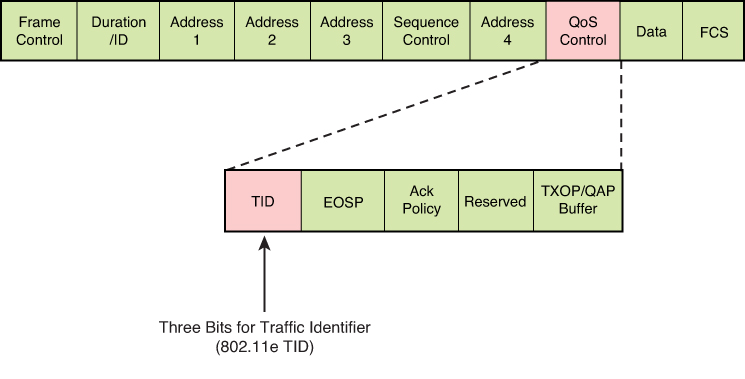
TID is a term used to indicate a 3-bit field in the QoS Control field of the 802.11 WiFi MAC frame. The 8 values of this field correspond to eight user priorities (UPs). TID is typically used for wireless Ethernet connections, and CoS is used for wired Ethernet connections
Trust Boundary
A trust boundary is a network location where packet markings are not accepted and are rewritten
In an enterprise campus network, the trust boundary is almost always at the edge switch
For example, a user computer set up to mark all traffic at DSCP EF will be ignored by the access switch at the trust boundary, and the traffic is inspected and re-marked according to enterprise QoS policies implemented on the switch.
Video traffic comes in a wide array of different traffic types belonging to applications that may be extremely high priority and delay sensitive (such as immersive Cisco TelePresence traffic) to unwanted Scavenger class traffic (nonorganization entertainment videos, such as YouTube) that in many cases may be dropped outright.
IEEE 802.11 specification, which provides a means for wireless devices to request traffic in different access categories with different markings (which are usually on the untrusted side of the network trust boundary and so raises the question of whether the trust boundary for wireless devices could, or should, be extended to the wireless device under certain circumstances).
L2 Frame
Ethernet frames can be marked with their relative importance at Layer 2 by setting the 802.1p user priority bits (CoS) of the 802.1Q
Wireless Ethernet frames can be marked at Layer 2 by setting the 802.11 WiFi Traffic Identifier (TID) field with in the QoS Control field
GRE , IPSec

The marking field from the inner header might or might not be copied automatically to the outer header. If not, explicit CLI must be used to mark the outer header. Methods to achieve this include the qos pre-classify CLI on the tunnel interface
l2tp tos reflect CLI can also be used on L2TP tunnels. L2TPv3 is widely used to transport L2 frames over IP networks.
MPLS
4-bit CoS field – 3 bits MPLS EXP (Experimental) bits and 1 bit Bottom of Stack Indicator
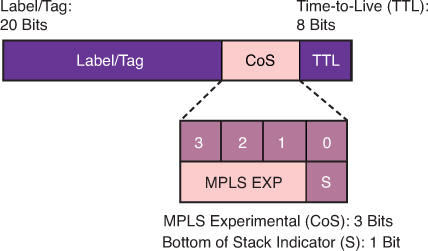
In MPLS tunneling scenarios, there can be multiple MPLS headers on a packet. The set mpls experimental imposition command sets a value on all labels on the packet, and the set mpls experimental topmost command sets a specific value only on the outermost label.
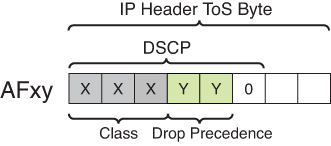
DSCP PHBs: Best-Effort (BE or DSCP 0), Assured Forwarding (AFxy), Expedited Forwarding (EF) and Class-Selector (CSx) code points
Class-Selector (CSx) code points have been defined to be backward compatible with IP precedence. (In other words, CS1 through CS7 are identical to IP precedence values 1 through 7
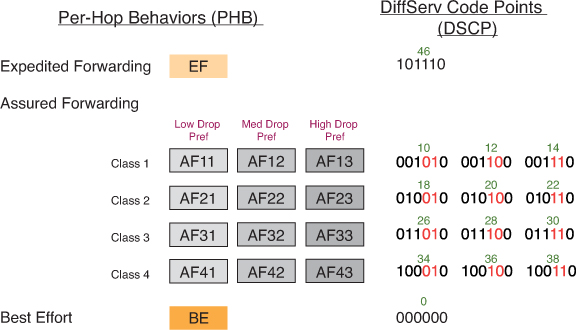
The first digit denotes the “AF class” and can range from 1 through 4. The second digit refers to the level of drop preference within each AF class and can range from 1 (lowest drop preference) to 3 (highest drop preference).
For example, during periods of congestion (on an RFC 2597-compliant node), AF33 would statistically be dropped more often than AF32, which, in turn, would be dropped more often than AF31
NBAR
NBAR is a L4–L7 deep-packet inspection classifier triggered by the match protocol in class-map
It is a more CPU-intensive than classifiers that match traffic by markings (DSCPs), addresses, or ACLs.
identifying application layer protocols by matching them against a Protocol Description Language Module (PDLM)
PDLM definitions are modular, and new ones can be added to a system without requiring a Cisco IOS upgrade.
Two modes of operation that NBAR offers:
Passive mode: Discovers and provides real-time statistics on applications per interface or protocol and gives bidirectional statistics such as bit rate (bps), packet, and byte counts
Active mode: Classifies applications for the purpose of marking the traffic so that QoS policies can be applied.
Router# show run
interface fastethernet 0/0
  ip nbar protocol-discovery

! NBAR used as a classifier
Router# show run
class-map match-any MY-VIDEO
  match protocol cuseeme
  match protocol h323
  match protocol rtp video

-----------------------------------------------------

class-map match-any ERP
   match protocol sqlnet
   match protocol ftp
   match protocol telnet
class-map match-any AUDIO-VIDEO
   match protocol http mime "*/audio/*"
   match protocol http mime "*/video/*"
class-map match-any WEB-IMAGES
   match protocol http url "*.gif"
   match protocol http url "*.jpg|*.jpeg"

-----------------------------------------------------

match protocol h323 ! identifies all H.323 voice traffic
match protocol rtp [audio | video | payload-type payload-string]
Sequence of classes within a policy map
Sequence of classes within a policy map is significant
packet is examined against each subsequent class within a policy map until a match is found. When found, the examination process terminates, and no further classes are checked. If no matches are found, the packet ends up in the default class (because policy map is applied on the interface and every policy map has class class-default section)
class-map match-all FAX-RELAY
  match dscp ef
class-map match-all VOICE
  match protocol rtp audio
!
policy-map VOICE-AND-FAX
class FAX-RELAY
  priority 64
  police cir 64000
class VOICE
  priority 216
  police cir 216000
No traffic would ever show against the VOICE class because both voice and fax-relay traffic would match on DSCP EF and would therefore be assigned to the FAX-RELAY class, to fix it we will need to reverse the order of classes inside policy map
service-policy command also specifies whether the policies should be applied to ingress or egress traffic on this interface using keywords input and output.
policy-map POLICY-1
  ...
  bandwidth 20000
policy-map POLICY-2
  ...
  bandwidth 64000
!
interface Ethernet 1/0
  service-policy input POLICY-1
!
interface Ethernet 1/1
  service-policy output POLICY-2
Subinterfaces

the two subinterfaces are collectively allowing 22K of traffic, which in turn is shaped to 20K throughput, on the main interface to maintain an aggregate throughput not to exceed 20K and shave off the extra 2Kbps.
! Definitions for sub-interface GE1.1
policy-map CHILD1
  class VOICE1
    priority 3000
  class VIDEO1
    bandwidth 5000
policy-map PARENT1
  class class-default
    shape average 15000
    service-policy CHILD1
!
! Definitions for sub-interface GE1.2
policy-map CHILD2
  class VOICE2
    priority 1500
  class VIDEO2
    bandwidth 2500
policy-map PARENT2
  class class-default
    shape average 7000
    service-policy CHILD2
!
! Definitions for the main interface
policy-map AGGREGATE
  class class-default
    shape average 20000
!
interface ge 1/1.1
  service-policy output PARENT1
interface ge 1/1.2
  service-policy output PARENT2
interface ge 1/1
  service-policy output AGGREGATE
PARENT1 policy:
Shapes all traffic on GE1.1 to an average of 15 Mbps.
Within that shaped pipe, it applies the CHILD1 policy, enforcing priority for voice and bandwidth for video.
AGGREGATE policy:
Shapes the whole physical interface GE1/1 to 20 Mbps total.
This ensures the combined traffic from both sub-interfaces (GE1.1 + GE1.2) cannot exceed 20 Mbps.
GE1/1.1 → applies PARENT1 (→ CHILD1) = 15 Mbps max.
GE1/1.2 → applies PARENT2 (→ CHILD2) = 7 Mbps max.
GE1/1 → applies AGGREGATE = 20 Mbps total for both.
all traffic at the interface level being shaped overall to 20K (policy-map AGGREGATE), while voice traffic within that rate is guaranteed to get a minimum of 3K or 1.5K of bandwidth
Marking conversion with table map
You can build a conversion table with the table-map CLI and then reference the table in a set command to do the translation
Any values not explicitly defined in a “to-from” relationship are set to the default value
If the default value is omitted from the table, the content of the packet header is left unchanged.
In this example, the DSCP value will be set according to the CoS value defined in the table
table-map MAP1
  map from 0 to 0
  map from 2 to 1
  default 3
!
policy-map POLICY1
  class traffic1
    set dscp cos table MAP1
Congestion Avoidance
Congestion avoidance aims to control traffic before it enters the queueing phase. Congestion should be avoided at all cost because it can cause TCP global sync for all TCP connection flows simultaneously
dropping and marking the packet, are applied before the packet enters a queue for egress scheduling
“bandwidth,” “police,” and “shape”
Bandwidth
The bandwidth command is used to assign “minimum bandwidth” to a traffic class during congestion times. Just like a rubber “band” can be stretched and then it comes back to its original size, This is how a class can use positively more bandwidth or minimum of defined bandwidth (under congestion)
It is often used in conjunction with the Low Latency Queueing (LLQ) or Class-Based Weighted Fair Queueing (CBWFQ) to assign different classes different bandwidths. Assigning predictable bandwidth or chunks of interface speed to classes is much better way to handle the times of congestion
bandwidth {value in kbps}bandwidth 2000 (This allocates 2000 kbps to the class.)Police
The police command is used to force traffic to a rate limit regardless of congestion or not. Police command and shape command are applied all the time regardless if congestion is happening or not
Traffic of class where policing is applied can use less or equal to rate specified in police command
It is used to control the “max” speed a traffic can use often used to hard rate limit certain class.
Remember this from Police on highway, they make public drivers conform to max speeds defined, if a driver exceeds that speed, police stops or gives ticket to that person
Policing drops or marks packets that exceed the specified rate, traffic exceeding the specified rate is either dropped or remarked for lower marking
police {rate in bps} [burst-normal in bytes] [burst-max in bytes] [conform-action transmit] [exceed-action drop] [violate-action {drop | remark}]
police 1000000 20000 20000 conform-action transmit exceed-action drop
(This limits the traffic to 1 Mbps, with a normal burst of 20,000 bytes and a maximum burst of 20,000 bytes. Conforming packets are transmitted, while exceeding packets are dropped.)
Shape
The shape command (traffic shaping) is used to buffer and smooth out bursts of traffic to a specified rate regardless of the congestion or not. Like police command, it also has a reducing function, It is used to ensure that traffic rate is controlled, and used in scenarios where you want to rate limit traffic to a rate but also not drop any traffic instead delay it.
Shaping delays excess packets by storing them in a queue , buffer and releasing them at a controlled rate. This helps in smoothing traffic flows and prevents sudden bursts that could overwhelm network devices.
shape average {rate in bps} [burst-size in bytes] [excess-burst-size in bytes]
Example: shape average 1000000 20000 20000
(This shapes the traffic to an average rate of 1 Mbps, with a burst size of 20,000 bytes and an excess burst size of 20,000 bytes.)
Key Differences:
Bandwidth vs. Police:
bandwidth reserves a minimum guaranteed bandwidth, ensuring that a class gets its share of the link capacity even under congestion.
police enforces a maximum rate, dropping or marking packets that exceed this rate.
Police vs Shape:
police drops or marks packets that exceed the specified rate, providing a hard limit.shape smooths out bursts of traffic instead of dropping packets, sending traffic at a controlled rate.

Policers are also often deployed at egress to control bandwidth used (or allocated) to a particular class of traffic, because such a decision often cannot be made until the packets reach the egress interface.
Shapers are commonly used on enterprise-to-service-provider links (on the enterprise egress side) to ensure that traffic destined for the service provider (SP) does not exceeds a contracted rate
Policer and Tail drop
When traffic exceeds the policed pipe, it does not expand the pipe but instead excess traffic / rate stays at the tail of the pipe and that is why it is called tail drop
A policer does tail drop, which describes an action that drops every packet that exceeds the given rate, until the traffic drops below the rate
Tail drop can have adverse effects on TCP retransmission methods and cause TCP global sync. Another mechanism of dropping packets is random dropping, which proactively drop packets before the queue is full to signal TCP flows to slow down inside the queue, known as random early detection (RED) and weighted RED (WRED). These methods work more effectively with TCP retransmission logic, but they are not policing/shaping tools. RED and WRED which are part of queue management / congestion avoidance (sometimes described as “intelligent dropping” inside the queue)
Instead of waiting for the queue to fill up and then tail-drop, RED/WRED randomly drop packets early, which prevents global synchronization and keeps throughput smoother.
Policing and RED/WRED can be applied on same service policy on interface but they work at different stages of packet handling, so you need to be clear how they interact.
Policing action will be taken as shown in above diagram since Congestion Avoidance takes place first and that controls the rate but for some reason if queue starts to fill up due to any other reason (since back pressure is on due to constant rate coming through policer) then WRED will activate
police command for tail drop and random-detect for WRED
They don’t “conflict,” but the policer acts first. If the policer already drops excess traffic, less traffic even reaches the queue, so WRED might do little and in production networks only should be implemented, unless there are complaints about TCP Global Sync, then honestly pipe should be increased rather than implementation of WRED
More common combo = shaping + WRED (because shaping delays bursts, then WRED handles congestion gracefully inside the queue).
policer when drops packets, it does “tail drop” on queues, it sounds like a queueing function (congestion management) but it is not, it is part of policer and it is general drop of traffic that simply exceeds the rate or pipe
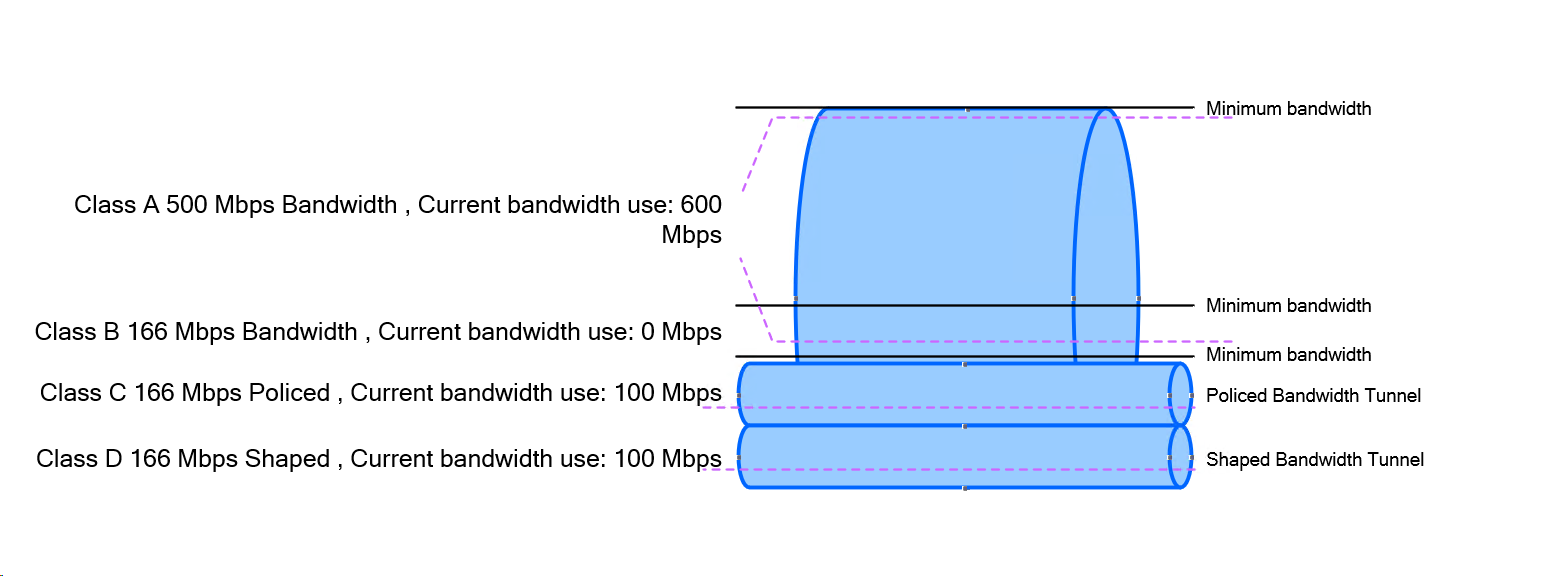
When a traffic rate is exceeded, a policer can take one of two actions:
- Drop the traffic
- Re-mark
Section: Random Detect example with remark , mark down
re-marking (or markdown) should be done according to standards-based defined in Per Hop Behavior PHB – Assured Forwarding (AF) for example: excess traffic arriving as AFx1 should be marked down to AFx2 (or AFx3, whenever dual-rate policing is supported)
Then when traffic reaches the queue (congestion management), queue should be configured with (DSCP)-based WRED, WRED policy should be to drop AFx3 (statistically) more aggressively than AFx2, which in turn should be dropped (statistically) more aggressively than AFx1.
! ---- Classify AF queues (typical) ----
class-map match-any AF1
  match dscp af11 af12 af13
class-map match-any AF2
  match dscp af21 af22 af23
class-map match-any AF3
  match dscp af31 af32 af33
class-map match-any AF4
  match dscp af41 af42 af43

! ---- Policy with WRED tuned by drop precedence ----
policy-map WAN-OUT
  class AF1
    bandwidth percent 10
    random-detect dscp-based
    ! AF13 (x3) most aggressive
    random-detect dscp af13 20 40 5
    ! AF12 (x2) medium aggressive
    random-detect dscp af12 30 55 7
    ! AF11 (x1) least aggressive
    random-detect dscp af11 40 70 10

  class AF2
    bandwidth percent 10
    random-detect dscp-based

    random-detect dscp af23 20 40 5


random-detect dscp <DSCP-value> <min-threshold> <max-threshold> <mark-prob-denominator>

random-detect dscp af23

This tells the router to apply DSCP-based WRED to packets marked AF23.
Each DSCP value can have its own drop profile.

<min-threshold> → 20

This is the queue depth (in packets) at which WRED starts dropping probabilistically.
At queue length below 20 packets, no drops occur for AF23.

<max-threshold> → 40

This is the queue depth at which WRED reaches 100% drop probability for AF23.
At 40 packets or more, all AF23 packets are dropped.

<mark-prob-denominator> → 5

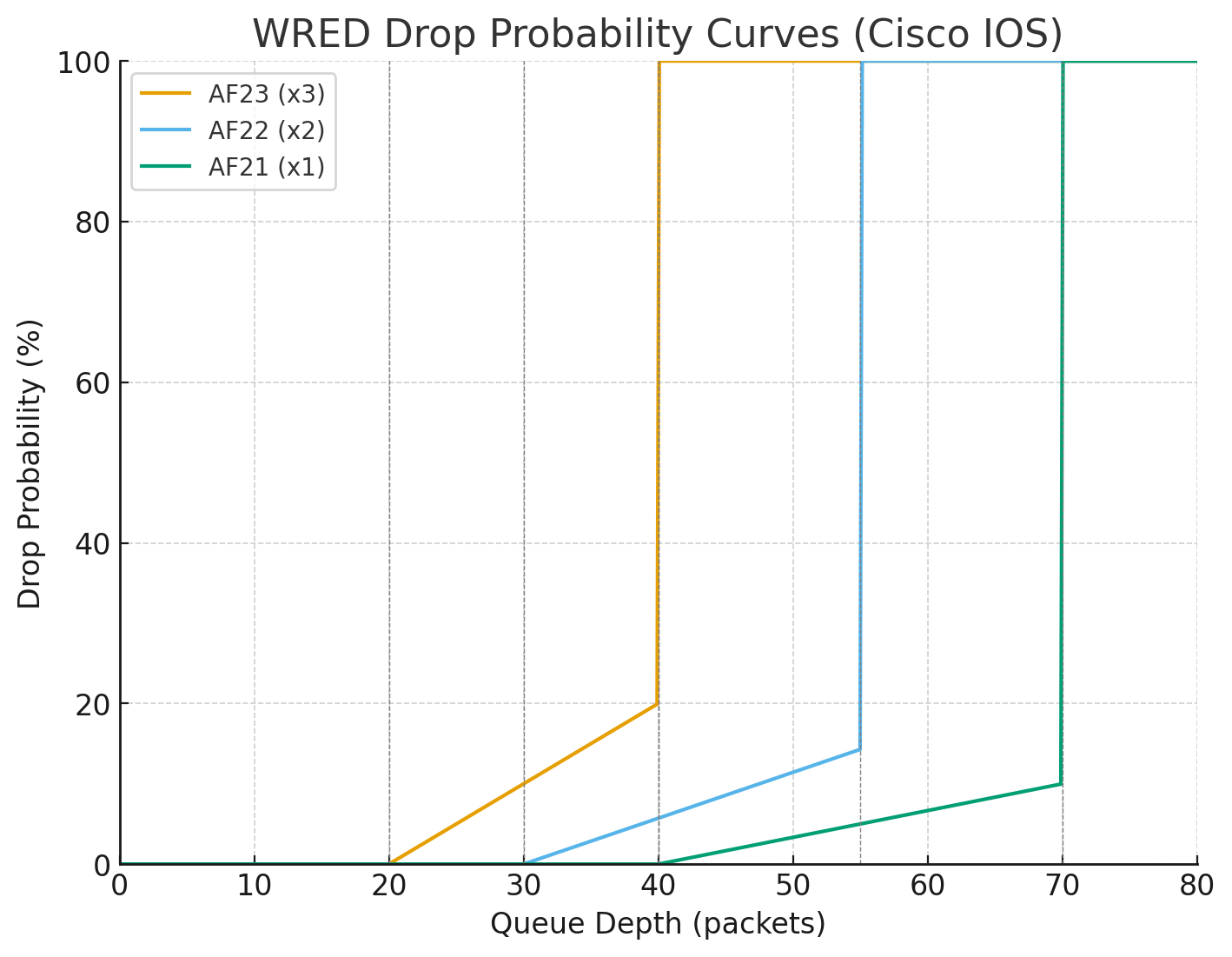
This controls the slope of the drop curve between min and max threshold (as seen in chart below).

Drop probability = 1 / denominator at max-threshold

Here: 1/5 = 20% max probability (at threshold just below 40).

So queue depth
at 20 → 0% drop chance,
at 30 → ~10% drop chance,
at 39 → ~20% drop chance,
at ≥40 → 100% drop.

AF23 (x3): min 20, max 40, denom 5 → starts dropping early, ramps quickly → Most aggressive (drops at shallow queue depth).

AF22 (x2): min 30, max 55, denom 7 → later start, gentler slope → Medium aggressive.

AF21 (x1): min 40, max 70, denom 10 → starts dropping late, gentlest slope → Least aggressive (protected).


    random-detect dscp af22 30 55 7
    random-detect dscp af21 40 70 10

  class AF3
    bandwidth percent 10
    random-detect dscp-based
    random-detect dscp af33 20 40 5
    random-detect dscp af32 30 55 7
    random-detect dscp af31 40 70 10

  class AF4
    bandwidth percent 10
    random-detect dscp-based
    random-detect dscp af43 20 40 5
    random-detect dscp af42 30 55 7
    random-detect dscp af41 40 70 10

  class class-default
    fair-queue
    random-detect

! Apply to the egress interface
interface GigabitEthernet0/0
  service-policy output WAN-OUT
✅ So: AFx3 packets hit drop earliest and hardest, AFx2 later/softer, AFx1 latest and mildest.
This all happening in a single queue and this queue contains multiple packets with AF21 , AF22 and AF23 packets and as queue if filling up they are all getting dropped in progression but AF23 will start dropping early and hard before AF21 starts dropping
See how drop probability gets lower and lower (AF21 at 10%) before 100% drop, as this is design intention to have AF21 suffer from only 10% of total packets drop before queue that has multiple packets made up of AF23 , AF22 and AF21 hits queue size of 70
What if we want drop probability to be 80%?
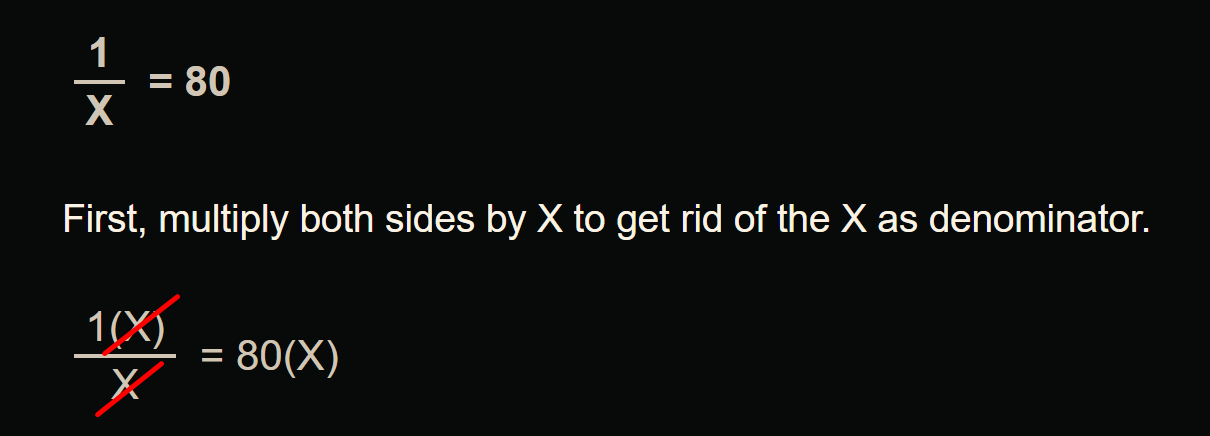

1 / 80 = 0.0125
0.0125 * 100 = 1.25
If we enter 1.25 that will not be accepted by cisco command line and it only allows us whole numbers
If we want increase in drop probability we can use 2 which will give us sharp drop of 50%
Token Bucket Algorithms
Token bucket algorithms are metering engines that keep track of how much traffic can be sent
One token permits a single unit (usually a bit, but can be a byte) of traffic to be sent
New Tokens equal to “CIR” are granted usually every second
For example, if the CIR is set to 8000 bps, 8000 tokens are placed in a bucket at the beginning of the time period. Each time a 1 bit of traffic passes “policer”, the bucket is checked for tokens
-> If there are tokens in the bucket, the traffic is viewed as conforming to the rate and the typical action is to send the traffic.
-> One token is removed from the bucket for each bit of traffic passed.
-> If there are no tokens, any additional offered traffic is viewed to exceed the rate, and the exceed action is taken, which is typically either to re-mark or drop the traffic.
At the end of the second, there might be unused tokens. The handling of unused tokens is a key differentiator among policers
Rate limit using TDM
With TDM, when a rate limit (or CIR) is imposed on an interface, the traffic bits are pinned to subsecond milliseconds – 1 thousandth of a second units
This multiple subsecond time slices are combined into larger interval called “Tc”
For example, if an 8-Kbps CIR is imposed on a 64-Kbps link, traffic can be sent for an interval of 125 ms (64,000 bps / 8000 bits). We just divided the total rate of the link with desired rate 64000 / 8000 = 8, and 8th of a second is 125 ms and that 125 ms will be our Tc value.
The entire amount allowed by the CIR (8000 bits) could theoretically be sent at once, but then the algorithm would have to wait 875 ms before it could send any more data
Therefore, to smooth out the allowed flow over each second, traffic is released on the link in smaller bursts called committed burst “Bc” which can be sent per Tc interval
Below illustration only shows scenarios for different Tc times and not Tc of 125 ms
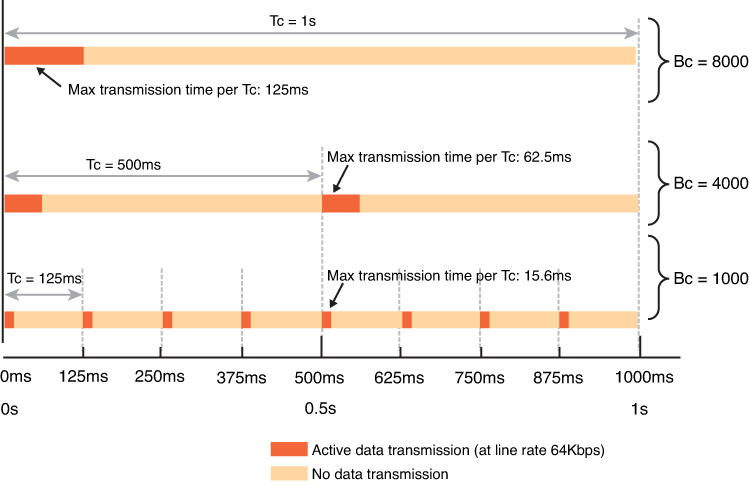
It is not necessary for device to keep sending during whole of Tc, instead device can send for some duration of Tc but send whole of Bc and wait for next Tc interval as shown in last example of Bc = 1000 in illustration above
token bucket algorithm is as follows: Bc = CIR * Tc (Bits = Rate * Time)
Cisco IOS Software does not allow the explicit definition of the interval (Tc). Instead, it takes the CIR and Bc values as arguments
From a practical perspective, when implementing networks, Tc should not exceed 125 ms. Shorter intervals can be configured and are necessary to limit jitter in real-time traffic, but longer intervals are not practical for most networks because the interpacket delay becomes too large
so we can drive down the value of Tc from 125 ms to 62.5 ms (half) using below
Bc = CIR * Tc (Bits = Rate * Time) using this formula we can figure out or set the Tc
for Tc of 125 ms
CIR or total rate 64000 bits/sec * Tc 125 ms = 8000000
8000000 / 1000 ms or 1 sec for result in seconds = 8000 -> Bc
( 64000 * 125 ) / 1000 = 8000 -> Bc
for Tc of 62.5 ms
( 64000 * 62.5 ) / 1000 = 4000 -> Bc
Types of Policers
There are different variations of policing algorithms, including the following:
Single-rate two-color
Single-rate three-color
Dual-rate three-color
Single-Rate Two-Color Policers
The original policers implemented use a single-rate, two-color model with
A single rate and single token bucket algorithm
Traffic identified as one of two states (or colors): conforming to or exceeding the CIR. Marking or dropping actions are performed on each of the two states of traffic
Single-Rate Three-Color Policers
An improvement on single-rate two-color policer algorithm
Traffic identified as one of three states (or colors): conforming to, exceeding or “violating” the CIR.
First part operates just like the single-rate two-color system But if there are any tokens left over in the bucket after each time period, these are placed in the second bucket to be used as credits later for temporary bursts that might exceed the CIR
Tokens placed in this second bucket are called the excess burst (Be). Be is the maximum number of bits that can exceed the Bc burst size.
With this two token-bucket mechanism, traffic can be identified in three states (or three colors) as follows:
Conform: Traffic within the CIR—usually sent (optionally re-marked)
Exceed: Traffic within the excess burst allowance above CIR—can be dropped, or re-marked and sent
Violate: Traffic beyond the excess burst—usually dropped (optionally re-marked and transmitted)
CIR: Committed information rate, the policed rate
CBS: Committed burst size, the maximum size of the first token bucket
EBS: Excess burst size, the maximum size of the second token bucket
Tc: Token count of CBS, the number of tokens in the CBS bucket (Do not confuse the term Tc here with the earlier use of Tc in the context of time but this Tc is only used for diagram below)
Te: Token count of EBS, the instantaneous number of tokens left in the EBS bucket
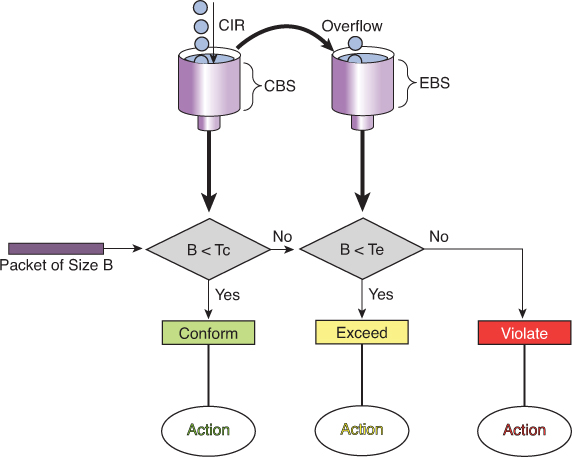
Single-rate three-color policer’s tolerance of temporary bursts results in fewer TCP retransmissions and is therefore more efficient for bandwidth utilization. It is a highly suitable tool for marking according to RFC 2597 AF classes, which have three “colors” (or drop preferences) defined per class (AFx1, AFx2, and AFx3). Using a three-color policer generally makes sense only if the actions taken for each color differ. If the actions for two or more colors are the same, a simpler policer (and therefore a simpler QoS policy) is more suitable to implement, making the network easier to maintain.
! -----------------------------
! Classify traffic (examples)
! -----------------------------
ip access-list extended AF1-TRAFFIC
  remark <<< define your AF1 class traffic here >>>
  permit ip 10.1.0.0 0.0.255.255 any

ip access-list extended AF2-TRAFFIC
  remark <<< define your AF2 class traffic here >>>
  permit ip 10.2.0.0 0.0.255.255 any

ip access-list extended AF3-TRAFFIC
  remark <<< define your AF3 class traffic here >>>
  permit ip 10.3.0.0 0.0.255.255 any

class-map match-any CLASS-AF1
  match access-group name AF1-TRAFFIC
class-map match-any CLASS-AF2
  match access-group name AF2-TRAFFIC
class-map match-any CLASS-AF3
  match access-group name AF3-TRAFFIC

! ---------------------------------------------------------
! Single-rate three-color policer per AF class
! - Adjust CIR/Bc/Be to your needs (bps / bytes).
! - Typical starting point: Be ≈ 2*Bc
! ---------------------------------------------------------
policy-map POLICE-AF
  class CLASS-AF1
    ! Example: 10 Mbps CIR, Bc/Be placeholders
    police cir 10000000 bc 312500 be 625000 \
      conform-action set-dscp-transmit af11 \
      exceed-action  set-dscp-transmit af12 \
      violate-action drop

  class CLASS-AF2
    ! Example: 5 Mbps CIR
    police cir 5000000 bc 156250 be 312500 \
      conform-action set-dscp-transmit af21 \
      exceed-action  set-dscp-transmit af22 \
      violate-action drop

  class CLASS-AF3
    ! Example: 2 Mbps CIR
    police cir 2000000 bc 62500 be 125000 \
      conform-action set-dscp-transmit af31 \
      exceed-action  set-dscp-transmit af32 \
      violate-action drop

  class class-default
    set dscp default

! ---------------------------------------
! Apply the policy (ingress or egress)
! ---------------------------------------
interface GigabitEthernet0/0
  description WAN-Uplink
  service-policy output POLICE-AF
police cir 10000000 bc 312500 be 625000 -> in order to find its Tc
This Bc of 312500 is not optimal as it results in 250 ms

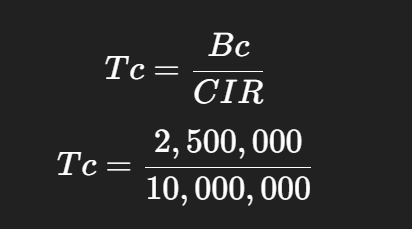

Bc = CIR * Tc
10000000 bits * 125 ms = 1250000000 / 1000 ms = 1250000 bits of Bc
for command line we will convert it to bytes 1250000 / 8 = 156,250 bytes
police cir 10000000 bc 156250 be 312500
Dual-Rate Three-Color Policers
The single-rate three-color marker/policer was a significant improvement for policers—it made allowance for temporary traffic bursts
the two-rate three-color marker/policer allows for a sustainable excess burst (negating the need to accumulate credits to accommodate temporary bursts) and allows for different actions for the traffic exceeding the different burst values.
This policer addresses the peak information rate (PIR), which is unpredictable in the RFC 2697 model two-rate three-color marker/policer. Furthermore, the two-rate three-color marker/policer allows for a sustainable excess burst (negating the need to accumulate credits to accommodate temporary bursts) and allows for different actions for the traffic exceeding the different burst values.
The dual-rate three-color marker/policer uses the following definitions parameters to meter the traffic stream:
PIR: Peak information rate, the maximum rate that traffic ever is allowed
PBS: Peak burst size, the maximum size of the first token bucket
CIR: Committed information rate, the policed rate
CBS: Committed burst size, the maximum size of the second token bucket
Tp: Token count of PBS, the instantaneous number of tokens left in the PBS bucket
Tc: Token count of CBS, the instantaneous number of tokens left in the CBS bucket
B: Byte size of offered packet
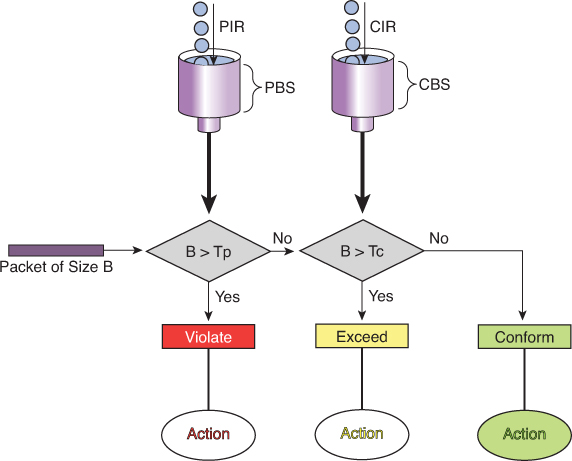
Policing Logic
- First check against PIR (Peak Bucket):
- If B > Tp (packet size larger than available tokens in PBS) → Violate (red).
- Packet is non-conformant and marked/dropped depending on policy.
- Otherwise, move to next step.
- If B > Tp (packet size larger than available tokens in PBS) → Violate (red).
- Then check against CIR (Committed Bucket):
- If B > Tc (packet size larger than tokens in CBS) → Exceed (yellow).
- Packet is considered “in excess traffic” but not outright violation.
- Otherwise → Conform (green).
- If B > Tc (packet size larger than tokens in CBS) → Exceed (yellow).
Actions
- Violate (Red): Drop or heavily penalize traffic.
- Exceed (Yellow): Forward, but mark as lower-priority (may be dropped if congestion occurs).
- Conform (Green): Forward as guaranteed/priority traffic.
! Class-map: match the traffic you want to police
class-map match-any APP-TRAFFIC
 match access-group 101
! or DSCP/ACL/etc.

policy-map POLICE-TRTCM
 class APP-TRAFFIC
  police cir 1000000 bc 10000 pir 2000000 be 20000 \
    conform-action transmit \
    exceed-action set-dscp-transmit cs1 \
    violate-action drop
!
! Apply inbound (or outbound if supported)
interface GigabitEthernet0/0/0
 description Ingress toward core
 service-policy input POLICE-TRTCM
CoPP is a feature that allows the configuration of QoS policers to rate-limit the traffic destined to the main CPU of the switch/router. Such CoPP policers serve to protect the control plane of the switch/router from DoS attacks and reconnaissance activity in order to protect the CPU and control plane running as CPU processes
! Single-rate policer
policy-map POLICY1
  class C1
    police cir 1000000 conform-action transmit exceed-action drop
!
! Dual-rate policer
policy-map POLICY2
  class C2
    police cir 500000 bc 10000 pir 1000000 be 10000 conform-action
    transmit exceed-action set-prec-transmit 2 violate-action drop
!
! Percentage-based policing
policy-map POLICY3
   class C3
     police cir percent 20 bc 300 ms be 400 ms pir percent 40
     conform-action set-cos-inner-transmit 3
Summary
Policing happens before packets enter the output queue.
A policer enforces a traffic contract (rate/committed burst).
Packets that exceed the configured rate are either dropped (default) or remarked (e.g. to a lower priority).
This happens regardless of whether there is congestion or not.
Congestion occurs after packets have entered the interface output queue.
Congestion management mechanisms (like Weighted Fair Queuing, Priority Queuing, CBWFQ, LLQ, etc.) decide which packets get queued and transmitted.
If a queue overflows (due to congestion), packets are dropped from that queue.
This can happen even for traffic that has already been policed — if the queue fills, traffic is dropped.
Hierarchical Policing
it might be desirable to limit all TCP traffic to 10 Mbps, while at the same time limiting FTP traffic (a subset of TCP traffic) to no more than 1.5 Mbps. To achieve this nested policing requirement, hierarchical policing can be used with up to three levels.
policy-map FTP-POLICER
  class FTP
   police cir 1500000
     conform-action transmit
     exceed-action  drop
!
 policy-map TCP-POLICER
  class TCP
   police cir 10000000
     conform-action transmit
     exceed-action  drop
     service-policy FTP-POLICER
!
interface ge 1/1
  service-policy output TCP-POLICER
Percentage-Based Policing
Most networks contain a wide array of interfaces with different bandwidths. If it is desirable to have an overall network policy in which, for example, FTP traffic is not to exceed 10 percent of the bandwidth on any interface, percentage-based policing can be used.
CIR and PIR values can be specified with percent, but not the burst sizes; the burst sizes are configured in units of milliseconds. If the CIR is configured in percent, the PIR also must be
When the service policy is attached to an interface, the CIR (and PIR, if configured) is determined as a percentage of the interface bandwidth. If the interface bandwidth is changed, the CIR and PIR values and burst sizes are automatically recalculated using the new interface bandwidth value
For subinterfaces, the bandwidth of the main interface is used for the calculation
If the percent feature is used in a second- or third-level policy, the bandwidth of the lower-level policy statement is determined by the configuration of the higher or parent level
LLQ is a policer and not bandwidth
LLQ mechanism “priority” contains an implicit policer and LLQ gives strict transmission priority to real-time traffic, and by doing so it introduces the possibility of starving lower-priority traffic. To prevent this situation, the LLQ mechanism polices traffic to the bandwidth specified in the priority statement by indiscriminately tail-dropping traffic exceeding the configured rate
priority statement can be specified with an absolute bandwidth or by using a percentage.
Control Plane Policing
CoPP allows the configuration of QoS policers to rate-limit the traffic handled by the main CPU of the switch. These policers serve to protect the control plane of the switch/router from DoS attacks and reconnaissance activity. With CoPP, QoS policies are configured to permit, block, or rate-limit packets destined to the main CPU. For example, if a large amount of multicast traffic is introduced into the network with a Time To Live (TTL) of 1, this traffic would force the switch to decrement the TTL, and thereby force the control plane to send an ICMP (Internet Control Message Protocol) error message. If enough of these events happened, the CPU would not be able to process them all, and the node would be effectively taken out of service
CoPP can protect a node against this type of attack
Shaper
Continue from file:///G:/My%20Drive/Learn%20Journey/2_QoS/Book%20HTMLs/End-to-End%20QoS%20Network%20Design%20Quality%20of%20Service%20for%20Rich-Media%20&%20Cloud%20Networks,%20Second%20Edition/online%20version/Chapter%204.%20Policing,%20Shaping,%20and%20Markdown%20Tools.html
“Traffic Shaping Tools”
! PRACTICE
! This class map relies on packets with marking already applied
class-map match-any REALTIME
  match dscp ef       ! Matches VoIP bearer traffic
  match dscp cs5      ! Matches Broadcast Video traffic
  match dscp cs4      ! Matches Realtime-Interactive traffic
!
class-map match-any CONTROL
  match dscp cs6      ! Matches Network-Control traffic
  match dscp cs3      ! Matches Voice/Video Signaling traffic
  match dscp cs2      ! Matches Network Management traffic
!
class-map match-any CRITICAL-DATA
  match dscp af41 af42 af43  ! Matches Multimedia Conf. on AF4
  match dscp af31 af32 af33  ! Matches Multimedia Streaming on AF3
  match dscp af21 af22 af23  ! Matches Transactional Data on AF2
  match dscp af11 af12 af13  ! Matches Bulk Data on AF1
!
policy-map WAN-EDGE-4-CLASS
  class REALTIME
    priority percent 33      ! 33% LLQ for REALTIME class
  class CONTROL
    bandwidth percent 7      ! 7% CBWFQ for CONTROL class
  class CRITICAL-DATA
    bandwidth percent 35     ! 35% CBWFQ for CRITICAL-DATA class
    fair-queue               ! Fair-queuing on CRITICAL-DATA
    random-detect dscp-based ! DSCP-based WRED on CRITICAL-DATA
  class class-default
    bandwidth percent 25     ! 25% CBWFQ for default class
    fair-queue               ! fair-queuing on default class
    random-detect dscp-based ! DSCP-based WRED on default class
!
interface serial 1/0/0
  service-policy output WAN-EDGE-4-CLASS

-----------------------------------------------------

class-map markings
  match dscp af41 af42 af43
!
class-map mac-address
  match destination-address mac 00:00:00:00:00:00
!
class-map ftp
  match protocol ftp

-----------------------------------------------------

policy-map SET-DSCP
  class DSCP-AF31
    set dscp af31

-----------------------------------------------------

class-map match-any TRAFFICTYPE1
  match <criteria1>
  match <criteria2>
class-map match-all TRAFFICTYPE2
  match <criteria3>
  match <criteria4>
class-map TRAFFICTYPE3
  match not <criteria5>

! reusing previously defined class
class-map DETAILS
  match <criteria6>
class-map HIGHER-LEVEL
  match class-map DETAILS
  match <criteria7>

-----------------------------------------------------

! police set actions for remarking
Router(config)# policy-map CB-POLICING
Router(config-pmap)# class FOO
Router(config-pmap-c)# police 8000 conform-action ?
  drop                 drop packet
  exceed-action        action when rate is within conform and
                       conform + exceed burst
  set-clp-transmit             set atm clp and send it
  set-discard-class-transmit   set discard-class and send it
  set-dscp-transmit            set dscp and send it
  set-frde-transmit            set FR DE and send it
  set-mpls-exp-imposition-transmit  set exp at tag imposition
                                    and send it
  set-mpls-exp-topmost-transmit     set exp on topmost label
                                    and send it
  set-prec-transmit            rewrite packet precedence
                               and send it
  set-qos-transmit             set qos-group and send it
  transmit                     transmit packet
When you configure multiple DSCP values on the same line, like this:
match dscp af41 af42 af43This is treated as a logical OR within that line.
match-any → logical OR
The packet only needs to match one of the listed conditions to be considered a match.
match-all → logical AND
The packet must satisfy all of the listed conditions at the same time to be considered a match.
The default logical operator (if unspecified) is match-all.
match not
will select inverse traffic
Note that class map and policy map names are case sensitive. Thus, class-map type1 is different from class-map Type1, which is different from class-map TYPE1. Class map names and cases must match exactly the class names specified in policy maps.
Unclassified traffic (traffic that does not meet the match criteria specified in the explicit traffic classes) is treated as belonging to the implicit default class.
specifying a policy map for “class-default” is optional, and if not specified, default class traffic has no QoS features assigned
default class traffic has no QoS features assigned, receives best-effort treatment, and can use all bandwidth not allotted or needed by the classes explicitly specified in the configuration – so if a lot of bandwidth is left on link then this class wins, if there is a less bandwidth left on the link then this class default traffic is looser
The default treatment for unclassified traffic with no QoS features enabled is a first-in, first-out (FIFO) queue with tail drop (which treats all traffic equally and simply drops packets when the output queue is full).
priority queuing, fair queuing are queueing treatments called priority queuing and fair queuing
priority command allocates bandwidth and also sets queuing treatment of priority as well, any traffic that has priority applied is sent out as soon as received, “skips to the front of the queue and scheduled first over anything else”
Queueing
Queueing types FIFO, CBWFQ and LLQ
Queue is a memory or buffer allocated on the interface and queue is always there on an interface, it only comes into play (holds packet to wait) when packets are coming into router faster than it can send them out or dispatch them out of egress interface
queue or buffer is a limited memory that can fill up and overflow and if we try to put a packet into this overflowing queue, packet will be dropped
A brilliant solution is to make sub queues or smaller queues carved out of that one big queue
so queue for best effort overflows it does not effect the voip traffic, only best effort packets will be denied or dropped while traffic for all other services keep working
Cisco recommends no more than 11 sub queues
If all traffic is dropped due to single queue for all services – TCP global Sync
TCP has sliding window, which means that TCP can gradually start skipping the acknowledgements as time passes and this window or set or number of segments start to increase till one ack is missed and TCP thinks that there is no accountability for what was sent and what was received (from remote end) so it shrinks that window down
random-detect
random-detect command enables Weighted Random Early Detection (WRED) on a queue.
It monitors the average queue depth.
If the queue starts filling:
Below the minimum threshold → no packets dropped.
Between min and max thresholds → packets are randomly dropped with increasing probability.
Above the maximum threshold → all packets are dropped (tail drop).
This prevents global synchronization of TCP flows and smooths congestion
See Section: Random Detect example with remark , mark down
for config example and explanation
fair-queue (queueing)
fair-queue command is one of the older queueing mechanisms in IOS, before CBWFQ and LLQ became standard
Fair Queueing (FQ) = A congestion management method that automatically creates separate queues per flow (based on source/destination IP and port), Used mainly on slow links (≤ 2 Mbps)
The router then services each queue in a round-robin fashion, so no single flow (e.g. a big FTP transfer) can dominate the link
Cisco recommends CBWFQ/LLQ instead of fair-queue on modern WANs
QoS commands
show qos interface show queueing interface show class-map show policy-map show policy-map interface show table-map C4500# show policy-map interface TenGigabitEthernet 1/1 TenGigabitEthernet1/1 Service-policy output: 1P7Q1T Class-map: PRIORITY-QUEUE (match-any) 102598 packets Match: dscp ef (46) 102598 packets Match: dscp cs5 (40) 0 packets Match: dscp cs4 (32) 0 packets priority queue: Transmit: 22782306 Bytes, Queue Full Drops: 0 Packets Class-map: CONTROL-MGMT-QUEUE (match-any) 24847 packets Match: dscp cs7 (56) 0 packets Match: dscp cs6 (48) 0 packets Match: dscp cs3 (24) 24847 packets Match: dscp cs2 (16) 0 packets bandwidth remaining 10 (%) Transmit: 24909844 Bytes, Queue Full Drops: 0 Packets Class-map: MULTIMEDIA-CONFERENCING-QUEUE (match-all) 22280511 packets Match: dscp af41 (34) af42 (36) af43 (38) bandwidth remaining 10 (%) Transmit: 4002626800 Bytes, Queue Full Drops: 0 Packets dbl Probabilistic Drops: 0 Packets Belligerent Flow Drops: 0 Packets Class-map: MULTIMEDIA-STREAMING-QUEUE (match-all) 0 packets Match: dscp af31 (26) af32 (28) af33 (30) bandwidth remaining 10 (%) Transmit: 0 Bytes, Queue Full Drops: 0 Packets dbl Probabilistic Drops: 0 Packets Belligerent Flow Drops: 0 Packets Class-map: TRANSACTIONAL-DATA-QUEUE (match-all) 235852 packets Match: dscp af21 (18) af22 (20) af23 (22) bandwidth remaining 10 (%) Transmit: 247591260 Bytes, Queue Full Drops: 0 Packets dbl Probabilistic Drops: 0 Packets Belligerent Flow Drops: 0 Packets Class-map: BULK-DATA-QUEUE (match-all) 2359020 packets Match: dscp af11 (10) af12 (12) af13 (14) bandwidth remaining 4 (%) Transmit: 2476460700 Bytes, Queue Full Drops: 0 Packets dbl Probabilistic Drops: 0 Packets Belligerent Flow Drops: 0 Packets Class-map: SCAVENGER-QUEUE (match-all) 78607323 packets Match: dscp cs1 (8) bandwidth remaining 1 (%) Transmit: 98144078642 Bytes, Queue Full Drops: 26268 Packets Class-map: class-default (match-any) 12388183 packets Match: any 12388183 packets bandwidth remaining 25 (%) Transmit: 13001465825 Bytes, Queue Full Drops: 0 Packets dbl Probabilistic Drops: 0 Packets Belligerent Flow Drops: 0 Packets C4500#