BGP
BGP
AS autonomous system, collection of router under a domain
An organization requiring connectivity to the Internet must obtain an ASN.
ASNs were originally 2 bytes (in the 16-bit range), 65,534 ASNs.
Due to exhaustion, ASN field expanded to accommodate 4 bytes (in the 32-bit range), This allows for 4,294,967,295 unique ASNs
https://ipwithease.com/basic-understanding-of-4-byte-asn/
Private ASN 16-bit range as 64512 to 65534
Public ASN 16-bit range 1 through 64511
Private ASN 32-bit range as 4200000000 to 4294967294
in 4 bytes ASN 0 – 65535 AS numbers are same as they were with 2 byte AS. These AS numbers help in interoperability between AS using 2 byte ASNs and AS using 4 byte ASNs.
4 Byte AS representation can be done in 3 ways as listed below:
- asplain – simple decimal representation of the ASN. For example, ASN 7747 will be represented as 7747, while 123456 will be represented as 123456.
- asdot+ – breaks the number up in two 16-bit values as low-order and high-order, separated by a dot. All the 2-byte ASNs can be represented in the low-order value. For example, ASN 65535 will be 0.65535, 65536 will be 1.0, 65537 will be 1.1 and so on. The last ASN 4294967296 will be 65535.65535.
- asdot – it is a mixture of asplain and asdot+. Any ASN in the 2-byte range is represented as asplain and any ASN above the 2-byte range is represented as asdot+. For example, 65535 will be 65535 while 65536 will be 1.0. Cisco uses this form of implementation.
It is significant to understand the interoperability of the 2 Byte AS number with the 4 Byte AS number.
4 byte AS support is advertised via BGP capability negotiation. Speakers who support 4-byte AS are known as New-BGP speakers & those who do not are known as Old-BGP speakers, it includes its 4-byte ASN in the Capability advertisement
No support / backwards compatibility scenario
If one neighbor or router is very old and it does not respond to 4-byte ASN capability, in this case new BGP speaker can bring up session with this very old router using a reserved 2 byte ASN called AS_TRANS (AS23456)
Because AS_TRANS AS23456 is reserved, no Old-BGP speaker can use it as its own ASN; only New-BGP speakers can use it.
New BGP Speaker to new BGP Speaker advertise routes using 4 byte ASN but new BGP Speaker to old BGP speaker
AS_PATH
- Any 4-byte ASN in the AS_PATH is replaced with AS_TRANS (23456) so the old router can “parse” it.
AS4_PATH (optional transitive attribute)
- The real 4-byte ASNs are preserved in the AS4_PATH attribute.
- Old routers ignore AS4_PATH.
- New routers later reconstruct the correct AS_PATH using AS4_PATH.
When an Old BGP Speaker advertises routes with AS4_PATH and AS_PATH attributes to a New BGP Speaker, the New BGP Speaker uses both attributes to reconstruct the path: AS4_PATH for 4-byte ASNs and AS_PATH for 2-byte ASNs by replacing 4-byte ASN with an AS_TRANS. In this way, the AS_PATH shows the correct number of hops
AS4_AGGREGATOR
A new attribute AS4_AGGREGATOR is introduced for similar reasons. If the New BGP Speaker has to send the AGGREGATOR attribute towards old speaker neighbor and if the aggregating ASN is a 4-byte ASN, then the speaker constructs the AS4_AGGREGATOR attributes by copying the attribute length and attribute value from the AGGREGATOR attribute, places the attribute length and attribute value in the AS4_AGGREGATOR attribute, and replaces the 4-byte ASN with AS_TRANS ASN.
BGP Peering
BGP peering is also called BGP session
There 2 types of peering,
iBGP peering and eBGP peering
ibgp can be like pseudowires
iBGP: Sessions established with a router that are in the same AS or that participate in the same BGP confederation
eBGP: Sessions established with a BGP router that are in a different AS
BGP does not use hello packets to discover neighbors
BGP was designed as an inter-autonomous routing protocol, implying that neighbor adjacencies should not change frequently and are coordinated.
BGP uses TCP port 179 to communicate with other routers
Relying on TCP allows for handling of fragmentation, sequencing, and reliability (acknowledgment and retransmission)
Most recent implementations of BGP set the do-not-fragment (DF) bit to prevent fragmentation and rely on path MTU discovery PMTUD https://learn.anasather.uk/ccie-misc/ccie-everything-else/
Multihop BGP peerings
BGP uses TCP that can cross boundaries unlike IGP which use link local multicast to form neighbors, BGP can form neighbor adjacencies that are directly connected or adjacencies that are multiple hops away.
BGP neighbors connected to the same network use the ARP table to locate the IP address of the peer.
Multi-hop BGP sessions require routing table information for finding the IP address of the peer.
A default route is not sufficient to establish a multi-hop BGP session.
Multi-hop sessions require that the router use an underlying route installed in the RIB (static or from any routing protocol) to establish the TCP session with the remote endpoint
If that neighbor’s IP isn’t specifically resolvable in the routing table (e.g., via a static route or an IGP-learned route), BGP won’t even attempt to start the TCP connection.
BGP Messages
OUNK
| Type | Name | Functional Overview |
|---|---|---|
| 1 | OPEN | Sets up and establishes BGP adjacency |
| 2 | UPDATE | Advertises, updates, or withdraws routes, CRUD |
| 3 | NOTIFICATION | Indicates an error condition to a BGP neighbor |
| 4 | KEEPALIVE | Ensures that BGP neighbors are still alive |
OPEN
OPEN message is used to establish adjacency,
Session capabilities are exchanged in open messages.
OPEN message contains following:
BGP version
ASN
Hold time
RID etc
Hold time: The hold time field in OPEN messages sets hold timer in seconds,
When establishing a BGP session, the routers use the smaller hold time value between the two routers.
The hold time value must be at least 3 seconds,
the hold time is set to 0 to disable KEEPALIVE messages.
For Cisco routers, the default hold time is 180 seconds.
BGP identifier RID: The BGP router ID (RID) is a 32-bit unique number that identifies the BGP router in the advertised prefixes.
The RID is used as a loop-prevention mechanism for routers advertised within an autonomous system.
The RID can be set manually or dynamically for BGP, setting manually is much stable way.
A nonzero value must be set in order for routers to become neighbors.
Dynamic RID allocation logic uses the highest IP address of any up loopback interfaces. If there is not an up loopback interface, then the highest IP address of any active up interfaces becomes the RID
To ensure that the RID does not change, a static RID is assigned (typically represented as an IPv4 address that resides on the router, such as a loopback address). Any IPv4 address can be used, including IP addresses not configured on the router
KEEPALIVE
KEEPALIVE messages are exchanged between neighbors, by default every 60 seconds, “3rd of the default Hold timer 180” seconds
If the hold time is set to 0, no KEEPALIVE messages are also sent between the BGP neighbors.
BGP keepalive timer and hold timer can be set at the process level or per neighbor session.
UPDATE
An Update can either advertise routes or withdraw routes
Prefixes that need to be withdrawn are advertised in the WITHDRAWN ROUTES field of the UPDATE message
Update message also serves as a keepalive as well,
Upon receipt of an UPDATE or KEEPALIVE, the hold timer resets to the initial value,
If the hold timer reaches zero, the BGP session is torn down, routes from that neighbor are removed, and an appropriate update route withdraw message is sent to other BGP neighbors for the affected prefixes
Notification
A Notification message is sent when an error is detected with the BGP session,
such as a hold timer expiring,
neighbor capabilities changing,
or a BGP session reset being requested.
Notification causes the BGP connection to close.
Notification message is basically a signal to neighbor to initiate session shutdown
BGP Neighbor States
BGP FSM
- Idle
- Connect
- Active
- OpenSent
- OpenConfirm
- Established
Idle
-BGP Process start
-BGP Process starts listening on TCP 179
-BGP tries to move to next state: connect
-In case any issues revert it back to idle – set ConnectRetry timer to 60 seconds, this time must count to 0 before any connection try can be made – ConnectRetry basically a delay timer
-Further failures to leave the Idle state result in the ConnectRetry timer doubling in length
Connect
-BGP initiates the TCP connection 3 way handshake
-If the TCP connection fails, the state changes to Active
-If the three-way TCP handshake completes,
-sends the OPEN message to the neighbor,
-moves to the OpenSent state
R1# show tcp brief
TCB       Local Address      Foreign Address        (state)
F6F84258  10.12.1.1.179      10.12.1.2.59884        ESTAB
R2# show tcp brief
TCB       Local Address      Foreign Address        (state)
EF153B88  10.12.1.2.59884    10.12.1.1.179          ESTAB
Active
-In the Active state, BGP starts a new three-way TCP handshake.
-If this attempt for TCP connection fails, the state moves back or downgrades to the Connect state
-If a connection is established,
-an OPEN message is sent,
-the hold timer is set to 4 minutes (longer hold time because of issues and hence Active state, longer hold time means that neighbor’s presence will not be checked quicker)
-and the state moves to OpenSent.
OpenSent
-OPEN message has been sent from the originating router and is awaiting an OPEN message from the other router.
-When the originating router receives the OPEN message from the other router, local OPEN and received OPEN message are checked for following:
-BGP versions must match
-The source IP address of the OPEN message must match what is configured for the neighbor
-The AS number must match what is configured for the neighbor
-RID must be unique
-Security parameters (such as password and time-to-live [TTL]) must qualify.
Hold times are compared, lowest hold time is used
Keepalive is sent
Connection state is then moved to OpenConfirm
If an error is found in the OPEN message, a NOTIFICATION message is sent, and the state is moved back to Idle.
OpenConfirm
In OpenConfirm state, BGP waits for a KEEPALIVE or NOTIFICATION message – so 2 way can be confirmed
Upon receipt of a neighbor’s KEEPALIVE, the state is moved to Established
If
-hold timer expires,
-a stop event occurs,
-a NOTIFICATION message is received
the state is moved to Idle
Established
BGP session is established
BGP neighbors exchange routes through UPDATE messages. As UPDATE and KEEPALIVE messages are received, the hold timer is reset.
If the hold timer expires, BGP moves the neighbor back to the Idle state and send a withdraw to other neighbors for routes learned through the now idle neighbor
BGP PA
BGP associates attributes with each network path / route and it is called its Path Attributes, which can also be considered as qualities of the path, such as AS Path shows the length of path and ASs the traffic will traverse, metric is cost associated with path – tells us about the thinking of admin assigning initial cost , weight to the path
These Path Attributes are of 4 different types:
Well-known mandatory
Well known man
Well-known attributes must be recognized by all BGP implementations – because it is well known and known by every BGP module that is written
Mandatory as well – mandatory attributes must be included with every prefix advertisement;
Well-known discretionary
well-known discretionary attributes may or may not be included with the prefix advertisement and can be skipped in sending of an update
Optional transitive
Optional attributes do not have to be recognized by all BGP implementations – BGP module writers can fully skip it as it is optional
Optional attributes can be transitive and stay with the route advertisement from AS to AS
Optional non-transitive
Some optional PAs are non-transitive and cannot be shared from AS to AS.
AS_PATH for Loop Prevention
AS_Path is used as a loop-prevention mechanism in BGP
BGP is a path vector routing protocol and does not contain a complete topology of the network, as do link-state routing protocols, BGP behaves like distance vector protocols
The BGP attribute AS_Path is a “well-known mandatory” attribute and includes a complete list of all the ASNs that the prefix advertisement has traversed from its source AS
“If a BGP router receives a prefix advertisement with its AS listed in AS_Path, it discards the prefix because the router thinks the advertisement forms a loop“
Multi-Protocol BGP (MP-BGP)
Originally BGP was designed around IPv4 but later on Multi-Protocol BGP (MP-BGP) allowed other protocols to be carried as well and that allowed BGP to carry (Address Family) AFI such as IPv6
An address family correlates to a specific network protocol, such as IPv4 or IPv6, and additional granularity is provided through a subsequent address family identifier (SAFI), such as unicast or multicast in that protocol
Multiprotocol BGP (MP-BGP) carries separate path attributes (PAs) for Multi protocol MP_REACH_NLRI and MP_UNREACH_NLRI than IPv4 based BGP, These PA attributes are held inside BGP update messages and that is why BGP can be used for different address families or protocols, that facilitates addresses just like IPv4 , IPv6 , Multicast and even MAC addresses. Address family maintains a separate database and configuration for each protocol under same BGP session.
Address family needs to be activated on peer
An address family must be activated for a BGP peer in order for BGP to initiate a session with that peer
IOS XE activates the IPv4 address family by default. This simplifies the configuration in an IPv4 environment, command no bgp default ipv4-unicast disables the automatic activation of the IPv4 AFI
Multiple Address families per neighbor
BGP Session parameters are configured such as neighbor IP , ASN , authentication , keepalive timers , source IP etc
but address family related configuration such as Network commands and summarization occur within the address family because IPv4 unicast and IPv6 multicast cannot have same configuration, although these 2 different AFI and SAFI can belong to same neighbor
Specifying the source interface
neighbor x.x.x.x update-source <interface> only changes the source IP address used in BGP packets. It does not change the actual outgoing interface used to send the packets. Outgoing interface can only be changed or dictated with static or dynamic route for that neighbor
BGP Authentication
BGP supports authentication with MD5 in order to prevent manipulation of BGP packets
BGP Configuration
R1 (Default IPv4 Address-Family Enabled)
router bgp 65100
 neighbor 10.12.1.2 remote-as 65200
 neighbor 10.12.1.2 password CISCOBGP
 neighbor 10.12.1.2 timers 10 40
R2 (Default IPv4 Address-Family Disabled)
router bgp 65200
no bgp default ipv4-unicast
neighbor 10.12.1.1 remote-as 65100
neighbor 10.12.1.1 password CISCOBGP
neighbor 10.12.1.1 timers 15 50
!
address-family ipv4
neighbor 10.12.1.1 activateUse show commands with AFI and SAFI
R1# show bgp ipv4 unicast summary
BGP router identifier 192.168.1.1, local AS number 65100
BGP table version is 1, main routing table version 1

Neighbor      V     AS MsgRcvd MsgSent   TblVer  InQ OutQ Up/Down  State/PfxRcd
10.12.1.2     4  65200       8       9        1    0    0 00:05:23        0
                                                   |    |    |          |
                                                   |    |    |          |
               Number of messages received from peer and queued to be processed
                                                        |    |          |
                                                        |    |          |
                               Number of messages queued to be sent to the peer
                                                             |          |
                                                             |          |
                                  Length of time the BGP session is established
                                                                        |
                                                                        |
         Current BGP peer state or the number of prefixes received from the peer
Up/Down column indicates that the BGP session is up for over 5 minutes.
R2# show bgp ipv4 unicast neighbors 10.12.1.1

! Output omitted for brevity

! The first section provides the neighbor's IP address, remote-as, indicates if
! the neighbor is 'internal' or 'external', the neighbor's BGP version, RID,
! session state, and timers.

BGP neighbor is 10.12.1.1, remote AS65100, external link
  BGP version 4, remote router ID 192.168.1.1
  BGP state = Established, up for 00:01:04
  Last read 00:00:10, last write 00:00:09, hold is 40, keepalive is 13 seconds
  Neighbor sessions:
    1 active, is not multisession capable (disabled)

! This second section indicates the capabilities of the BGP neighbor and
! address-families configured on the neighbor.

  Neighbor capabilities:
    Route refresh: advertised and received(new)
    Four-octets ASN Capability: advertised and received <<<
    Address family IPv4 Unicast: advertised and received <<<
    Enhanced Refresh Capability: advertised <<<
    Multisession Capability:
    Stateful switchover support enabled: NO for session 1  <<<
  Message statistics:
    InQ depth is 0
    OutQ depth is 0

! This section provides a list of the BGP packet types that have been received
! or sent to the neighbor router.
                         Sent       Rcvd
    Opens:                  1          1
    Notifications:          0          0
    Updates:                0          0
    Keepalives:             2          2
    Route Refresh:          0          0
    Total:                  4          3
  Default minimum time between advertisement runs is 0 seconds

! This section provides the BGP table version of the IPv4 Unicast address-
! family. The table version is not a 1-to-1 correlation with routes as multiple
! route change can occur during a revision change. Notice the Prefix Activity
! columns in this section.

For address family: IPv4 Unicast
  Session: 10.12.1.1
  BGP table version 1, neighbor version 1/0
  Output queue size : 0
  Index 1, Advertise bit 0
                                 Sent       Rcvd
  Prefix activity:               ----       ----
    Prefixes Current:               0          0
    Prefixes Total:                 0          0
    Implicit Withdraw:              0          0
    Explicit Withdraw:              0          0
    Used as bestpath:             n/a          0
    Used as multipath:            n/a          0

                                   Outbound    Inbound
  Local Policy Denied Prefixes:    --------    -------   <<<
    Total:                                0          0
  Number of NLRIs in the update sent: max 0, min 0

! This section indicates that a valid route exists in the RIB to the BGP peer IP
! address, provides the number of times that the connection has established and
! time dropped, since the last reset, the reason for the reset, if path-mtu-
! discovery is enabled, and ports used for the BGP session.

  Address tracking is enabled, the RIB does have a route to 10.12.1.1 <<<
  Connections established 2; dropped 1
  Last reset 00:01:40, due to Peer closed the session <<<
  Transport(tcp) path-mtu-discovery is enabled <<<
Connection state is ESTAB, I/O status: 1, unread input bytes: 0
Minimum incoming TTL 0, Outgoing TTL 255 <<<
Local host: 10.12.1.2, Local port: 179
Foreign host: 10.12.1.1, Foreign port: 56824
BGP Adj tables
BGP uses three tables for maintaining the network paths and path attributes (PAs)
There are 3 different ways of learning a route
-Network command
-Learned from neighbor
-Redistribution into BGP
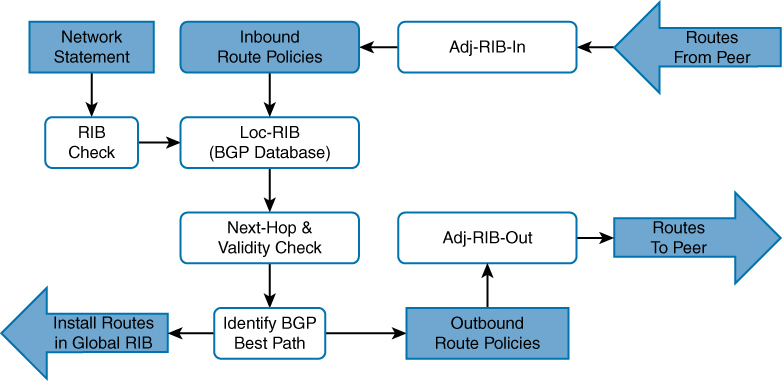
Adj-RIB-in: Contains the routes in original form (that is, from before inbound route policies were processed). The table is purgeable and is purged after all route policies are processed to save memory. After all routes have been fed through local policies it is emptied out
Loc-RIB:
-Loc-RIB contains routes after applying import policy, import policy only applies to routes learned from neighbors) Routes injected with the network command or redistributed – do not go through inbound policy – Locally-originated routes do go through best-path selection, but not through inbound policy + when a route comes from network statement then RIB check is made and only added in loc-RIB if there is same route with same subnet mask in RIB or routing table
-Routes collected in Loc-RIB are not the best routes and hence can contain multiple routes to a prefix
-contains routes that are originated locally and learned from neighbors.
-this table is “show ip bgp”
-after storing the routes here a validity check is performed, next-hop address in route if resolvable in the RIB then route is valid – and route is marked valid ” * “
-after valid routes are determined, these routes are passed through BGP best path algorithm and best routes is selected for “a prefix” and marked best with ” > ” – creating symbol of ” *> ” (valid + best)
Star means valid and not best
> means best
-Install the best-path route into the RIB
-After you enter a BGP network statement, the BGP process searches the global RIB for an exact network match. The network can be a connected network, a secondary connected network, or any route from a routing protocol.
-After verifying that the network statement matches a route in the RIB, the prefix is installed into the Loc-RIB table. As the BGP prefix is installed into the Loc-RIB, the following BGP PAs are set, depending on the RIB prefix type:
Connected network: The next-hop BGP attribute is set to 0.0.0.0, the BGP Origin attribute is set to i (for IGP), and the BGP weight is set to 32,768.
Static route or routing protocol: The next-hop BGP attribute is set to the next-hop IP address in the RIB, the BGP Origin attribute is set to i (for IGP), the BGP weight is set to 32,768, and the multi-exit discriminator (MED) is set to the IGP metric.
Remember best from > symbol, which means use this > route
Adj-RIB-out: Contains the routes after outbound route policies have been processed
This is a per neighbor table
By default, BGP only advertises the best path to other BGP peers
Advertise the route to BGP peers. If the route’s next-hop BGP PA is 0.0.0.0, the next-hop address is changed to the IP address of the BGP session.
It enables a network engineer to view routes advertised to a specific router using command show bgp afi safi neighbors ip-address advertised-routesMultiple BGP route sources
R1 already eBGP with R2
R1 has multiple routes learned from static routes, EIGRP, and OSPF
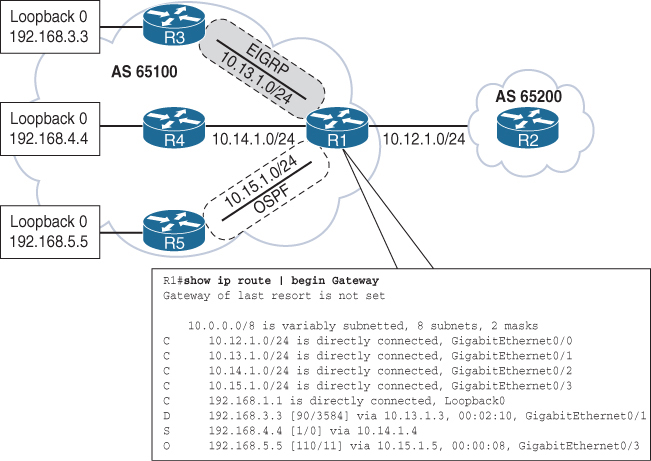
All the routes in R1’s routing table can be advertised into BGP, regardless of the source routing protocol.
Loopback networks are added as network statement except OSPF one, loopback learned over OSPF is redistributed instead
router bgp 65100
 neighbor 10.12.1.2 remote-as 65200
 address-family ipv4 unicast
  neighbor 10.12.1.2 activate
  network 10.12.1.0 mask 255.255.255.0
  network 192.168.1.1 mask 255.255.255.255
  network 192.168.3.3 mask 255.255.255.255
  network 192.168.4.4 mask 255.255.255.255
 redistribute ospf 1
Redistributing routes learned from an IGP into BGP is completely safe; however, redistributing routes learned from BGP into an IGP should be done with caution. BGP is designed for large scale and can handle a routing table the size of the Internet (940,000+ prefixes), whereas IGPs could have stability problems with fewer than 20,000 routes.
Origin code is IGP (for routes learned from the network statement) or incomplete (redistributed)
R1# show bgp ipv4 unicast
BGP table version is 9, local router ID is 192.168.1.1
Status codes: s suppressed, d damped, h history, * valid, > best, i - internal,
              r RIB-failure, S Stale, m multipath, b backup-path, f RT-Filter,
              x best-external, a additional-path, c RIB-compressed,
Origin codes: i - IGP, e - EGP, ? - incomplete
RPKI validation codes: V valid, I invalid, N Not found

     Network          Next Hop            Metric LocPrf Weight Path
 *>  10.12.1.0/24     0.0.0.0                  0         32768 i
 *                    10.12.1.2                0             0 65200 i
 *>  10.15.1.0/24     0.0.0.0                  0         32768 ?
 *>  192.168.1.1/32   0.0.0.0                  0         32768 i
 *>  192.168.2.2/32   10.12.1.2                0             0 65200 i
 ! The following route comes from EIGRP and uses a network statement
 *>  192.168.3.3/32   10.13.1.3             3584         32768 i
! The following route comes from a static route and uses a network statement
 *>  192.168.4.4/32   10.14.1.4                0         32768 i
! The following route was redistributed from OSPF
 *>  192.168.5.5/32   10.15.1.5               11         32768 ?
if the LocPrf (Local Preference) attribute is not shown in the BGP table output, that means:The Local Preference is 100 by default, Cisco only displays non-default local preference values in the BGP table
R2# show bgp ipv4 unicast | begin Network
     Network          Next Hop            Metric LocPrf Weight Path
 *   10.12.1.0/24     10.12.1.1                0             0 65100 i
 *>                   0.0.0.0                  0         32768 i

 *>  10.15.1.0/24     10.12.1.1                0             0 65100 ?
 *>  192.168.1.1/32   10.12.1.1                0             0 65100 i
 *>  192.168.2.2/32   0.0.0.0                  0         32768 i
 *>  192.168.3.3/32   10.12.1.1             3584             0 65100 i
 *>  192.168.4.4/32   10.12.1.1                0             0 65100 i
 *>  192.168.5.5/32   10.12.1.1               11             0 65100 ?
If multiple paths exist for the same prefix, only the first prefix is listed and other paths leave an empty space in the output
* valid paths
> best paths
Next hop is also a PA attribute
Metric – MED optional non-transitive BGP path attribute used in the BGP best-path algorithm for that specific path.
Optional = routers are not required to understand or use the attribute.
Non-transitive = the attribute must not be passed beyond the neighboring AS.
AS X sends a route with a MED to AS Y.
AS Y does NOT pass that MED on when advertising the route to any other AS (AS Z, etc.).
The MED is only meaningful between two directly connected ASes — it influences which entry point the neighbor should use, not the entire global internet
LocPrf – Local preference, a well-known discretionary path attribute used in the BGP best-path algorithm for that specific path.
Weight – A locally significant Cisco-defined attribute used in the BGP best-path algorithm for that specific path.
Path – AS_Path, a well-known mandatory BGP path attribute used for loop prevention and in the BGP best-path algorithm for that specific path.
Origin – Origin, a well-known mandatory BGP path attribute used in the BGP best-path algorithm. The value i represents an IGP, e is for EGP, and ? is for a route that was redistributed into BGP.
R1# show bgp ipv4 unicast 10.12.1.0
BGP routing table entry for 10.12.1.0/24, version 2
Paths: (2 available, best #2, table default)
  Advertised to update-groups:
     2
  Refresh Epoch 1
  65200
    10.12.1.2 from 10.12.1.2 (192.168.2.2)
      Origin IGP, metric 0, localpref 100, valid, external
      rx pathid: 0, tx pathid: 0
  Refresh Epoch 1
  Local
    0.0.0.0 from 0.0.0.0 (192.168.1.1)
      Origin IGP, metric 0, localpref 100, weight 32768, valid, sourced, local, best
      rx pathid: 0, tx pathid: 0x0
Paths: (2 available, best #2)
Provides a count of BGP paths in the BGP Loc-RIB table and identifies the path selected as the BGP best path.
Advertised to update-groups
BGP neighbors are consolidated into BGP update groups. If a path is not advertised, Not advertised to any peer is displayed.
65200 (1st path)
Local (2nd path)
This is the AS_Path for the path as it was received or whether the prefix was locally advertised.
10.12.1.2 from 10.12.1.2 (192.168.2.2)
      |            |            |
      |            |            |
   next hop        |            |
                   |            |
           advertising neighbor |
                                |
                                |
                  RID of the advertising neighbor
The first entry lists the IP address of the next hop for the prefix.
The from field lists the IP address of the advertising neighbor. (The field could change when an external path is learned from an iBGP peer.)
The number in parentheses is the BGP identifier (RID) for the node.
Origin
Origin is well-known mandatory attribute that states the mechanism for advertising this path. In this instance, it is an internal path.
metric 0
Displays the optional non-transitive BGP attribute MED, also known as the BGP metric.
localpref 100
Displays the well-known discretionary BGP attribute Local Preference.
valid
Displays the validity of this path.
External (1st path)
Local (2nd path)
Displays how the path was learned: internal, external, or local.
R1# show bgp ipv4 unicast neighbors 10.12.1.2 advertised-routes
! Output omitted for brevity
     Network         Next Hop            Metric LocPrf Weight Path
 *> 10.12.1.0/24     0.0.0.0                  0         32768 i
 *>  10.15.1.0/24    0.0.0.0                  0         32768 ?
 *>  192.168.1.1/32  0.0.0.0                  0         32768 i
 *>  192.168.3.3/32  10.13.1.3             3584         32768 i
 *>  192.168.4.4/32  10.14.1.4                0         32768 i
 *>  192.168.5.5/32  10.15.1.5               11         32768 ?

Total number of prefixes 6
R2# show bgp ipv4 unicast neighbors 10.12.1.1 advertised-routes
! Output omitted for brevity
Network Next Hop Metric LocPrf Weight Path
*> 10.12.1.0/24 0.0.0.0 0 32768 i
*> 192.168.2.2/32 0.0.0.0 0 32768 i
Total number of prefixes 2R1# show bgp ipv4 unicast summary
! Output omitted for brevity
Neighbor V AS MsgRcvd MsgSent TblVer InQ OutQ Up/Down State/PfxRcd
10.12.1.2 4 65200 11 10 9 0 0 00:04:56 2eBGP and iBGP
Internal BGP (iBGP):
in the same AS
or in same BGP confederation
iBGP learned routes are assigned AD of 200
External BGP (eBGP):
in a different AS
eBGP learned routes are assigned AD of 20
iBGP
Need for iBGP is needed when transit connectivity is needed or multi-homing is needed
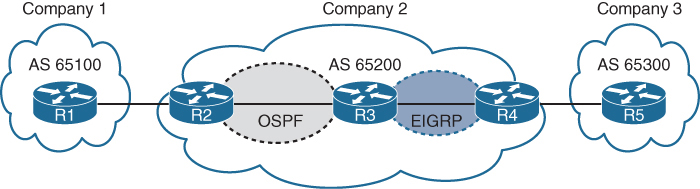
AS 65200 provides transit connectivity to AS 65100 and AS 65300
R2 could form an iBGP session directly with R4
but R3 would not know where to forward traffic when traffic from either AS reaches R3
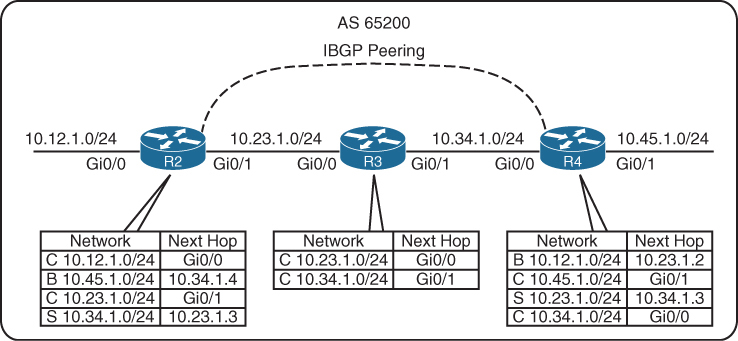
You might assume that redistributing the BGP table into an IGP overcomes the problem, but this not a viable solution, incase the BGP table is way larger than IGP can handle:
Scalability: IGPs cannot scale to that level of routes.
Routing: Link-state protocols and distance vector routing protocols use metric as the primary method for routing, while BGP uses multiple steps to identify the best path, The best path from BGP perspective could be longer, which would normally be deemed suboptimal from an IGP’s perspective.
Path attributes: All the BGP path attributes cannot be maintained within IGP protocols, upon redistribution into IGP, PA are lost
Solution to above problem is iBGP on all routers R2, R3 and R4 also called full mesh iBGP, that will allow proper forwarding of traffic
Above was just an example scenario, Enterprise organizations are consumers and should not provide transit connectivity between autonomous systems across the Internet, only service providers do.
BGP synchronization
In early iBGP deployments where the AS was used as a transit AS, network prefixes would commonly be redistributed into the IGP, To ensure full connectivity in the transit AS, BGP would use synchronization. BGP synchronization is the process of verifying that the BGP route existed in the IGP before the route could be advertised to an eBGP peer. BGP synchronization is no longer a default and is not commonly used
iBGP Full Mesh
iBGP peers do not prepend their ASN to AS_Path.
No other method exists for detecting loops with iBGP sessions so writers of BGP prohibit the advertisement of a route received from an iBGP peer to another iBGP peer.
RFC 4271 states that all BGP routers in a single AS must be fully meshed to provide a complete loop-free routing table
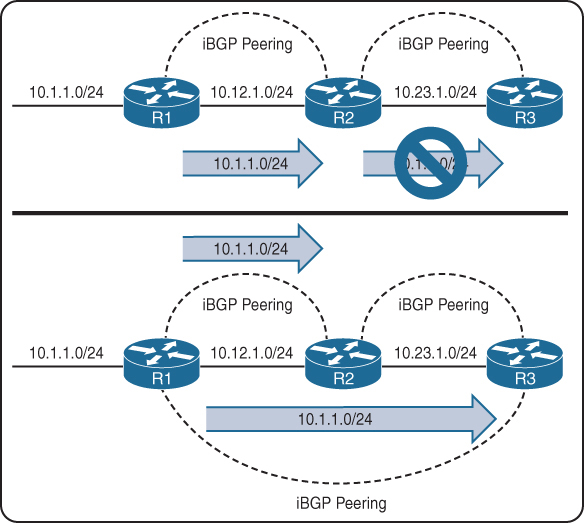
R1 advertises the 10.1.1.0/24 prefix to R2, which is processed and inserted into R2’s BGP table. R2 does not advertise the 10.1.1.0/24 route to R3 because it received the route from an iBGP peer R1
To resolve this issue, “R1 must form a multi-hop iBGP session with R3” so that R3 can receive the 10.1.1.0/24 route directly from R1
R1 and R3 either need a static route to the remote peering transit nets or R2 can advertise the 10.12.1.0/24 and 10.23.1.0/24 networks into BGP, if you think that R1’s 10.12.1.0/24 will not be passed by R2 to R3 but R1 did not advertise 10.12.1.0/24 instead R2 did, so 10.12.1.0/24 will be passed to R3 by R2
Need for peering using loopbacks

R1, R2, and R3 are a full mesh of iBGP sessions peered by transit links.
In the event of a link failure on the 10.13.1.0/24 network
R3’s BGP session with R1 will drop
R3 loses connectivity to the 10.1.1.0/24 network, even though R1 and R3 could communicate through R2 (through a multi-hop path).
This loss of connectivity occurs because iBGP does not advertise routes learned from another iBGP peer
You can overcome this issue by advertising the loopback into IGP and then creating BGP peering between loopback addresses
-loopback interface is virtual and always stays up
-Flexibility to failure: In the event of link failure, the session stays intact, and the IGP finds another path to the loopback address
-multi-hop iBGP session
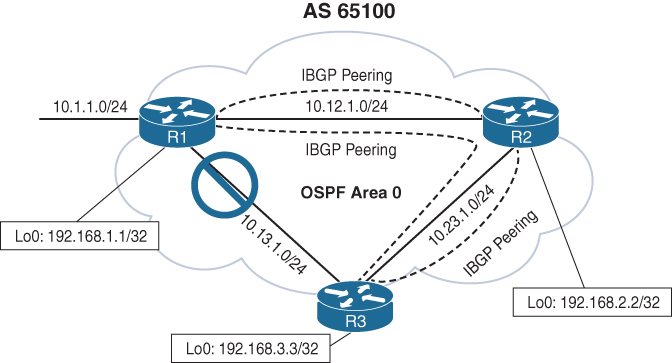
10.13.1.0/24 link fails. R1 and R3 still maintain BGP session connectivity by reaching each other’s loopback through R2, R2 will simply route the BGP packets between R1 and R3 without taking part in that BGP session
R1 (Default IPv4 Address Family Enabled)
router ospf 1
 network 10.12.0.0 0.0.255.255 area 0
 network 10.13.0.0 0.0.255.255 area 0
 network 192.168.1.1 0.0.0.0 area 0
!
router bgp 65100
 network 10.1.1.0 mask 255.255.255.0
 neighbor remote-as 192.168.2.2 65100
 neighbor 192.168.2.2 update-source Loopback0
 neighbor remote-as 192.168.3.3 65100
 neighbor 192.168.3.3 update-source Loopback0
 !
 address-family ipv4
  neighbor 192.168.2.2 activate
  neighbor 192.168.3.3 activate
R2 (Default IPv4 Address Family Disabled)
router ospf 1
network 10.0.0.0 0.255.255.255 area 0
network 192.168.2.2 0.0.0.0 area 0
!
router bgp 65100
no bgp default ipv4-unicast
neighbor remote-as 192.168.1.1 65100
neighbor 192.168.1.1 update-source Loopback0
neighbor remote-as 192.168.3.3 65100
neighbor 192.168.3.3 update-source Loopback0
!
address-family ipv4
neighbor 192.168.1.1 activate
neighbor 192.168.3.3 activateas side effect of using loopback interfaces for peering is that next hop addresses are loopback addresses and recursive lookup is performed to find the outgoing interface
Another side effect that can happen is that if loopbacks are advertised It end up providing automatic load balancing if there are multiple equal-cost paths through the IGP to the loopback address (but only for iBGP)
eBGP
eBGP peerings
-AS is different from the AS configured locally in bgp router command
-The time-to-live (TTL) on eBGP packets is set to 1. BGP packets drop in transit if a multi-hop BGP session is attempted. The TTL on iBGP packets is set to 255, which allows for multi-hop sessions by default
-The advertising router modifies the BGP next hop for updates to the IP address sourcing the BGP connection
-The advertising router prepends its ASN to the existing AS_Path
-most recent AS is always prepended (the furthest to the left) since AS path is right to left
-The receiving router verifies that the AS_Path does not contain an ASN that matches the local routers. BGP discards the update if it fails the AS_Path loop-prevention check.
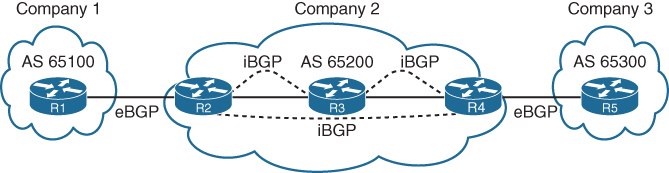
In above picture we can see ebgp peering and ibgp full mesh peering
Next hop issue for routes from eBGP to iBGP
As an eBGP prefix is advertised to an iBGP neighbor from local router, a route may not pass validity check because of next-hop reachability check and that route might be advertised from local router to first iBGP peer but not any further from that iBGP peer because that first iBGP peer considers route to be invalid due to next hop validity check failure
Because (local router) iBGP peer do not modify the next-hop address and when that foreign next hop address of eBGP router is passed to first iBGP peer and because that iBGP peer is not aware of that foreign address (next hop validity check which is first step in BGP best path selection fails), it is not advertised further to other iBGP peers as it is not even a valid route let alone best route.
The next-hop address must be resolvable in the RIB in order for it to be valid and advertised to other BGP peers.
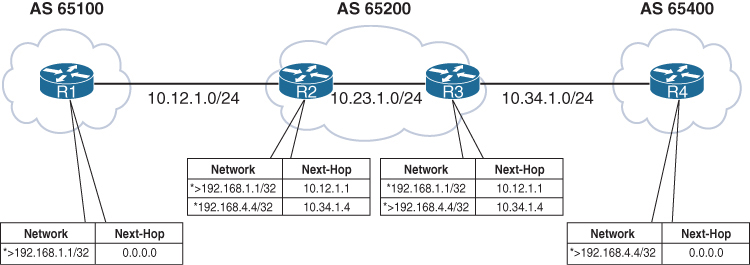
Notice that the BGP best-path symbol (>) is missing for the 192.168.4.4/32 prefix on R2 and for the 192.168.1.1/32 prefix on R3.
R1’s BGP table is missing the 192.168.4.4/32 route because the route did not pass R2’s next-hop accessibility check, preventing the execution of the BGP best-path algorithm
R4 advertised the route to R3 with the next-hop address 10.34.1.4, and R3 advertised the route to R2 with the next-hop address 10.34.1.4. R2 does not have a route for the 10.34.1.4 IP address and deems the next hop inaccessible. The same logic applies to R1’s 192.168.1.1/32 route when advertised toward R4.
R3# show bgp ipv4 unicast 192.168.1.1
BGP routing table entry for 192.1681.1/32, version 2
Paths: (1 available, no best path)
  Not advertised to any peer
  Refresh Epoch 1
  65100
    10.12.1.1 (inaccessible) from 10.23.1.2 (192.168.2.2)
      Origin IGP, metric 0, localpref 100, valid, internal
To correct the issue, we can advertise those peering links using either below methods:
- IGP advertisement (Remember to use the passive interface to prevent an accidental adjacency from forming. Most IGPs do not provide the filtering capability provided by BGP.)
- Advertisement of the networks into BGP
or we could change next hop using next-hop-self, which is much better solution due to scalability as shown below
next-hop-self
Imagine that a service provider network has 500 routers, and every router has 200 eBGP peering links. To ensure that the next-hop address is reachable to the iBGP peers, the provider needs the advertisement of 100,000 peering networks in BGP or an IGP consuming router resources
using next-hop-self on ibgp neighbor we can achieve modification of that foreign ebgp peer’s address to its ibgp session address towards that ibgp peer
The next-hop-self feature only modifies prefixes going from ebgp peers to iBGP peers by default, but using the command next-hop-self [all] modifies the next-hop address on prefixes learned from iBGP to iBGP peers
R2 (Default IPv4 Address-Family Enabled)
router bgp 65200
 neighbor 10.12.1.1 remote-as 65100
 neighbor 10.23.1.3 remote-as 65200
 neighbor 10.23.1.3 next-hop-self
R3 (Default IPv4 Address-Family Disabled)
router bgp 65200
no bgp default ipv4-unicast
neighbor 10.23.1.2 remote-as 65200
neighbor 10.34.1.4 remote-as 65400
!
address-family ipv4
neighbor 10.23.1.2 activate
neighbor 10.23.1.2 next-hop-self
neighbor 10.34.1.4 activate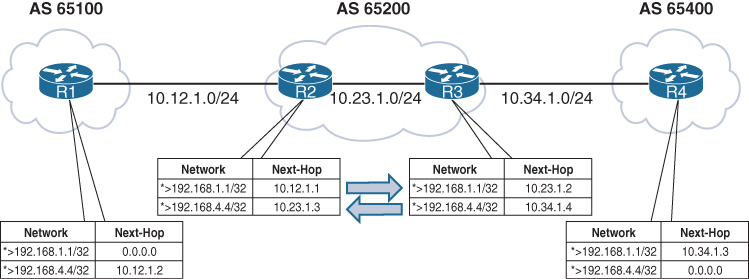
iBGP Scalability Solutions
The inability of BGP to advertise a route learned from one iBGP peer to another iBGP peer can lead to scalability issues within an AS. The formula n(n − 1)/2 provides the number of sessions required, where n represents the number of routers. A full mesh topology of 5 routers requires 10 sessions, and a topology of 10 routers requires 45 sessions
Route Reflectors
The router that is reflecting routes is known as a route reflector (RR),
the router that is receiving reflected routes is a route reflector client.
This reflector model is like an OSPF DR concept but for neighborships and not full sync, instead of all iBGP routers making adjacency with every other router, one router makes iBGP peering with all the routers
But there are few rules to follow
- Rule 1: If an RR receives an NLRI from a non-RR client, the RR advertises the NLRI to an RR client. It does not advertise the NLRI to a non-RR client.
- Rule 2: If an RR receives an NLRI from an RR client, it advertises the NLRI to RR clients and non-RR clients.
- Rule 3: If an RR receives a route from an eBGP peer, it advertises the route to RR clients and non-RR clients.
remember that RR clients receive in all scenarios / rules
Only Route Reflector is configured with RR configuration, and RR clients do not need to modify configuration, they just need to make iBGP peering with route reflecting RR router
BGP route reflector is an address family command like other loc-RIB commands
BGP route reflection is specific to each address family.
The command neighbor ip-address route-reflector-client is used under the neighbor address family configuration.
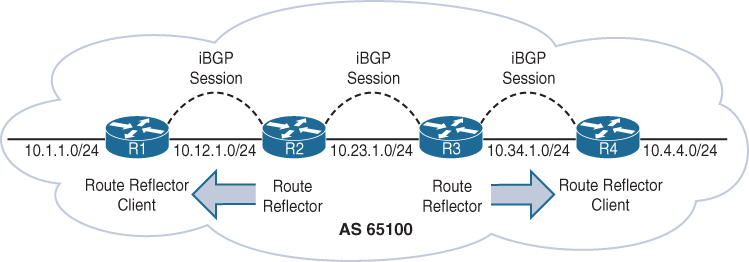
R1 is a route reflector client to R2, and R4 is a route reflector client to R3. R2 and R3 have a normal iBGP peering
You can have a gap in between 2 RRs in your design
R1 (Default IPv4 Address-Family Enabled)
router bgp 65100
 network 10.1.1.0 mask 255.255.255.0
 redistribute connected
 neighbor 10.12.1.2 remote-as 65100
R2 (Default IPv4 Address-Family Enabled)
router bgp 65100
redistribute connected
neighbor 10.12.1.1 remote-as 65100
neighbor 10.12.1.1 route-reflector-client
neighbor 10.23.1.3 remote-as 65100R3 (Default IPv4 Address-Family Disabled)
router bgp 65100
no bgp default ipv4-unicast
neighbor 10.23.1.2 remote-as 65100
neighbor 10.34.1.4 remote-as 65100
!
address-family ipv4
redistribute connected
neighbor 10.23.1.2 activate
neighbor 10.34.1.4 activate
neighbor 10.34.1.4 route-reflector-clientR4 (Default IPv4 Address-Family Disabled)
router bgp 65100
no bgp default ipv4-unicast
neighbor 10.34.1.3 remote-as 65100
!
address-family ipv4
neighbor 10.34.1.3 activate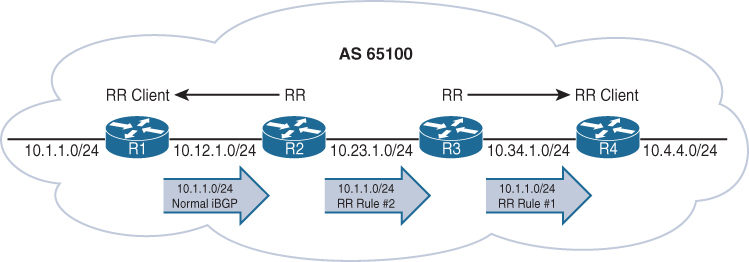
R1 advertises the 10.1.1.0/24 route to R2 as a normal iBGP advertisement.
R2 receives and advertises the 10.1.1.0/24 route using the route reflector rule 2 as just explained to R3 (a non-route reflector client) (this is why above gap [normal ibgp peering] can be made)
R3 receives and advertises the 10.1.1.0/24 route using the route reflector rule 1 as explained to R4 (a route reflector client).
- Rule 1: If an RR receives an NLRI from a non-RR client, the RR advertises the NLRI to an RR client. It does not advertise the NLRI to a non-RR client.
- Rule 2: If an RR receives an NLRI from an RR client, it advertises the NLRI to RR clients and non-RR clients.
- Rule 3: If an RR receives a route from an eBGP peer, it advertises the route to RR clients and non-RR clients.
See how iBGP between R2 and R3 is non client s
R1# show bgp ipv4 unicast | i Network|10.1.1
     Network          Next Hop            Metric LocPrf Weight Path
 *>  10.1.1.0/24      0.0.0.0                  0         32768 i
R2# show bgp ipv4 unicast | i Network|10.1.1
Network Next Hop Metric LocPrf Weight Path
*>i 10.1.1.0/24 10.12.1.1 0 100 0 iR3# show bgp ipv4 unicast | i Network|10.1.1
Network Next Hop Metric LocPrf Weight Path
*>i 10.1.1.0/24 10.12.1.1 0 100 0 iR4# show bgp ipv4 unicast | i Network|10.1.1
Network Next Hop Metric LocPrf Weight Path
*>i 10.1.1.0/24 10.12.1.1 0 100 0 iNotice the i immediately after the best-path indicator (>) on R2, R3, and R4. This indicates that the prefix is learned through iBGP.
Important notes on RR
Route reflector can be inband or in path or it can be outband or out of data path
With Route Reflector in our iBGP network we dont need to do full mesh iBGP instead we only do iBGP with Route Reflector only
Route Reflectors choose best path based on their perspective or exit point and not perspective of the client this can result in a situation where certain exit point in the network for a prefix is optimal for RR but not optimal for clients
When ibgp routers have multiple paths to compare then one ibgp router can say path A is better and another ibgp router can say that path B is best (based on IGP cost) but when RR is used then RR decides one best path for a prefix and then pushes that to all the clients and now all clients have one best path for a prefix regardless of IGP cost to the next hop
RR only advertise one path for a prefix to the clients and do not advertise any other path to clients
The fix for this is BGP Add Path
BGP Add Path
In standard BGP, a router advertises only one best path per prefix to its neighbors. Because of best path good alternative routes exist but are not advertised
Similarly RRs only advertise their single best path, reducing path diversity.
BGP Add-Path is an extension to BGP that allows a router to advertise multiple paths for the same prefix to a neighbor and this is how router can switch to second path faster.
BGP add path is useful for Datacenters and Large ISP, also networks that use route reflectors
But remember that add path is a capability and is exchanged in open message and needs to be supported and sent by peer
BGP routing table entry for 10.10.10.0/24
Paths: (2 available, best #1)
  Advertised to update-groups:
     1
  Path 1:
    Received Path ID 1 <<< ! Received Path ID confirms ADD-PATH
    65001 65002
    192.0.2.1 from 192.0.2.1 (192.0.2.1)
      Origin IGP, localpref 100, valid, external, best
  Path 2:
    Received Path ID 2 <<< ! Received Path ID confirms ADD-PATH
    65003 65002
    192.0.2.1 from 192.0.2.1 (192.0.2.1)
      Origin IGP, localpref 100, valid, external
Why is BGP Add Path needed when multipath is available?
Multipath makes router use multiple paths, while Additional paths from add path are kept as backup for faster failover
For multipath to work the routes must be equal including AS numbers and AS Path hops must be same and for ibgp routes must be equal including AS numbers and AS Path hops must be same + also the IGP metric to next hop too
Loop Prevention in Route Reflectors
Removing the full mesh requirement in an iBGP topology using route-reflector introduces the potential for routing loops. When RFC 1966 was drafted, two other BGP route reflector–specific attributes were added to prevent loops:
Originator: This optional non-transitive BGP attribute is created by the first route reflector and sets the value to the RID of the router that injected/advertised the prefix into the iBGP network. If Originator is already populated on a route, it should not be overwritten. If a router receives a route with its RID in the Originator attribute, the route is discarded.
Cluster List: This optional non-transitive BGP attribute is updated by the route reflector. This attribute is appended (hence the list , not overwritten) by the route reflector with its cluster ID. By default, this is the BGP identifier. If a route reflector receives a route with its cluster ID in the Cluster List attribute, the route is discarded.
R4# show bgp ipv4 unicast 10.1.1.0/24
! Output omitted for brevity
Paths: (1 available, best #1, table default)
  Refresh Epoch 1
  Local
    10.12.1.1 from 10.34.1.3 (192.168.3.3)
      Origin IGP, metric 0, localpref 100, valid, internal, best
      Originator: 192.168.1.1, Cluster list: 192.168.3.3, 192.168.2.2
Confederations
BGP confederations is also an alternative solution to the iBGP full mesh scalability issues
Sub-ASs known as member ASs
Larger AS known as an AS confederation
Member ASs normally use ASNs from the private ASN range (64,512 to 65,534)
eBGP peers peer using confederation AS
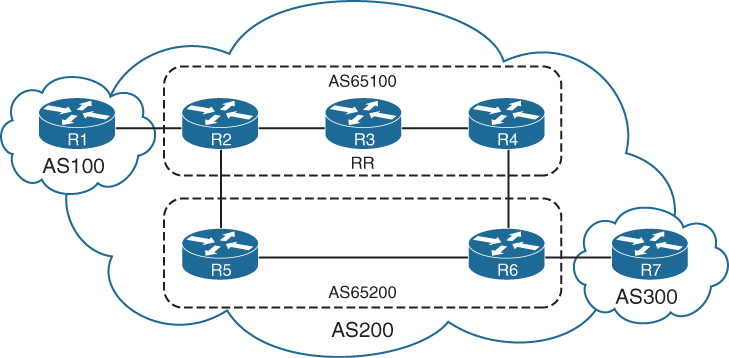
Notice that R3 provides route reflection in member AS 65100.
R1
router bgp 100
 neighbor 10.12.1.2 remote-as 200
R2
router bgp 65100 <<< local bubble
bgp confederation identifier 200 <<< larger bubble
bgp confederation peers 65200 <<< other bubbles we peer with
neighbor 10.12.1.1 remote-as 100 <<< normal peering
neighbor 10.23.1.3 remote-as 65100 <<< normal peering
neighbor 10.25.1.5 remote-as 65200 <<< normal peeringR3
router bgp 65100
bgp confederation identifier 200
neighbor 10.23.1.2 remote-as 65100
neighbor 10.23.1.2 route-reflector-client
neighbor 10.34.1.4 remote-as 65100
neighbor 10.34.1.4 route-reflector-clientR4
router bgp 65100
bgp confederation identifier 200
bgp confederation peers 65200
neighbor 10.34.1.3 remote-as 65100
neighbor 10.46.1.6 remote-as 65200R5
router bgp 65200
bgp confederation identifier 200
bgp confederation peers 65100
neighbor 10.25.1.2 remote-as 65100
neighbor 10.56.1.6 remote-as 65200R6
router bgp 65200
bgp confederation identifier 200
bgp confederation peers 65100
neighbor 10.46.1.4 remote-as 65100
neighbor 10.56.1.5 remote-as 65200
neighbor 10.67.1.7 remote-as 300R7
router bgp 300
neighbor 10.67.1.6 remote-as 200The AS_Path attribute contains a subfield called AS_CONFED_SEQUENCE.
AS_CONFED_SEQUENCE is confederation’s AS PATH but displayed in parentheses before any external ASNs in AS_Path.
As the route passes from member AS to member AS, AS_CONFED_SEQUENCE is appended to contain the member AS ASNs.
The AS_CONFED_SEQUENCE attribute is only used to prevent loops but is not used (counted) when choosing the shortest AS_Path.
Route reflectors can be used within the member AS as in normal iBGP peerings.
The BGP MED attribute is transitive to all other member ASs and Within the confederation, MED is propagated between member sub-ASes but MED is NOT advertised outside the confederation to external ASes. When routes leave the confederation and are advertised to a true external AS: The MED is stripped (unless explicitly re-set by policy).
The LOCAL_PREF attribute is transitive to all other member ASs just like iBGP
The next-hop address for external confederation routes does not change as the route is exchanged between member ASs
AS_CONFED_SEQUENCE is removed from AS_Path when the route is advertised outside the confederation.
AS 100 is not aware that AS 200 is a confederation
R1-AS100# show bgp ipv4 unicast | begin Network
     Network          Next Hop            Metric LocPrf Weight Path
 *>  10.1.1.0/24      0.0.0.0                  0         32768 ?
 *>  10.7.7.0/24      10.12.1.2                              0 200 300 i
 *   10.12.1.0/24     10.12.1.2                0             0 200 ?
 *>                   0.0.0.0                     0         32768 ?
 *>  10.23.1.0/24     10.12.1.2                0             0 200 ?
 *>  10.25.1.0/24     10.12.1.2                0             0 200 ?
 *>  10.46.1.0/24     10.12.1.2                              0 200 ?
 *>  10.56.1.0/24     10.12.1.2                              0 200 ?
 *>  10.67.1.0/24     10.12.1.2                              0 200 ?
 *>  10.78.1.0/24     10.12.1.2                              0 200 300 ?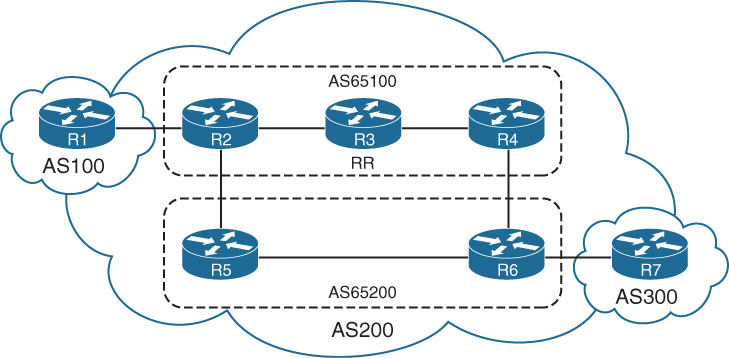
R2’s BGP table which is in member AS 65100, see that next hop IP address for 10.7.7.0/24 was not changed (advertised by R7) even though it passed different member AS
AS_CONFED_SEQUENCE in parentheses indicates that it passed through sub AS 65200
R2# show bgp ipv4 unicast | begin Network
     Network          Next Hop            Metric LocPrf Weight Path
 *>  10.1.1.0/24      10.12.1.1              111             0 100 ?
 *>  10.7.7.0/24      10.67.1.7                0    100      0 (65200) 300 i
 *>  10.12.1.0/24     0.0.0.0                  0         32768 ?
 *                    10.12.1.1              111             0 100 ?
 *>  10.23.1.0/24     0.0.0.0                  0         32768 ?
 *   10.25.1.0/24     10.25.1.5                0    100      0 (65200) ?
 *>                   0.0.0.0                  0         32768 ?
 *>  10.46.1.0/24     10.56.1.6                0    100      0 (65200) ?
 *>  10.56.1.0/24     10.25.1.5                0    100      0 (65200) ?
 *>  10.67.1.0/24     10.56.1.6                0    100      0 (65200) ?
 *>  10.78.1.0/24     10.67.1.7                0    100      0 (65200) 300 ?
Processed 9 prefixes, 11 paths
Notice that the path information includes the attribute confed-internal or confed-external, based on whether the route was received within the same member AS or a different one.
R4# show bgp ipv4 unicast 10.7.7.0/24
! Output omitted for brevity
BGP routing table entry for 10.7.7.0/24, version 504
Paths: (2 available, best #1, table default)
  Advertised to update-groups:
     3
  Refresh Epoch 1
  (65200) 300
    10.67.1.7 from 10.34.1.3 (192.168.3.3)
      Origin IGP, metric 0, localpref 100, valid, confed-internal, best
      Originator: 192.168.2.2, Cluster list: 192.168.3.3
      rx pathid: 0, tx pathid: 0x0
  Refresh Epoch 1
  (65200) 300
    10.67.1.7 from 10.46.1.6 (192.168.6.6)
      Origin IGP, metric 0, localpref 100, valid, confed-external
      rx pathid: 0, tx pathid: 0
Multiprotocol BGP for IPv6
Multiprotocol BGP (MP-BGP) enables BGP to carry NLRI for different protocols
such as IPv6, MPLS Layer 3 with VRFs info
New BGPv4 optional and nontransitive attributes:
-Multiprotocol reachable NLRI: Describes IPv6 route information
-Multiprotocol unreachable NLRI: Withdraws the IPv6 route from service
These attributes are optional and nontransitive, so if an older router does not understand the attributes, the information can just be ignored as there are a lot of old routing equipment in internet
MP-BGP for IPv6 continues to use the same well-known TCP port 179
IPv4 unicast: AFI:1, SAFI:1
IPv6 unicast: AFI:2, SAFI:1
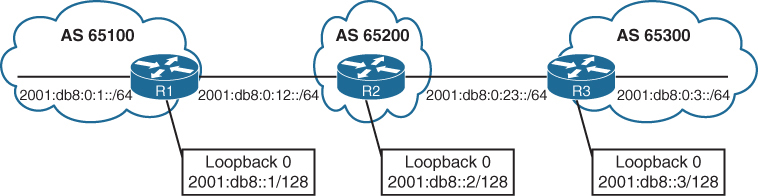
Unique global unicast addressing is the recommended method for BGP peering to avoid operational complexity. BGP peering using the link-local address may introduce risk if the address is not manually assigned to an interface
R1 advertises all its networks through redistribution
R2 and R3 use the network statement to advertise all their connected networks.
R1
router bgp 65100
 bgp router-id 192.168.1.1
 no bgp default ipv4-unicast
 neighbor 2001:DB8:0:12::2 remote-as 65200
 !
address-family ipv6
  neighbor 2001:DB8:0:12::2 activate
  redistribute connected
R2
router bgp 65200
bgp router-id 192.168.2.2
no bgp default ipv4-unicast
neighbor 2001:DB8:0:12::1 remote-as 65100
neighbor 2001:DB8:0:23::3 remote-as 65300
!
address-family ipv6
neighbor 2001:DB8:0:12::1 activate
neighbor 2001:DB8:0:23::3 activate
network 2001:DB8::2/128
network 2001:DB8:0:12::/64
network 2001:DB8:0:23::/64R3
router bgp 65300
bgp router-id 192.168.3.3
no bgp default ipv4-unicast
neighbor 2001:DB8:0:23::2 remote-as 65200
!
address-family ipv6
neighbor 2001:DB8:0:23::2 activate
network 2001:DB8::3/128
network 2001:DB8:0:3::/64
network 2001:DB8:0:23::/64IPv4 unicast routing capability is advertised by default in IOS XE
for pure IPv6 environment shut down the bgp on IPv4 neighbor or globally within the BGP process with the command no bgp default ipv4-unicast
show bgp ipv6 unicast neighbors ip-address [detail] displays detailed information about whether the IPv6 capabilities were negotiated successfully.
R1# show bgp ipv6 unicast neighbors 2001:DB8:0:12::2
! Output omitted for brevity
BGP neighbor is 2001:DB8:0:12::2,  remote AS 65200, external link
  BGP version 4, remote router ID 192.168.2.2
  BGP state = Established, up for 00:28:25
  Last read 00:00:54, last write 00:00:34, hold time is 180, keepalive interval is 60 seconds
  Neighbor sessions:
    1 active, is not multisession capable (disabled)
  Neighbor capabilities:
    Route refresh: advertised and received(new)
    Four-octets ASN Capability: advertised and received
    Address family IPv6 Unicast: advertised and received <<<
    Enhanced Refresh Capability: advertised and received
 ..
 For address family: IPv6 Unicast
  Session: 2001:DB8:0:12::2
  BGP table version 13, neighbor version 13/0
  Output queue size : 0
  Index 1, Advertise bit 0
  1 update-group member
  Slow-peer detection is disabled
  Slow-peer split-update-group dynamic is disabled
                                 Sent       Rcvd
  Prefix activity:               ----       ----
    Prefixes Current:               3          5 (Consumes 520 bytes)
    Prefixes Total:                 6         10
R2# show bgp ipv6 unicast summary
BGP router identifier 192.168.2.2, local AS number 65200
BGP table version is 19, main routing table version 19
7 network entries using 1176 bytes of memory
8 path entries using 832 bytes of memory
3/3 BGP path/bestpath attribute entries using 456 bytes of memory
2 BGP AS-PATH entries using 48 bytes of memory
0 BGP route-map cache entries using 0 bytes of memory
0 BGP filter-list cache entries using 0 bytes of memory
BGP using 2512 total bytes of memory
BGP activity 7/0 prefixes, 8/0 paths, scan interval 60 secs
Neighbor V AS MsgRcvd MsgSent TblVer InQ OutQ Up/Down State/PfxRcd
2001:DB8:0:12::1 4 65100 35 37 19 0 0 00:25:08 3
2001:DB8:0:23::3 4 65300 32 37 19 0 0 00:25:11 3Notice that some of the prefixes include the unspecified address as the next hop. The unspecified address indicates that the local router is generating the prefix for the BGP table
The weight value 32,768 also indicates that the prefix is locally originated by the router.
This is to force select this as always the best path since BGP best path algorithm has highest weight as top criteria
R1# show bgp ipv6 unicast
BGP table version is 13, local router ID is 192.168.1.1
Status codes: s suppressed, d damped, h history, * valid, > best, – - internal,
              r RIB-failure, S Stale, m multipath, b backup-path, f RT-Filter,
              x best-external, a additional-path, c RIB-compressed,
Origin codes: – - IGP, – - EGP, – - incomplete
RPKI validation codes: V valid, I invalid, N Not found

     Network            Next Hop          Metric LocPrf Weight Path
 *>  2001:DB8::1/128    ::                     0         32768 ?
 *>  2001:DB8::2/128    2001:DB8:0:12::2       0             0 65200 i
 *>  2001:DB8::3/128    2001:DB8:0:12::2                     0 65200 65300 i
 *>  2001:DB8:0:1::/64  ::                     0         32768 ?
 *>  2001:DB8:0:3::/64  2001:DB8:0:12::2                     0 65200 65300 i
 *   2001:DB8:0:12::/64 2001:DB8:0:12::2       0             0 65200 i
 *>                     ::                     0         32768 ?
 *>  2001:DB8:0:23::/64 2001:DB8:0:12::2                     0 65200 i
R2# show bgp ipv6 unicast | begin Network
Network Next Hop Metric LocPrf Weight Path
*> 2001:DB8::1/128 2001:DB8:0:12::1 0 0 65100 ?
*> 2001:DB8::2/128 :: 0 32768 i
*> 2001:DB8::3/128 2001:DB8:0:23::3 0 0 65300 i
*> 2001:DB8:0:1::/64 2001:DB8:0:12::1 0 0 65100 ?
*> 2001:DB8:0:3::/64 2001:DB8:0:23::3 0 0 65300 i
*> 2001:DB8:0:12::/64 :: 0 32768 i
* 2001:DB8:0:12::1 0 0 65100 ?
*> 2001:DB8:0:23::/64 :: 0 32768 i
2001:DB8:0:23::3 0 0 65300 iR3# show bgp ipv6 unicast | begin Network
Network Next Hop Metric LocPrf Weight Path
*> 2001:DB8::1/128 2001:DB8:0:23::2 0 65200 65100 ?
*> 2001:DB8::2/128 2001:DB8:0:23::2 0 0 65200 i
*> 2001:DB8::3/128 :: 0 32768 i
*> 2001:DB8:0:1::/64 2001:DB8:0:23::2 0 65200 65100 ?
*> 2001:DB8:0:3::/64 :: 0 32768 i
*> 2001:DB8:0:12::/64 2001:DB8:0:23::2 0 0 65200 i
*> 2001:DB8:0:23::/64 :: 0 32768 i
*> 2001:DB8:0:23::2 :: 0 32768 i
* 2001:DB8:0:23::2 0 0 65200 iR3# show bgp ipv6 unicast 2001:DB8::1/128
BGP routing table entry for 2001:DB8::1/128, version 9
Paths: (1 available, best #1, table default)
Not advertised to any peer <<<
Refresh Epoch 2
65200 65100
2001:DB8:0:23::2 (FE80::2) from 2001:DB8:0:23::2 (192.168.2.2)
Origin incomplete, localpref 100, valid, external, best
rx pathid: 0, tx pathid: 0x0Notice that the next-hop address is the link-local address for the next-hop forwarding address, which is resolved through a recursive lookup.
R2# show ipv6 route bgp
IPv6 Routing Table - default - 10 entries
Codes: C - Connected, L - Local, S - Static, U - Per-user Static route
       B - BGP, HA - Home Agent, MR - Mobile Router, R - RIP
       H - NHRP, I1 - ISIS L1, I2 - ISIS L2, IA - ISIS interarea
       IS - ISIS summary, D - EIGRP, EX - EIGRP external, NM - NEMO
       ND - ND Default, NDp - ND Prefix, DCE - Destination, NDr - Redirect
       RL - RPL, O - OSPF Intra, OI - OSPF Inter, OE1 - OSPF ext 1
       OE2 - OSPF ext 2, ON1 - OSPF NSSA ext 1, ON2 - OSPF NSSA ext 2
       la - LISP alt, lr - LISP site-registrations, ld - LISP dyn-eid
       a - Application
B   2001:DB8::1/128 [20/0]
     via FE80::1, GigabitEthernet0/0
B   2001:DB8::3/128 [20/0]
     via FE80::3, GigabitEthernet0/1
B   2001:DB8:0:1::/64 [20/0]
     via FE80::1, GigabitEthernet0/0
B   2001:DB8:0:3::/64 [20/0]
     via FE80::3, GigabitEthernet0/1
IPv6 over IPv4
BGP can exchange routes using either an IPv4 or IPv6 TCP session
In a typical deployment, IPv4 routes are exchanged using a dedicated IPv4 session, and IPv6 routes are exchanged with a dedicated IPv6 session
However, it is possible to share IPv6 routes over an IPv4 TCP session or IPv4 routes over an IPv6 TCP session
it is also possible to share IPv4 and IPv6 using a single BGP session.
R1
router bgp 65100
 bgp router-id 192.168.1.1
 no bgp default ipv4-unicast
 neighbor 10.12.1.2 remote-as 65200
 !
address-family ipv6 unicast
  redistribute connected
  neighbor 10.12.1.2 activate
R2
router bgp 65200
bgp router-id 192.168.2.2
no bgp default ipv4-unicast
neighbor 10.12.1.1 remote-as 65100
neighbor 10.23.1.3 remote-as 65300
!
address-family ipv6 unicast
network 2001:DB8::2/128
network 2001:DB8:0:12::/64
aggregate-address 2001:DB8::/62 summary-only
neighbor 10.12.1.1 activate <<< ipv4 neighbor inside IPv6 address family
neighbor 10.23.1.3 activate <<< ipv4 neighbor inside IPv6 address familyR3
router bgp 65300
bgp router-id 192.168.3.3
no bgp default ipv4-unicast
neighbor 10.23.1.2 remote-as 65200
!
address-family ipv6 unicast
network 2001:DB8::3/128
network 2001:DB8:0:3::/64
network 2001:DB8:0:23::/64
neighbor 10.23.1.2 activateR1# show bgp ipv6 unicast summary | begin Neighbor
Neighbor V AS MsgRcvd MsgSent TblVer InQ OutQ Up/Down State/PfxRcd
10.12.1.2 4 65200 115 116 11 0 0 01:40:14 2R2# show bgp ipv6 unicast summary | begin Neighbor
Neighbor V AS MsgRcvd MsgSent TblVer InQ OutQ Up/Down State/PfxRcd
10.12.1.1 4 65100 114 114 8 0 0 01:39:17 3
10.23.1.3 4 65300 113 115 8 0 0 01:39:16 3R3# show bgp ipv6 unicast summary | begin Neighbor
Neighbor V AS MsgRcvd MsgSent TblVer InQ OutQ Up/Down State/PfxRcd
10.23.1.2 4 65200 114 112 7 0 0 01:38:49 2The IPv6 routes advertised over an IPv4 BGP session are assigned an IPv4-mapped IPv6 address in the format (::FFFF:xx.xx.xx.xx) for the next hop, where xx.xx.xx.xx is the IPv4 address of the BGP peering. This is not a valid forwarding address, so the IPv6 route does not populate the RIB.
R1# show bgp ipv6 unicast | begin Network
     Network           Next Hop            Metric LocPrf Weight Path
 *  2001:DB8::/62      ::FFFF:10.12.1.2         0             0 65200 i
 *> 2001:DB8::1/128    ::                       0         32768 ?
 *> 2001:DB8:0:1::/64  ::                       0         32768 ?
 *  2001:DB8:0:12::/64 ::FFFF:10.12.1.2         0             0 65200 i
 *>                    ::                       0         32768 ?
R2# show bgp ipv6 unicast | begin Network
Network Next Hop Metric LocPrf Weight Path
*> 2001:DB8::/62 :: 32768 i
S 2001:DB8::1/128 ::FFFF:10.12.1.1 0 0 65100 ?
s> 2001:DB8::2/128 :: 0 32768 i
s 2001:DB8::3/128 ::FFFF:10.23.1.3 0 0 65300 i
s 2001:DB8:0:1::/64 ::FFFF:10.12.1.1 0 0 65100 ?
s 2001:DB8:0:3::/64 ::FFFF:10.23.1.3 0 0 65300 i
* 2001:DB8:0:12::/64 ::FFFF:10.12.1.1 0 0 65100 ?
*> :: 0 32768 i
* 2001:DB8:0:23::/64 ::FFFF:10.23.1.3 0 0 65300 iR3# show bgp ipv6 unicast | begin Network
Network Next Hop Metric LocPrf Weight Path
* 2001:DB8::/62 ::FFFF:10.23.1.2 0 0 65200 i
*> 2001:DB8::3/128 :: 0 32768 i
*> 2001:DB8:0:3::/64 :: 0 32768 i
* 2001:DB8:0:12::/64 ::FFFF:10.23.1.2 0 0 65200 i
*> 2001:DB8:0:23::/64 :: 0 32768 iA quick connectivity test between R1 and R3. The output confirms that connectivity cannot be maintained.
R1# ping 2001:DB8:0:3::3
Type escape sequence to abort.
Sending 5, 100-byte ICMP Echos to 2001:DB8:0:3::3, timeout is 2 seconds:

% No valid route for destination
Success rate is 0 percent (0/1)
R1# traceroute 2001:DB8:0:3::3
Type escape sequence to abort.
Tracing the route to 2001:DB8:0:3::3
1 * * *
2 * * *
3 * * *
..To correct the problem, the BGP route map needs to manually set the IPv6 next hop.
R1
route-map FromR1R2Link permit 10
 set ipv6 next-hop 2001:DB8:0:12::1
!
router bgp 65100
 address-family ipv6 unicast
  neighbor 10.12.1.2 route-map FromR1R2LINK out
R2
route-map FromR2R1LINK permit 10
set ipv6 next-hop 2001:DB8:0:12::2
route-map FromR2R3LINK permit 10
set ipv6 next-hop 2001:DB8:0:23::2
!
router bgp 65200
address-family ipv6 unicast
neighbor 10.12.1.1 route-map FromR2R1LINK out
neighbor 10.23.1.3 route-map FromR2R3LINK outR3
route-map FromR3R2Link permit 10
set ipv6 next-hop 2001:DB8:0:23::3
!
router bgp 65300
address-family ipv6 unicast
neighbor 10.23.1.2 route-map FromR3R2Link outThe next-hop IP address is valid, and the route can now be installed into the RIB.
R1# show bgp ipv6 unicast | begin Network
    Network            Next Hop            Metric LocPrf Weight Path
 *> 2001:DB8::/62      2001:DB8:0:12::2        0             0 65200 i
 *> 2001:DB8::1/128    ::                      0         32768 ?
 *> 2001:DB8:0:1::/64  ::                      0         32768 ?
 *> 2001:DB8:0:12::/64 ::                      0         32768 ?
 *                     2001:DB8:0:12::2        0             0 65200 i
R2# show bgp ipv6 unicast | begin Network
Network Next Hop Metric LocPrf Weight Path
*> 2001:DB8::/62 :: 32768 i
s> 2001:DB8::1/128 2001:DB8:0:12::1 0 0 65100 ?
s> 2001:DB8::2/128 :: 0 32768 i
s> 2001:DB8::3/128 2001:DB8:0:23::3 0 0 65300 i
s> 2001:DB8:0:1::/64 2001:DB8:0:12::1 0 0 65100 ?
s> 2001:DB8:0:3::/64 2001:DB8:0:23::3 0 0 65300 i
*> 2001:DB8:0:12::/64 :: 0 32768 i
r> 2001:DB8:0:23::/64 2001:DB8:0:23::3 0 0 65300 iR3# show bgp ipv6 unicast | begin Network
Network Next Hop Metric LocPrf Weight Path
*> 2001:DB8::/62 2001:DB8:0:23::2
0 0 65200 i
*> 2001:DB8::3/128 :: 0 32768 i
*> 2001:DB8:0:3::/64 :: 0 32768 i
*> 2001:DB8:0:12::/64 2001:DB8:0:23::2 0 0 65200 i
*> 2001:DB8:0:23::/64 :: 0 32768 iSummarization
Summarizing prefixes conserves router resources and accelerates best-path calculation by reducing the size of the table.
Summarization, also known as route aggregation, provides the benefit of stability by hiding route flaps from downstream routers, thereby reducing routing churn
While most service providers do not accept prefixes larger than /24 for IPv4 (/25 through /32), the Internet, at the time of this writing, still has more than 940,000 routes and continues to grow. A router has to receive first and then summaries it towards it neighbors
Dynamic BGP summarization consists of the configuration of an aggregate network prefix. When viable component routes that match the aggregate network prefix enter the BGP table, the aggregate prefix is created. The originating router creates a discard route with next hop to Null0 for the aggregated prefix for loop prevention.
Dynamic route summarization is accomplished with the BGP address family configuration command aggregate-address network subnet-mask [summary-only] [as-set].
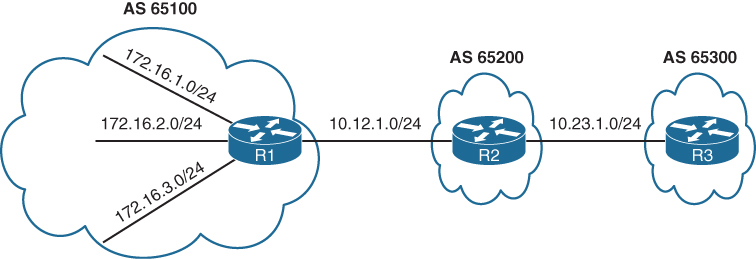
R1# show bgp ipv4 unicast | begin Network
     Network          Next Hop            Metric LocPrf Weight Path
 *   10.12.1.0/24     10.12.1.2                0             0 65200 ?
 *>                   0.0.0.0                  0         32768 ?
 *>  10.23.1.0/24     10.12.1.2                0             0 65200 ?
 *>  172.16.1.0/24    0.0.0.0                  0         32768 ?
 *>  172.16.2.0/24    0.0.0.0                  0         32768 ?
 *>  172.16.3.0/24    0.0.0.0                  0         32768 ?
 *>  192.168.1.1/32   0.0.0.0                  0         32768 ?
 *>  192.168.2.2/32   10.12.1.2                0             0 65200 ?
 *>  192.168.3.3/32   10.12.1.2                              0 65200 65300 ?
R2# show bgp ipv4 unicast | begin Network
Network Next Hop Metric LocPrf Weight Path
* 10.12.1.0/24 10.12.1.1 0 0 65100 ?
*> 0.0.0.0 0 32768 ?
* 10.23.1.0/24 10.23.1.3 0 0 65300 ?
*> 0.0.0.0 0 32768 ?
*> 172.16.1.0/24 10.12.1.1 0 0 65100 ?
*> 172.16.2.0/24 10.12.1.1 0 0 65100 ?
*> 172.16.3.0/24 10.12.1.1 0 0 65100 ?
*> 192.168.1.1/32 10.12.1.1 0 0 65100 ?
*> 192.168.2.2/32 0.0.0.0 0 32768 ?
*> 192.168.3.3/32 10.23.1.3 0 0 65300 ?R3# show bgp ipv4 unicast | begin Network
Network Next Hop Metric LocPrf Weight Path
*> 10.12.1.0/24 10.23.1.2 0 0 65200 ?
* 10.23.1.0/24 10.23.1.2 0 0 65200 ?
*> 0.0.0.0 0 32768 ?
*> 172.16.1.0/24 10.23.1.2 0 65200 65100 ?
*> 172.16.2.0/24 10.23.1.2 0 65200 65100 ?
*> 172.16.3.0/24 10.23.1.2 0 65200 65100 ?
*> 192.168.1.1/32 10.23.1.2 0 65200 65100 ?
*> 192.168.2.2/32 10.23.1.2 0 0 65200 ?
*> 192.168.3.3/32 0.0.0.0 0 32768 ?R1 aggregates all the stub networks (172.16.1.0/24, 172.16.2.0/24, and 172.16.3.0/24) into a 172.16.0.0/20 summary route
R2 aggregates all the router’s loopback addresses into a 192.168.0.0/16 summary route
R1# show running-config | section router bgp
router bgp 65100
 bgp log-neighbor-changes
 aggregate-address 172.16.0.0 255.255.240.0
 redistribute connected
 neighbor 10.12.1.2 remote-as 65200
R2# show running-config | section router bgp
router bgp 65200
bgp log-neighbor-changes
no bgp default ipv4-unicast
neighbor 10.12.1.1 remote-as 65100
neighbor 10.23.1.3 remote-as 65300
!
address-family ipv4
aggregate-address 192.168.0.0 255.255.0.0
redistribute connected
neighbor 10.12.1.1 activate
neighbor 10.23.1.3 activate
exit-address-family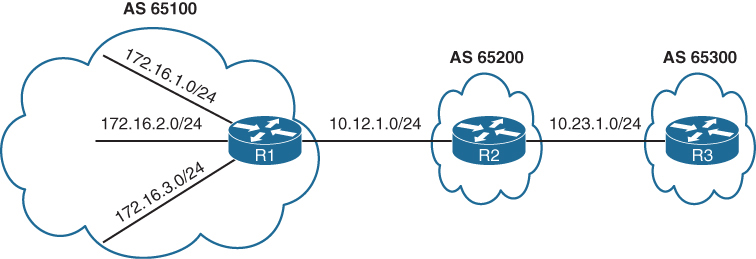
R1# show bgp ipv4 unicast | begin Network
     Network          Next Hop            Metric LocPrf Weight Path
 *   10.12.1.0/24     10.12.1.2                0             0 65200 ?
 *>                   0.0.0.0                  0         32768 ?
 *>  10.23.1.0/24     10.12.1.2                0             0 65200 ?
 *>  172.16.0.0/20    0.0.0.0                            32768 i >>> R1 will also install
 *>  172.16.1.0/24    0.0.0.0                  0         32768 ?
 *>  172.16.2.0/24    0.0.0.0                  0         32768 ?
 *>  172.16.3.0/24    0.0.0.0                  0         32768 ?
 *>  192.168.0.0/16   10.12.1.2                0             0 65200 i >>> summary received with AS of only 65200 loosing all previous AS PATH info
 *>  192.168.1.1/32   0.0.0.0                  0         32768 ?
 *>  192.168.2.2/32   10.12.1.2                0             0 65200 ?
 *>  192.168.3.3/32   10.12.1.2                              0 65200 65300 ?
R2# show bgp ipv4 unicast | begin Network
Network Next Hop Metric LocPrf Weight Path
* 10.12.1.0/24 10.12.1.1 0 0 65100 ?
*> 0.0.0.0 0 32768 ?
* 10.23.1.0/24 10.23.1.3 0 0 65300 ?
*> 0.0.0.0 0 32768 ?
*> 172.16.0.0/20 10.12.1.1 0 0 65100 i
*> 172.16.1.0/24 10.12.1.1 0 0 65100 ?
*> 172.16.2.0/24 10.12.1.1 0 0 65100 ?
*> 172.16.3.0/24 10.12.1.1 0 0 65100 ?
*> 192.168.0.0/16 0.0.0.0 32768 i
*> 192.168.1.1/32 10.12.1.1 0 0 65100 ?
*> 192.168.2.2/32 0.0.0.0 0 32768 ?
*> 192.168.3.3/32 10.23.1.3 0 0 65300 ?R3# show bgp ipv4 unicast | begin Network
Network Next Hop Metric LocPrf Weight Path
*> 10.12.1.0/24 10.23.1.2 0 0 65200 ?
* 10.23.1.0/24 10.23.1.2 0 0 65200 ?
*> 0.0.0.0 0 32768 ?
*> 172.16.0.0/20 10.23.1.2 <<< 0 65200 65100 i
*> 172.16.1.0/24 10.23.1.2 0 65200 65100 ?
*> 172.16.2.0/24 10.23.1.2 0 65200 65100 ?
*> 172.16.3.0/24 10.23.1.2 0 65200 65100 ?
*> 192.168.0.0/16 10.23.1.2 <<< 0 0 65200 i
*> 192.168.1.1/32 10.23.1.2 0 65200 65100 ?
*> 192.168.2.2/32 10.23.1.2 0 0 65200 ?
*> 192.168.3.3/32 0.0.0.0 0 32768 ?Notice that the 172.16.0.0/20 and 192.168.0.0/16 network prefixes are visible, but the smaller component network prefixes still exist on all the routers. The aggregate-address command advertises the aggregated network prefix in addition to the original component network prefixes. The optional summary-only keyword suppresses the component network prefixes in the summarized network prefix range.
Configuration with the summary-only keyword.
R1# show running-config | section router bgp
router bgp 65100
 bgp log-neighbor-changes
 aggregate-address 172.16.0.0 255.255.240.0 summary-only
 redistribute connected
 neighbor 10.12.1.2 remote-as 65200
R2# show running-config | section router bgp
router bgp 65200
bgp log-neighbor-changes
no bgp default ipv4-unicast
neighbor 10.12.1.1 remote-as 65100
neighbor 10.23.1.3 remote-as 65300
!
address-family ipv4
aggregate-address 192.168.0.0 255.255.0.0 summary-only
redistribute connected
neighbor 10.12.1.1 activate
neighbor 10.23.1.3 activate
exit-address-familyR3# show bgp ipv4 unicast | begin Network
Network Next Hop Metric LocPrf Weight Path
*> 10.12.1.0/24 10.23.1.2 0 0 65200 ?
* 10.23.1.0/24 10.23.1.2 0 0 65200 ?
*> 0.0.0.0 0 32768 ?
*> 172.16.0.0/20 10.23.1.2 0 65200 65100 i
*> 192.168.0.0/16 10.23.1.2 0 0 65200 i
*> 192.168.3.3/32 0.0.0.0 0 32768 ?R2# show bgp ipv4 unicast
BGP table version is 10, local router ID is 192.168.2.2
Status codes: s suppressed, d damped, h history, * valid, > best, i - internal,
r RIB-failure, S Stale, m multipath, b backup-path, f RT-Filter,
x best-external, a additional-path, c RIB-compressed,
Origin codes: i - IGP, e - EGP, ? - incomplete
RPKI validation codes: V valid, I invalid, N Not found
Network Next Hop Metric LocPrf Weight Path
* 10.12.1.0/24 10.12.1.1 0 0 65100 ?
*> 0.0.0.0 0 32768 ?
* 10.23.1.0/24 10.23.1.3 0 0 65300 ?
*> 0.0.0.0 0 32768 ?
*> 172.16.0.0/20 10.12.1.1 0 0 65100 i
*> 192.168.0.0/16 0.0.0.0 32768 i
s> 192.168.1.1/32 10.12.1.1 0 0 65100 ? >>> suppressed routes
s> 192.168.2.2/32 0.0.0.0 0 32768 ? >>> suppressed routes
s> 192.168.3.3/32 10.23.1.3 0 0 65300 ? >>> suppressed routes
! all component routes of summary route are suppressed as shown above due to summary-only keyworda summary discard route is installed to Null0 as a loop-prevention mechanism, this null0 route is generated on summarizing router only
R2# show ip route bgp | begin Gateway
Gateway of last resort is not set

      172.16.0.0/20 is subnetted, 1 subnets
B        172.16.0.0 [20/0] via 10.12.1.1, 00:06:18
B     192.168.0.0/16 [200/0], 00:05:37, Null0
      192.168.1.0/32 is subnetted, 1 subnets
B        192.168.1.1 [20/0] via 10.12.1.1, 00:02:15
      192.168.3.0/32 is subnetted, 1 subnets
B        192.168.3.3 [20/0] via 10.23.1.3, 00:02:15
R1 suppressing component routes in Loc-RIB
R1# show bgp ipv4 unicast | begin Network
     Network          Next Hop            Metric LocPrf Weight Path
 *   10.12.1.0/24     10.12.1.2                0             0 65200 ?
 *>                   0.0.0.0                  0         32768 ?
 *>  10.23.1.0/24     10.12.1.2                0             0 65200 ?
 *>  172.16.0.0/20    0.0.0.0                            32768 i
 s>  172.16.1.0/24    0.0.0.0                  0         32768 ?
 s>  172.16.2.0/24    0.0.0.0                  0         32768 ?
 s>  172.16.3.0/24    0.0.0.0                  0         32768 ?
 *>  192.168.0.0/16   10.12.1.2                0             0 65200 i
 *>  192.168.1.1/32   0.0.0.0                  0         32768 ?
R1# show ip route bgp | begin Gateway
Gateway of last resort is not set
10.0.0.0/8 is variably subnetted, 3 subnets, 2 masks
B 10.23.1.0/24 [20/0] via 10.12.1.2, 00:12:50
172.16.0.0/16 is variably subnetted, 7 subnets, 3 masks
B 172.16.0.0/20 [200/0], 00:06:51, Null0
B 192.168.0.0/16 [20/0] via 10.12.1.2, 00:06:10The Atomic Aggregate Attribute
Summarized routes act like new BGP routes with a shorter prefix length.
When a BGP router summarizes a route, it does not advertise the AS_Path information from before the route was summarized.
Also path attributes like multi-exit discriminator (MED), and BGP communities are not included in the new BGP aggregate prefix. The atomic aggregate attribute indicates that a loss of path information has occurred.
R2 can be configured to summarize the 172.16.0.0/20 and 192.168.0.0/16 routes with component route suppression
R2# show running-config | section router bgp
router bgp 65200
 bgp log-neighbor-changes
 no bgp default ipv4-unicast
 neighbor 10.12.1.1 remote-as 65100
 neighbor 10.23.1.3 remote-as 65300
 !
 address-family ipv4
  aggregate-address 192.168.0.0 255.255.0.0 summary-only
  aggregate-address 172.16.0.0 255.255.240.0 summary-only
  redistribute connected
  neighbor 10.12.1.1 activate
  neighbor 10.23.1.3 activate
R2 is aggregating and suppressing R1’s component networks (172.16.1.0/24, 172.16.2.0/24, and 172.16.3.0/24) into the 172.16.0.0/20 summary route
The component network prefixes maintain an AS_Path of 65100 on R2
with the aggregate 172.16.0.0/20 appears to be locally generated on R2.
From R3’s perspective, R2 does not advertise R1’s stub networks; instead, it is advertising the 172.16.0.0/20 network as its own
The AS_Path for the 172.16.0.0/20 route on R3 is simply AS 65200 and does not include AS 65100
R2# show bgp ipv4 unicast | begin Network
     Network          Next Hop            Metric LocPrf Weight Path
 *   10.12.1.0/24     10.12.1.1                0             0 65100 ?
 *>                   0.0.0.0                  0         32768 ?
 *   10.23.1.0/24     10.23.1.3                0             0 65300 ?
 *>                   0.0.0.0                  0         32768 ?
 *>  172.16.0.0/20    0.0.0.0                            32768 i >>> summarized looks like
                                                                 >>> locally originated route
 s>  172.16.1.0/24    10.12.1.1                0             0 65100 ? >>> while these original
 s>  172.16.2.0/24    10.12.1.1                0             0 65100 ? >>> component routes
 s>  172.16.3.0/24    10.12.1.1                0             0 65100 ? >>> with real AS PATH
                                                                       >>> are suppressed
 *>  192.168.0.0/16   0.0.0.0                            32768 i
 s>  192.168.1.1/32   10.12.1.1                0             0 65100 ?
 s>  192.168.2.2/32   0.0.0.0                  0         32768 ?
 s>  192.168.3.3/32   10.23.1.3                0             0 65300 ?
R3’s BGP entry for the 172.16.0.0/20 prefix
R3# show bgp ipv4 unicast | begin Network
     Network          Next Hop            Metric LocPrf Weight Path
 *>  10.12.1.0/24     10.23.1.2                0             0 65200 ?
 *   10.23.1.0/24     10.23.1.2                0             0 65200 ?
 *>                   0.0.0.0                  0         32768 ?
 *>  172.16.0.0/20    10.23.1.2                0             0 65200 i
 *>  192.168.0.0/16   10.23.1.2                0             0 65200 i
 *>  192.168.3.3/32   0.0.0.0                  0         32768 ?
Drilling down into it further we see that routes were summarized by AS 65200 by the router with the router ID (RID) 192.168.2.2
In addition, the atomic aggregate attribute has been set to indicate a loss of path attributes such as AS_Path in this scenario.
R3# show bgp ipv4 unicast 172.16.0.0
BGP routing table entry for 172.16.0.0/20, version 25
Paths: (1 available, best #1, table default)
  Not advertised to any peer
  Refresh Epoch 2
  65200, (aggregated by 65200 192.168.2.2)
    10.23.1.2 from 10.23.1.2 (192.168.2.2)
      Origin IGP, metric 0, localpref 100, valid, external, atomic-aggregate, best
      rx pathid: 0, tx pathid: 0x0
Route Aggregation with AS_SET
To keep the component route’s BGP path information, the optional as-set keyword may be used with the aggregate-address command
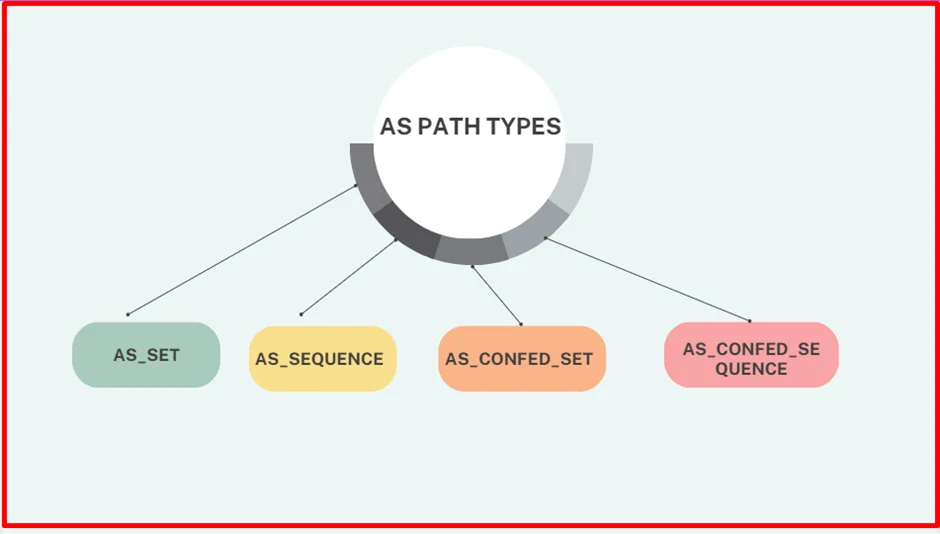
There are two types of copy actions that take place inside the AS Path of the aggregate route in BGP
- AS_SEQUENCE copy – this is when all component routes have same AS_PATH info and that is copied over as is (without { })
R3# show bgp ipv4 unicast 172.16.0.0
BGP routing table entry for 172.16.0.0/20, version 30
Paths: (1 available, best #1, table default)
  Not advertised to any peer
  Refresh Epoch 2
  65200 65100, (aggregated by 65200 192.168.2.2)
    10.23.1.2 from 10.23.1.2 (192.168.2.2)
      Origin incomplete, metric 0, localpref 100, valid, external, best
rx pathid: 0, tx pathid: 0x0- AS_SET – this is when multiple component routes have differing AS_PATH, They are displayed inside { } counts as only one AS hop
R2# show bgp ipv4 unicast 192.168.0.0
BGP routing table entry for 192.168.0.0/16, version 28
Paths: (1 available, best #1, table default)
  Advertised to update-groups:
     1
  Refresh Epoch 1
  {65100,65300}, (aggregated by 65200 192.168.2.2)
    0.0.0.0 from 0.0.0.0 (192.168.2.2)
      Origin incomplete, localpref 100, weight 32768, valid, aggregated, local, best
      rx pathid: 0, tx pathid: 0x0
Configuring as-set for differing prefixes
R2# show running-config | section router bgp
router bgp 65200
 bgp log-neighbor-changes
 no bgp default ipv4-unicast
 neighbor 10.12.1.1 remote-as 65100
 neighbor 10.23.1.3 remote-as 65300
 !
address-family ipv4
  aggregate-address 192.168.0.0 255.255.0.0 as-set summary-only
  aggregate-address 172.16.0.0 255.255.240.0 as-set summary-only
  redistribute connected
  neighbor 10.12.1.1 activate
  neighbor 10.23.1.3 activate
We check 172.16.0.0/20 summary route again, now with the BGP path information copied into it . Notice that the AS_Path information now contains AS 65100.
R3# show bgp ipv4 unicast 172.16.0.0
BGP routing table entry for 172.16.0.0/20, version 30
Paths: (1 available, best #1, table default)
  Not advertised to any peer
  Refresh Epoch 2
  65200 65100, (aggregated by 65200 192.168.2.2)
    10.23.1.2 from 10.23.1.2 (192.168.2.2)
      Origin incomplete, metric 0, localpref 100, valid, external, best
      rx pathid: 0, tx pathid: 0x0
R3# show bgp ipv4 unicast | begin Network
Network Next Hop Metric LocPrf Weight Path
*> 10.12.1.0/24 10.23.1.2 0 0 65200 ?
* 10.23.1.0/24 10.23.1.2 0 0 65200 ?
*> 0.0.0.0 0 32768 ?
*> 172.16.0.0/20 10.23.1.2 0 0 65200 65100 ?
*> 192.168.3.3/32 0.0.0.0 0 32768 ?Did you notice that the 192.168.0.0/16 summary route is no longer present in R3’s BGP table? The reason for this is on R2; R2 is summarizing all the loopback networks from R1 (AS 65100), R2 (AS 65200), and R3 (AS 65300). And now that R2 is copying the BGP AS_Path attributes of all the component network prefixes into the AS_SET information, the AS_Path for the 192.168.0.0/16 summary route contains AS 65300. When the aggregate is advertised to R3, R3 discards that prefix because it sees its own AS_Path in the advertisement and thinks that it is a loop.
R2# show bgp ipv4 unicast | begin Network
     Network          Next Hop            Metric LocPrf Weight Path
 *   10.12.1.0/24     10.12.1.1                0             0 65100 ?
 *>                   0.0.0.0                  0         32768 ?
 *   10.23.1.0/24     10.23.1.3                0             0 65300 ?
 *>                   0.0.0.0                  0         32768 ?
 *>  172.16.0.0/20    0.0.0.0                       100  32768 65100 ?
 s>  172.16.1.0/24    10.12.1.1                0             0 65100 ?
 s>  172.16.2.0/24    10.12.1.1                0             0 65100 ?
 s>  172.16.3.0/24    10.12.1.1                0             0 65100 ?
 *>  192.168.0.0/16   0.0.0.0                       100  32768 {65100,65300} ?
 s>  192.168.1.1/32   10.12.1.1                0             0 65100 ?
 s>  192.168.2.2/32   0.0.0.0                  0         32768 ?
 s>  192.168.3.3/32   10.23.1.3                0             0 65300 ?
R2# show bgp ipv4 unicast 192.168.0.0
BGP routing table entry for 192.168.0.0/16, version 28
Paths: (1 available, best #1, table default)
Advertised to update-groups:
1
Refresh Epoch 1
{65100,65300}, (aggregated by 65200 192.168.2.2)
0.0.0.0 from 0.0.0.0 (192.168.2.2)
Origin incomplete, localpref 100, weight 32768, valid, aggregated, local, best
rx pathid: 0, tx pathid: 0x0R1 does not install the 192.168.0.0/16 summary route for the same reason that R3 does not install the 192.168.0.0/16 summary route. R1 thinks that the advertisement is a loop because it detects AS 65100 in AS_Path. You can confirm this by examining R1’s BGP table
R1# show bgp ipv4 unicast | begin Network
     Network          Next Hop            Metric LocPrf Weight Path
 *   10.12.1.0/24     10.12.1.2                0             0 65200 ?
 *>                   0.0.0.0                  0         32768 ?
 *>  10.23.1.0/24     10.12.1.2                0             0 65200 ?
 *>  172.16.1.0/24    0.0.0.0                  0         32768 ?
 *>  172.16.2.0/24    0.0.0.0                  0         32768 ?
 *>  172.16.3.0/24    0.0.0.0                  0         32768 ?
 *>  192.168.1.1/32   0.0.0.0                  0         32768 ?
Solution here would be not to use as-set command
IPv6 Summarization
The same process for summarizing or aggregating IPv4 prefixes occurs with IPv6 prefixes, and the format is identical except that the configuration is placed under the IPv6 address family using the command aggregate-address prefix/prefix-length [summary-only] [as-set]
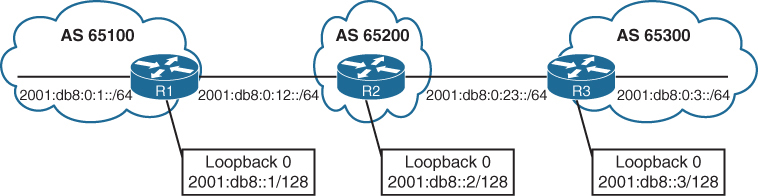
Summarization of the IPv6 loopback addresses (2001:db8:::1/128, 2001:db8:::2/128, and 2001:db8::3/128) and R1/R3’s stub networks (2001:db8:0:1::/64 and 2001:db8:0:3/64) is fairly simple as they all fall into the base IPv6 summary range 2001:db8:0:0::/64
The fourth hextet, beginning with a decimal value of 1, 2, or 3, would consume only 2 bits; the range could be summarized easily into the 2001:db8:0:0::/62 (or 2001:db8::/62) network range.
R2# show running-config | section router bgprouter bgp 65200
 bgp router-id 192.168.2.2
 bgp log-neighbor-changes
 neighbor 2001:DB8:0:12::1 remote-as 65100
 neighbor 2001:DB8:0:23::3 remote-as 65300
 !
 address-family ipv4
  no neighbor 2001:DB8:0:12::1 activate
  no neighbor 2001:DB8:0:23::3 activate
!
 address-family ipv6
  network 2001:DB8::2/128
  network 2001:DB8:0:12::/64
  network 2001:DB8:0:23::/64
  aggregate-address 2001:DB8::/58 summary-only
  neighbor 2001:DB8:0:12::1 activate
  neighbor 2001:DB8:0:23::3 activate
shows the BGP tables on R1 and R3. Notice that all the smaller component routes are summarized and suppressed into the 2001:db8::/58 summary route, as expected.
R3# show bgp ipv6 unicast | b Network
     Network            Next Hop          Metric LocPrf Weight Path
 *>  2001:DB8::/58      2001:DB8:0:23::2       0             0 65200 i
 *>  2001:DB8::3/128    ::                     0         32768 i
 *>  2001:DB8:0:3::/64  ::                     0         32768 i
 *>  2001:DB8:0:23::/64 ::                     0         32768 i
R1# show bgp ipv6 unicast | b Network
Network Next Hop Metric LocPrf Weight Path
*> 2001:DB8::/58 2001:DB8:0:12::2 0 0 65200 i
*> 2001:DB8::1/128 :: 0 32768 ?
*> 2001:DB8:0:1::/64 :: 0 32768 ?
*> 2001:DB8:0:12::/64 :: 0 32768 ?BGP Route Filtering and Manipulation
Controlling what we learn and advertise can give us control and security, simply relying on peer to be able to install any prefix into our routing domain is not a good idea
IOS XE provides four methods of filtering routes inbound or outbound for a specific BGP peer. Each of these methods can be used individually, or they can be used simultaneously with other methods:
There are multiple ways of filtering or allowing prefixes from BGP neighbors
- Route maps
- Filter List
- AS_Path ACL filtering
- Prefix List or
- Distribute List
A BGP neighbor cannot use a distribute list (ACL) and prefix list at the same time in the same direction (inbound or outbound).
If all are applied together on a BGP neighbor, following are the order of operation for both inbound and outbound
RFAP|D
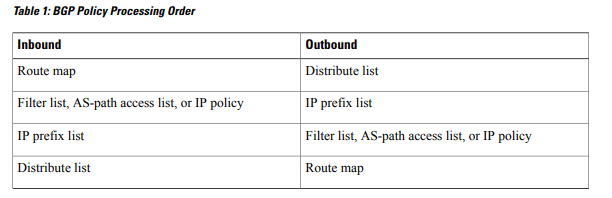
Filtering on below Loc-RIB
R1# show bgp ipv4 unicast | begin Network
     Network          Next Hop            Metric LocPrf Weight Path
 *>  10.3.3.0/24      10.12.1.2               33             0 65200 65300 3003 ?
 *   10.12.1.0/24     10.12.1.2               22             0 65200 ?
 *>                   0.0.0.0                  0         32768 ?
 *>  10.23.1.0/24     10.12.1.2              333             0 65200 ?
 *>  100.64.2.0/25    10.12.1.2               22             0 65200 ?
 *>  100.64.2.192/26  10.12.1.2               22             0 65200 ?
 *>  100.64.3.0/25    10.12.1.2               22             0 65200 65300 300 ?
 *>  192.168.1.1/32   0.0.0.0                  0         32768 ?
 *>  192.168.2.2/32   10.12.1.2               22             0 65200 ?
 *>  192.168.3.3/32   10.12.1.2             3333             0 65200 65300 ?
Distribute List Filtering
Distribute lists has the allow or whitelisting effect
Distribute list uses standard or extended ACLs
Remember that extended ACLs for BGP use the source fields to match the network portion and the destination fields to match against the network mask
The first entry allows any network that starts in the 192.168.0.0 to 192.168.255.255 range with a network length of only /32. The second entry allows networks that contain the 100.64.x.0 pattern with prefix length /25 to demonstrate the wildcard abilities of an extended ACL with BGP
R1
ip access-list extended ACL-ALLOW
 permit ip 192.168.0.0 0.0.255.255 host 255.255.255.255
 permit ip 100.64.0.0 0.0.255.0 host 255.255.255.128
!
router bgp 65100
 neighbor 10.12.1.2 remote-as 65200
 address-family ipv4
 neighbor 10.12.1.2 distribute-list ACL-ALLOW in
The 100.64.2.192/26 network is rejected because the prefix length or mask does not match the second ACL-ALLOW entry while two of the networks in the 100.64.x.0 pattern (100.64.2.0/25 and 100.64.3.0/25) are accepted
R1# show bgp ipv4 unicast | begin Network
     Network          Next Hop            Metric LocPrf Weight Path
 *>  10.12.1.0/24     0.0.0.0                  0         32768 ?
 *>  100.64.2.0/25    10.12.1.2               22             0 65200 ?
 *>  100.64.3.0/25    10.12.1.2               22             0 65200 65300 300 ?
 *>  192.168.1.1/32   0.0.0.0                  0         32768 ?
 *>  192.168.2.2/32   10.12.1.2               22             0 65200 ?
 *>  192.168.3.3/32   10.12.1.2             3333             0 65200 65300 ?
Prefix List Filtering
Prefix list also has the whitelisting effect same as distribute list but instead of ACL uses prefix list
A prefix list called RFC1918 is created to permit only prefixes in the RFC1918 address space.
R1# configure terminal
Enter configuration commands, one per line. End with CNTL/Z.
R1(config)# ip prefix-list RFC1918 seq 10 permit 10.0.0.0/8 le 32
R1(config)# ip prefix-list RFC1918 seq 20 permit 172.16.0.0/12 le 32
R1(config)# ip prefix-list RFC1918 seq 30 permit 192.168.0.0/16 le 32
R1(config)# router bgp 65100
R1(config-router)# address-family ipv4 unicast
R1(config-router-af)# neighbor 10.12.1.2 prefix-list RFC1918 in
Notice that the 100.64.2.0/25, 100.64.2.192/26, and 100.64.3.0/25 routes are filtered as they do not fall within the prefix list matching criteria.
R1# show bgp ipv4 unicast | begin Network
     Network          Next Hop            Metric LocPrf Weight Path
 *>  10.3.3.0/24      10.12.1.2               33             0 65200 65300 3003 ?
 *   10.12.1.0/24     10.12.1.2               22             0 65200 ?
 *>                   0.0.0.0                  0         32768 ?
 *>  10.23.1.0/24     10.12.1.2              333             0 65200 ?
 *>  192.168.1.1/32   0.0.0.0                  0         32768 ?
 *>  192.168.2.2/32   10.12.1.2               22             0 65200 ?
 *>  192.168.3.3/32   10.12.1.2             3333             0 65200 65300 ?
AS_Path Filtering
There may be times when conditionally matching prefixes may be too complicated, and identifying all routes from a specific organization is preferred, in such cases we can use AS PATH ACL to filer out routes using regex against AS PATH PA
| Modifier | Description |
|---|---|
| _ (underscore) | Matches a space |
| ^ (caret) | Indicates the start of the string |
| $ (dollar sign) | Indicates the end of the string |
| [] (brackets) | Matches a single character or nesting within a range |
| – (hyphen) | Indicates a range of numbers in brackets |
| [^] (caret in brackets) | Excludes the characters listed in brackets |
| () (parentheses) | Used for nesting of search patterns |
| | (pipe) | Provides or functionality to the query |
| . (period) | Matches a single character, including a space |
| * (asterisk) | Matches zero or more characters or patterns |
| + (plus sign) | Matches one or more instances of the character or pattern |
| ? (question mark) | Matches one or no instances of the character or pattern |
BGP table can be parsed with regex using the command show bgp afi safi regexp regex-pattern
so we can test locally before applying it to neighbor
R2# show bgp ipv4 unicast
! Output omitted for brevity
     Network          Next Hop   Metric LocPrf Weight Path
*> 172.16.0.0/24     172.32.23.3      0             0 300 80 90 21003 2100 i
*> 172.16.4.0/23     172.32.23.3      0             0 300 878 1190 1100 1010 i
*> 172.16.16.0/22    172.32.23.3      0             0 300 779 21234 45 i
*> 172.16.99.0/24    172.32.23.3      0             0 300 145 40 i
*> 172.16.129.0/24   172.32.23.3      0             0 300 10010 300 1010 40 50 i
*> 192.168.0.0/16    172.16.12.1      0             0 100 80 90 21003 2100 i
*> 192.168.4.0/23    172.16.12.1      0             0 100 878 1190 1100 1010 i
*> 192.168.16.0/22   172.16.12.1      0             0 100 779 21234 45 i
*> 192.168.99.0/24   172.16.12.1      0             0 100 145 40 i
*> 192.168.129.0/24  172.16.12.1      0             0 100 10010 300 1010 40 50 i
AS_Path for the 172.16.129.0/24 route includes AS 300 twice non-consecutively for a specific purpose. This would not be seen in real life because it indicates a routing loop.
_ (Underscore) – Matches a space – AS anywhere regardless of AS position as origin or transit or last AS
Display prefixes coming via AS 100 (regardless of AS 100 position as last or transit or origin AS)
R2# show bgp ipv4 unicast regex 100
! Output omitted for brevity
     Network         Next Hop    Metric LocPrf Weight Path
*> 172.16.0.0/24     172.32.23.3      0             0 300 80 90 21003 2100 i
*> 172.16.4.0/23     172.32.23.3      0             0 300 878 1190 1100 1010 i
*> 172.16.129.0/24   172.32.23.3      0             0 300 10010 300 1010 40 50 i
*> 192.168.0.0/16    172.16.12.1      0             0 100 80 90 21003 2100 i
*> 192.168.4.0/23    172.16.12.1      0             0 100 878 1190 1100 1010 i
*> 192.168.16.0/22   172.16.12.1      0             0 100 779 21234 45 i
*> 192.168.99.0/24   172.16.12.1      0             0 100 145 40 i
*> 192.168.129.0/24  172.16.12.1      0             0 100 10010 300 1010 40 50 i
above did not work so lets try again, The regex query includes the following unwanted ASN: 10010.
R2# show bgp ipv4 unicast regexp _100
! Output omitted for brevity
     Network         Next Hop    Metric LocPrf Weight Path
*> 172.16.129.0/24   172.32.23.3      0             0 300 10010 300 1010 40 50 i <<<
*> 192.168.0.0/16    172.16.12.1      0             0 100 80 90 21003 2100 i
*> 192.168.4.0/23    172.16.12.1      0             0 100 878 1190 1100 1010 i
*> 192.168.16.0/22   172.16.12.1      0             0 100 779 21234 45 i
*> 192.168.99.0/24   172.16.12.1      0             0 100 145 40 i
*> 192.168.129.0/24  172.16.12.1      0             0 100 10010 300 1010 40 i
Still did not work, lets try _ before and after _
R2# show bgp ipv4 unicast regexp _100_
! Output omitted for brevity
     Network         Next Hop    Metric LocPrf Weight Path
*> 192.168.0.0/16    172.16.12.1      0             0 100 80 90 21003 2100 i
*> 192.168.4.0/23    172.16.12.1      0             0 100 878 1190 1100 1010 i
*> 192.168.16.0/22   172.16.12.1      0             0 100 779 21234 45 i
*> 192.168.99.0/24   172.16.12.1      0             0 100 145 40 i
*> 192.168.129.0/24  172.16.12.1      0             0 100 10010 300 1010 40 50 i
This one worked because it satisfies the condition of AS 100 existing as either last, or transit, or as origin
^ (Caret) – start of the string – Last AS
Display only prefixes that were advertised from directly connected AS 300 or last AS 300.
R2# show bgp ipv4 unicast regexp ^300_
! Output omitted for brevity
     Network        Next Hop      Metric LocPrf Weight Path
*> 172.16.0.0/24    172.32.23.3        0             0 300 80 90 21003 2100 i
*> 172.16.4.0/23    172.32.23.3        0             0 300 878 1190 1100 1010 i
*> 172.16.16.0/22   172.32.23.3        0             0 300 779 21234 45 i
*> 172.16.99.0/24   172.32.23.3        0             0 300 145 40 i
*> 172.16.129.0/24  172.32.23.3        0             0 300 10010 300 1010 40 50 i
$ (Dollar Sign) – End of the string
Display only prefixes that originated in AS 40
R2# show bgp ipv4 unicast regexp _40$
! Output omitted for brevity
     Network        Next Hop    Metric  LocPrf Weight Path
*> 172.16.99.0/24   172.32.23.3      0             0  300 145 40 i
*> 192.168.99.0/24  172.16.12.1      0    100      0  100 145 40 i
[ ] (Brackets) – Matches a single character – used for common characters in same place
Display only prefixes with an AS that contains 11 or 14 in it
R2# show bgp ipv4 unicast regexp _1[14]_
! Output omitted for brevity
     Network        Next Hop  Metric LocPrf   Weight Path
*> 172.16.4.0/23    172.32.23.3      0             0 300 878 14 1100 1010 i
*> 172.16.99.0/24   172.32.23.3      0             0 300 14 40 i
*> 192.168.4.0/23   172.16.12.1      0             0 100 878 1190 14 1010 i
*> 192.168.99.0/24  172.16.12.1      0             0 100 14 40 i
– Hyphen (range matching to reduce the regex size)
Display only prefixes with the last two digits of the AS (40, 50, 60, 70, or 80).
R2# show bgp ipv4 unicast regexp [4-8]0_
! Output omitted for brevity
     Network         Next Hop    Metric LocPrf Weight Path
*> 172.16.0.0/24     172.32.23.3      0             0 300 80 90 21003 2100 i
*> 172.16.99.0/24    172.32.23.3      0             0 300 145 40 i
*> 172.16.129.0/24   172.32.23.3      0             0 300 10010 300 1010 40 50 i
*> 192.168.0.0/16    172.16.12.1      0             0 100 80 90 21003 2100 i
*> 192.168.99.0/24   172.16.12.1      0             0 100 145 40 i
*> 192.168.129.0/24  172.16.12.1      0             0 100 10010 300 1010 40 50 i
[^] (Caret in Brackets) – Excludes the character
Display only prefixes where the second AS from AS 100 or AS 300 does not start with 3, 4, 5, 6, 7, or 8
The first component of the regex query restricts the AS to start with 100 or 300 with the regex query ^[13]00_
and the second component filters out AS starting with 3 through 8 with the regex filter _[^3-8].
R2# show bgp ipv4 unicast regexp ^[13]00_[^3-8]
! Output omitted for brevity
     Network         Next Hop    Metric LocPrf Weight Path
*> 172.16.99.0/24    172.32.23.3      0             0 300 145 40 i
*> 172.16.129.0/24   172.32.23.3      0             0 300 10010 300 1010 40 50 i
*> 192.168.99.0/24   172.16.12.1      0             0 100 145 40 i
*> 192.168.129.0/24 172.16.12.1 0 0 100 10010 300 1010 40 50 i^[3][0-9]+_[3][0-9]+_[3][0-9]+_
frr.routeviews.org> show bgp ipv4 unicast regexp ^[3][0-9]+_[3][0-9]+_[3][0-9]+_
BGP table version is 264529750, local router ID is 128.223.51.23, vrf id 0
Default local pref 100, local AS 65123
Status codes: s suppressed, d damped, h history, u unsorted, * valid, > best, = multipath,
i internal, r RIB-failure, S Stale, R Removed
Nexthop codes: @NNN nexthop's vrf id, < announce-nh-self
Origin codes: i - IGP, e - EGP, ? - incomplete
RPKI validation codes: V valid, I invalid, N Not found
Network Next Hop Metric LocPrf Weight Path
V*> 1.6.9.0/24 128.223.253.9 0 3582 3701 3356 6453 4755 9583 i
V*= 128.223.253.10 0 3582 3701 3356 6453 4755 9583 i
V*> 1.6.11.0/24 128.223.253.9 0 3582 3701 3356 6453 4755 9583 i
V*= 128.223.253.10 0 3582 3701 3356 6453 4755 9583 i
V*> 1.6.12.0/22 128.223.253.9 0 3582 3701 3356 6453 4755 9583 i
V*= 128.223.253.10 0 3582 3701 3356 6453 4755 9583 i
V*> 1.6.13.0/24 128.223.253.9 0 3582 3701 3356 6453 4755 9583 i
V*= 128.223.253.10 0 3582 3701 3356 6453 4755 9583 i
V*> 1.6.17.0/24 128.223.253.9 0 3582 3701 3356 2914 9583 i
V*= 128.223.253.10 0 3582 3701 3356 2914 9583 i
V*> 1.6.19.0/24 128.223.253.9 0 3582 3701 3356 6453 4755 9583 i
V*= 128.223.253.10 0 3582 3701 3356 6453 4755 9583 i
V*> 1.6.32.0/22 128.223.253.9 0 3582 3701 3356 6453 4755 9583 i
V*= 128.223.253.10 0 3582 3701 3356 6453 4755 9583 i
V*> 1.6.40.0/22 128.223.253.9 0 3582 3701 3356 6453 4755 9583 i
V*= 128.223.253.10 0 3582 3701 3356 6453 4755 9583 i
V*> 1.6.48.0/22 128.223.253.9 0 3582 3701 3356 6453 4755 9583 i
V*= 128.223.253.10 0 3582 3701 3356 6453 4755 9583 i
V*> 1.6.56.0/22 128.223.253.9 0 3582 3701 3356 6453 4755 9583 i
V*= 128.223.253.10 0 3582 3701 3356 6453 4755 9583 i
V*> 1.6.59.0/24 128.223.253.9 0 3582 3701 3356 6453 4755 9583 i
V*= 128.223.253.10 0 3582 3701 3356 6453 4755 9583 i
V*> 1.6.67.0/24 128.223.253.9 0 3582 3701 3356 6453 4755 9583 i
V*= 128.223.253.10 0 3582 3701 3356 6453 4755 9583 i
V*> 1.6.69.0/24 128.223.253.9 0 3582 3701 3356 6453 4755 9583 i
V*= 128.223.253.10 0 3582 3701 3356 6453 4755 9583 i( ) and | (Parentheses and Pipe) – for ‘or’ functionality
AS_Path ends with AS 40 or 45 in it
R2# show bgp ipv4 unicast regexp _4(5|0)$
! Output omitted for brevity
     Network        Next Hop     Metric LocPrf Weight Path
*> 172.16.16.0/22   172.32.23.3       0             0 300 779 21234 45 i
*> 172.16.99.0/24   172.32.23.3       0             0 300 145 40 i
*> 192.168.16.0/22  172.16.12.1       0             0 100 779 21234 45 i
*> 192.168.99.0/24  172.16.12.1       0             0 100 145 40 i
. (Period) – single character, including a space
Display only prefixes originating from single digit AS
R2# show bgp ipv4 unicast regexp _.$
! Output omitted for brevity
     Network         Next Hop    Metric LocPrf Weight Path
*> 172.16.16.0/22    172.32.23.3      0             0 300 779 21234 4 i
*> 172.16.99.0/24    172.32.23.3      0             0 300 145 4 i
*> 172.16.129.0/24   172.32.23.3      0             0 300 10010 300 1010 40 5 i
*> 192.168.16.0/22   172.16.12.1      0             0 100 779 21234 4 i
*> 192.168.99.0/24   172.16.12.1      0             0 100 145 4 i
*> 192.168.129.0/24  172.16.12.1      0             0 100 10010 300 1010 40 5 i
to match prefixes originating from 2 digit AS
show bgp ipv4 unicast regexp _[0-9][0-9]?$
or
show bgp ipv4 unicast regexp _..$
+ (Plus Sign) – one or more instances of the character or pattern.
Display only prefixes that contain “at least one 10” in the AS path but where the pattern 100 should not be used in matching
R2# show bgp ipv4 unicast regexp (10)+[^(100)]
! Output omitted for brevity
     Network         Next Hop    Metric LocPrf Weight Path
*> 172.16.4.0/23     172.32.23.3      0             0 300 878 1190 1100 1010 i
*> 172.16.129.0/24   172.32.23.3      0             0 300 10010 300 1010 40 50 i
*> 192.168.4.0/23    172.16.12.1      0             0 100 878 1190 1100 1010 i
*> 192.168.129.0/24  172.16.12.1      0             0 100 10010 300 1010 40 50 i

(133388)+

frr.routeviews.org> show bgp ipv4 unicast regexp (133388)+
BGP table version is 264877433, local router ID is 128.223.51.23, vrf id 0
Default local pref 100, local AS 65123
Status codes:  s suppressed, d damped, h history, u unsorted, * valid, > best, = multipath,
               i internal, r RIB-failure, S Stale, R Removed
Nexthop codes: @NNN nexthop's vrf id, < announce-nh-self
Origin codes:  i - IGP, e - EGP, ? - incomplete
RPKI validation codes: V valid, I invalid, N Not found

     Network          Next Hop            Metric LocPrf Weight Path
V*>  1.7.24.0/24      128.223.253.9                          0 3582 3701 11164 4637 64049 55836 9583 133388 133388 133388 133388 i
V*=                   128.223.253.10                         0 3582 3701 11164 4637 64049 55836 9583 133388 133388 133388 133388 i
N*>  162.44.150.0/23  128.223.253.9                          0 3582 3701 174 55410 133388 i
N*=                   128.223.253.10                         0 3582 3701 174 55410 133388 i
N*>  162.44.150.0/24  128.223.253.10                         0 3582 3701 11164 4637 64049 55836 55410 133388 i
N*=                   128.223.253.9                          0 3582 3701 11164 4637 64049 55836 55410 133388 i
N*>  162.44.151.0/24  128.223.253.10                         0 3582 3701 11164 4637 64049 55836 55410 133388 i
N*=                   128.223.253.9                          0 3582 3701 11164 4637 64049 55836 55410 133388 i
N*>  162.44.250.0/24  128.223.253.10                         0 3582 3701 11164 4637 64049 55836 55410 133388 i
N*=                   128.223.253.9                          0 3582 3701 11164 4637 64049 55836 55410 133388 i
? (Question Mark) – one or no instances of the character or pattern.
Display only prefixes from the neighboring AS or its directly connected AS (that is, restrict to two ASs away).
You must use the Ctrl+V escape sequence before entering the ?.
R1# show bgp ipv4 unicast regexp ^[0-9]+ ([0-9]+)?$
! Output omitted for brevity
     Network        Next Hop       Metric LocPrf Weight Path
*> 172.16.99.0/24   172.32.23.3         0             0 300 40 i
*> 192.168.99.0/24  172.16.12.1         0    100      0 100 40 i
* (Asterisk) – zero or more characters or patterns.
Display all prefixes from any AS
decoding .*
. means any character including symbols, alphabets and numbers and * means 0 or more
combining the two means any character 0 or more times which will include content that is null empty (zero) or more (anything)
This may seem like a useless task, but it might be a valid requirement when using AS_Path access lists, which are explained in the following section.
R1# show bgp ipv4 unicast regexp .*
! Output omitted for brevity
     Network         Next Hop   Metric LocPrf Weight Path
*> 172.16.0.0/24     172.32.23.3     0             0 300 80 90 21003 2100 i
*> 172.16.4.0/23     172.32.23.3     0             0 300 1080 1090 1100 1110 i
*> 172.16.16.0/22    172.32.23.3     0             0 300 11234 21234 31234 i
*> 172.16.99.0/24    172.32.23.3     0             0 300 40 i
*> 172.16.129.0/24   172.32.23.3     0             0 300 10010 300 30010 30050 i
*> 192.168.0.0/16    172.16.12.1     0    100      0 100 80 90 21003 2100 i
*> 192.168.4.0/23    172.16.12.1     0    100      0 100 1080 1090 1100 1110 i
*> 192.168.16.0/22   172.16.12.1     0    100      0 100 11234 21234 31234 i
*> 192.168.99.0/24   172.16.12.1     0    100      0 100 40 i
*> 192.168.129.0/24  172.16.12.1     0    100      0 100 10010 300 30010 30050 i
Difference to remember between + * and ?
+ is 1 or more
while ? and * are more similar to one another
? is 0 or one
* is 0 or more / multiple
AS_Path ACLs
Selecting routes from a BGP neighbor by using AS_Path requires the definition of an AS_Path ACL
The AS_Path ACL processing is performed in a sequential top-down order just like normal ACL,
and the first qualifying match processes against the appropriate permit or deny action.
An implicit deny exists at the end of the AS path ACL.
R2# show bgp ipv4 unicast neighbors 10.12.1.1 advertised-routes | begin Network
     Network          Next Hop            Metric LocPrf Weight Path
 *>  10.3.3.0/24      10.23.1.3               33             0 65300 3003 ?
 *>  10.12.1.0/24     0.0.0.0                  0         32768 ?
 *>  10.23.1.0/24     0.0.0.0                  0         32768 ?
 *>  100.64.2.0/25    0.0.0.0                  0         32768 ?
 *>  100.64.2.192/26  0.0.0.0                  0         32768 ?
 *>  100.64.3.0/25    10.23.1.3                3             0 65300 300 ?
 *>  192.168.2.2/32   0.0.0.0                  0         32768 ?
 *>  192.168.3.3/32   10.23.1.3              333             0 65300 ?

Total number of prefixes 8
R2 is advertising the routes learned from R3 (AS 65300) to R1, using an AS_Path ACL to restrict the advertisement of only AS 65200 routes is recommended.
R2 using an AS_Path ACL to restrict traffic to only “locally originated” traffic using the regex pattern ^$
R2
ip as-path access-list 1 permit ^$
!
router bgp 65200
 address-family ipv4 unicast
  neighbor 10.12.1.1 filter-list 1 out
  neighbor 10.23.1.3 filter-list 1 out
R2# show bgp ipv4 unicast neighbors 10.12.1.1 advertised-routes | begin Network
Network Next Hop Metric LocPrf Weight Path
*> 10.12.1.0/24 0.0.0.0 0 32768 ?
*> 10.23.1.0/24 0.0.0.0 0 32768 ?
*> 100.64.2.0/25 0.0.0.0 0 32768 ?
*> 100.64.2.192/26 0.0.0.0 0 32768 ?
*> 192.168.2.2/32 0.0.0.0 0 32768 ?
Total number of prefixes 5Route Maps
Route maps provide more functionality than pure filtering; they provide a method to manipulate BGP path attributes, Route maps are applied on a BGP neighbor basis for routes that are advertised or received. A different route map can be used for each direction
R1# show bgp ipv4 unicast | begin Network
     Network          Next Hop            Metric LocPrf Weight Path
 *>  10.1.1.0/24      0.0.0.0                  0         32768 ?
 *>  10.3.3.0/24      10.12.1.2               33             0 65200 65300 3003 ?
 *   10.12.1.0/24     10.12.1.2               22             0 65200 ?
 *>                   0.0.0.0                  0         32768 ?
 *>  10.23.1.0/24     10.12.1.2              333             0 65200 ?
 *>  100.64.2.0/25    10.12.1.2               22             0 65200 ?
 *>  100.64.2.192/26  10.12.1.2               22             0 65200 ?
 *>  100.64.3.0/25    10.12.1.2               22             0 65200 65300 300 ?
 *>  192.168.1.1/32   0.0.0.0                  0         32768 ?
 *>  192.168.2.2/32   10.12.1.2               22             0 65200 ?
 *>  192.168.3.3/32   10.12.1.2             3333             0 65200 65300 ?
Step 1. Deny any routes that are in the 192.168.0.0/16 network by using a prefix list.
Step 2. Match any routes originating from AS 65200 that are within the 100.64.0.0/10 network range and set the BGP local preference to 222.
Step 3. Match any routes originating from AS 65200 that did not match step 2 and set the BGP weight to 65200.
Step 4. Permit all other routes to process.
R1
ip prefix-list FIRST-RFC1918 permit  192.168.0.0/16 le 32
ip as-path access-list 1 permit _65200$
ip prefix-list SECOND-CGNAT permit 100.64.0.0/10 le 32
!
route-map AS65200IN deny 10
 description Deny any RFC1918 networks via Prefix List Matching
 match ip address prefix-list FIRST-RFC1918
route-map AS65200IN permit 20
 description Change local preference for AS65200 originate route in 100.64.x.x/10
 match ip address prefix-list SECOND-CGNAT
 match as-path 1
 set local-preference 222
route-map AS65200IN permit 30
 description Change the weight for AS65200 originate routes
 match as-path 1
 set weight 65200
route-map AS65200IN permit 40
 description Permit all other routes un-modified
!
router bgp 65100
 neighbor 10.12.1.2 remote-as 65200
 address-family ipv4 unicast
 neighbor 10.12.1.2 route-map AS65200IN in
displays R1’s BGP routing table, which shows that the following actions occurred:
The 192.168.2.2/32 and 192.168.3.3/32 routes were discarded. The 192.168.1.1/32 route is a locally generated route.
The 100.64.2.0/25 and 100.64.2.192/26 networks had the local preference modified to 222 because they originate from AS 65200 and are within the 100.64.0.0/10 network range.
The 10.12.1.0/24 and 10.23.1.0/24 routes from R2 have been assigned the locally significant BGP attribute weight 65,200.
All other routes were received and not modified.
R1# show bgp ipv4 unicast | b Network
     Network          Next Hop            Metric LocPrf Weight Path
 *>  10.1.1.0/24      0.0.0.0                  0         32768 ?
 *>  10.3.3.0/24      10.12.1.2               33             0 65200 65300 3003 ?
 r>  10.12.1.0/24     10.12.1.2               22         65200 65200 ?
 r                    0.0.0.0                  0         32768 ?
 *>  10.23.1.0/24     10.12.1.2              333         65200 65200 ?
 *>  100.64.2.0/25    10.12.1.2               22    222      0 65200 ?
 *>  100.64.2.192/26  10.12.1.2               22    222      0 65200 ?
 *>  100.64.3.0/25    10.12.1.2               22             0 65200 65300 300 ?
 *>  192.168.1.1/32   0.0.0.0                  0         32768 ?
clear ip bgp
A hard reset tears down and rebuilds the peering sessions and rebuilds the BGP routing tables
Hard neighborship reset
clear ip bgp *
clear ip bgp neighbor-address
clear ip bgp peer-group group-name
Soft Reconfiguration
A soft reconfiguration uses stored prefix cache without tearing down existing peering sessions at the cost of additional memory for storing the updates, Soft reconfiguration is not on by default and needs to be configured for inbound on neighbors at least, Soft reconfiguration can be configured for inbound or outbound sessions.
neighbor soft-reconfiguration inbound
clear ip bgp 10.100.0.1 soft in
Route Refresh
route refresh capability allows the local router to reset inbound routing tables dynamically by sending route refresh requests given the neighbor not just supports it but also negotiated route refresh capability
clear ip bgp 172.16.10.2 inBGP Communities
BGP communities are optional attributes that let routers attach tags to routes so other routers can apply routing policies (like prefer, filter, or modify routes) without inspecting prefixes in detail.
A BGP community is an optional transitive BGP attribute that can traverse from AS to AS.
A BGP community is a 32-bit number that can be included with a route
A BGP community can be displayed as a full 32-bit number (0 through 4,294,967,295) or as two 16-bit numbers (0 through 65535):(0 through 65535), commonly referred to as new format.
By convention, with private BGP communities, the first 16 bits represent the AS of the community and the second 16 bits represent a pattern defined by the originating AS
Format
- 32-bit value
- Usually written as:
ASN:VALUE(e.g.65000:100)
Well-known standard communities
These have predefined meanings:
no-export→ do not advertise to eBGP peersno-advertise→ do not advertise to any peerinternet→ advertise everywhere
Extended BGP communities:
Format
- 64-bit value
- Structured into sub-fields, not just a single number
- Encoded as Type + Value
Examples (vendor CLI format varies):
rt 65000:100(Route Target)soo 65000:200(Site of Origin)
What they’re used for
Extended communities were introduced to solve the limitations of standard communities, especially for:
- MPLS VPNs
- L3VPN / L2VPN
- Advanced traffic engineering
- EVPN
- Policy precision across large networks
Common types of extended communities
- Route Target (RT) – controls VPN route import/export
- Route Distinguisher-related signaling
- Site of Origin (SoO) – prevents routing loops
- Bandwidth, color, QoS, and traffic engineering attributes
Advantages
Much more expressive
Globally meaningful when standardized
Safer for large multi-AS or service provider networks
Designed for scalable VPN and EVPN environments
Enabling BGP Community Support
IOS XE routers do not advertise BGP communities to peers by default. Communities are enabled on a neighbor-by-neighbor basis
neighbor ip-address send-community [standard | extended | both]
! If a keyword is not specified, standard communities are sent by default
IOS XE nodes can display communities in new format, and they are easier to read if you use the global configuration command
ip bgp-community new-format! DECIMAL FORMAT
R3# show bgp 192.168.1.1
! Output omitted for brevity
BGP routing table entry for 192.168.1.1/32, version 6
Community: 6553602 6577023! New-Format
R3# show bgp 192.168.1.1
! Output omitted for brevity
BGP routing table entry for 192.168.1.1/32, version 6
Community: 100:2 100:23423Well-Known Communities
RFC 1997 defined a set of global communities (known as well-known communities) that use the community range 4,294,901,760 (0xFFFF0000) to 4,294,967,295 (0xFFFFFFFF).
All routers that are capable of sending/receiving BGP communities must implement well-known communities.
The following are the common well-known communities:
- Internet
- No_Advertise
- No_Export
- Local AS
The No_Advertise BGP Community
For the No_Advertise community (0xFFFFFF02 or 4,294,967,042), routes should not be advertised to any BGP peer. The No_Advertise BGP community can be advertised from an upstream BGP peer or locally with an inbound BGP policy.
In either method, the No_Advertise community is set in the BGP Loc-RIB table that affects outbound route advertisement. The No_Advertise community is set with the command set community no-advertise within a route map

R1 is advertising the 10.1.1.0/24 route to R2.
R2 sets the BGP No_Advertise community on the prefix on an inbound route map associated with R1.
R2 does not advertise the 10.1.1.0/24 route to R3
Notice that the route was “not advertised to any peer” and has the BGP community No_Advertise set.
R2# show bgp 10.1.1.0/24
! Output omitted for brevity
BGP routing table entry for 10.1.1.0/24, version 18
Paths: (1 available, best #1, table default, not advertised to any peer)
  Not advertised to any peer
  Refresh Epoch 1
  100, (received & used)
    10.1.12.1 from 10.1.12.1 (192.168.1.1)
      Origin IGP, metric 0, localpref 100, valid, external, best
      Community: no-advertise
You can quickly see BGP routes that are set with the No_Advertise community by using the command show bgp afi safi community no-advertise
R2# show bgp ipv4 unicast community no-advertise
! Output omitted for brevity
     Network          Next Hop            Metric LocPrf Weight Path
 *>  10.1.1.0/24      10.1.12.1                0             0 100 i
The No_Export BGP Community
When a route is received with the No_Export community (0xFFFFFF01 or 4,294,967,041), the route is not advertised to any eBGP peer. If the router receiving the No_Export route is a confederation member, the route can be advertised to other sub-ASs in the confederation
The No_Export community is set with the command set community no-export within a route map.
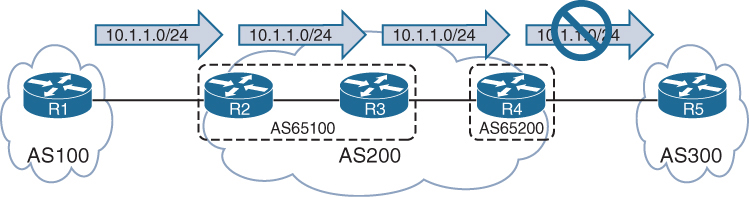
AS 200 is a BGP confederation composed of member AS 65100 and AS 65200
R1 is advertising the 10.1.1.0/24 route to R2, and R2 sets the No_Export community on an inbound route map associated with R1. R2 advertises the prefix to R3, and R3 advertises the prefix to R4. R4 does not advertise the prefix to R5 because it is an eBGP session
Notice that R4 display not advertised to EBGP peer.
R3# show bgp ipv4 unicast 10.1.1.0/24
BGP routing table entry for 10.1.1.0/24, version 6
Paths: (1 available, best #1, table default, not advertised to EBGP peer)
  Advertised to update-groups:
     3
  Refresh Epoch 1
  100, (Received from a RR-client), (received & used)
    10.1.23.2 from 10.1.23.2 (192.168.2.2)
      Origin IGP, metric 0, localpref 100, valid, confed-internal, best
     Community: no-export
R4# show bgp ipv4 unicast 10.1.1.0/24
! Output omitted for brevity
BGP routing table entry for 10.1.1.0/24, version 4
Paths: (1 available, best #1, table default, not advertised to EBGP peer)
Not advertised to any peer
Refresh Epoch 1
(65100) 100, (received & used)
10.1.23.2 (metric 20) from 10.1.34.3 (192.168.3.3)
Origin IGP, metric 0, localpref 100, valid, confed-external, best
Community: no-exportYou can see all the BGP prefixes that contain the No_Export community by using the command show bgp afi safi community no-export
R4# show bgp ipv4 unicast community no-export | b Network
     Network          Next Hop            Metric LocPrf Weight Path
 *>  10.1.1.0/24      10.1.23.2                0    100      0 (65100) 100 i
R2# show bgp ipv4 unicast community no-export | b Network
Network Next Hop Metric LocPrf Weight Path
*> 10.1.1.0/24 10.1.12.1 0 0 100 iThe Local AS (No_Export_SubConfed) BGP Community
With the No_Export_SubConfed community (0xFFFFFF03 or 4,294,967,043), known as the local AS community, a route is not advertised outside the local AS. The local AS community is set with the command set community local-as within a route map.
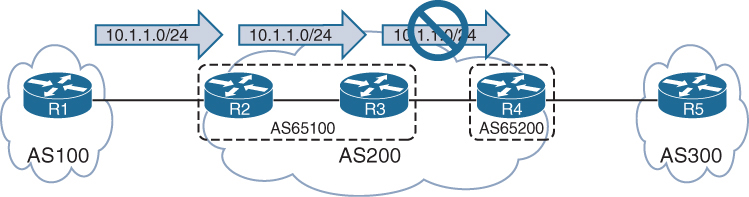
R2 sets the local AS community on an inbound route map associated with R1. R2 advertises the prefix to R3, but R3 does not advertise the prefix to R4 because the prefix contains the local AS community.
R3# show bgp ipv4 unicast 10.1.1.0/24
BGP routing table entry for 10.1.1.0/24, version 8
Paths: (1 available, best #1, table default, not advertised outside local AS)
  Not advertised to any peer
  Refresh Epoch 1
  100, (Received from a RR-client), (received & used)
    10.1.23.2 from 10.1.23.2 (192.168.2.2)
      Origin IGP, metric 0, localpref 100, valid, confed-internal, best
      Community: local-AS
You can see all the BGP prefixes that contain the local AS community by using the command show bgp afi safi community local-as
R3# show bgp ipv4 unicast community local-AS  | b Network
     Network          Next Hop            Metric LocPrf Weight Path
 *>i 10.1.1.0/24      10.1.23.2                0    100      0 100 i
R2# show bgp ipv4 unicast community local-AS | b Network
Network Next Hop Metric LocPrf Weight Path
*> 10.1.1.0/24 10.1.12.1 0 0 100 iConditionally Matching BGP Communities
R1# show bgp ipv4 unicast | begin Network
     Network          Next Hop            Metric LocPrf Weight Path
 *>  10.1.1.0/24      0.0.0.0                  0         32768 ?
 *   10.12.1.0/24     10.12.1.2               22             0 65200 ?

 *>                   0.0.0.0                  0         32768 ?
 *>  10.23.1.0/24     10.12.1.2              333             0 65200 ?
 *>  192.168.1.1/32   0.0.0.0                  0         32768 ?
 *>  192.168.2.2/32   10.12.1.2               22             0 65200 ?
 *>  192.168.3.3/32   10.12.1.2             3333             0 65200 65300 ?
show bgp afi safi detail and then manually select a route with a specific community. However, if the BGP community is known, you can display all the routes by using the command show bgp afi safi community community, as shown in the following snippet:
R1# show bgp ipv4 unicast community 333:333 | begin Network

     Network         Next Hop          Metric LocPrf Weight Path

 *>  10.23.1.0/24    10.12.1.2          333            0 65200 ?
10.23.1.0/24 route and all the BGP path attributes. Notice that two BGP communities (333:333 and 65300:333) are added to the path.
R1# show ip bgp 10.23.1.0/24
BGP routing table entry for 10.23.1.0/24, version 15
Paths: (1 available, best #1, table default)
  Not advertised to any peer
  Refresh Epoch 3
  65200
    10.12.1.2 from 10.12.1.2 (192.168.2.2)
      Origin incomplete, metric 333, localpref 100, valid, external, best
      Community: 333:333 65300:333 <<<
      rx pathid: 0, tx pathid: 0x0
Conditionally matching requires the creation of a community list that shares a structure similar to that of an ACL
Standard community lists are numbered 1 to 99 and match either well-known communities or a private community number (as-number:16-bit-number)
Expanded community lists are numbered 100 to 500 and use regex patterns.
When multiple communities are on the same ip community list statement, all communities for that statement must exist in that route’s community list. If only one out of many communities is required, you can use multiple ip community list statements.
ip community 1 permit 11:100 11:200BGP community list that matches on the community 333:333
The BGP community list is then used in the first sequence of route map COMMUNITY-CHECK, which denies any routes with that community.
The second route map sequence allows for all other BGP routes and sets the BGP weight (locally significant) to 111. The route map is then applied on routes advertised from R2 toward R1.
R1
ip community-list 100 permit 333:333
!
route-map COMMUNITY-CHECK deny 10
 description Block Routes with Community 333:333 in it
 match community 100
route-map COMMUNITY-CHECK permit 20
 description Allow routes with either community in it
 set weight 111
!
router bgp 65100
 neighbor 10.12.1.2 remote-as 65200
 address-family ipv4 unicast
 neighbor 10.12.1.2 route-map COMMUNITY-CHECK in
10.23.1.0/24 prefix is discarded, and all the other prefixes learned from AS 65200 have the BGP weight set to 111
R1# show bgp ipv4 unicast | begin Network
     Network          Next Hop            Metric LocPrf Weight Path
 *>  10.1.1.0/24      0.0.0.0                  0         32768 ?
 *   10.12.1.0/24     10.12.1.2               22           111 65200 ?
 *>                   0.0.0.0                  0         32768 ?
 *>  192.168.1.1/32   0.0.0.0                  0         32768 ?
 *>  192.168.2.2/32   10.12.1.2               22           111 65200 ?
 *>  192.168.3.3/32   10.12.1.2             3333           111 65200 65300 ?
Setting Private BGP Communities
You set a private BGP community in a route map by using the command set community bgp-community [additive]. By default, when you set a community, any existing communities are overwritten, but you can preserve them by using the optional additive keyword.
10.23.1.0/24 route, which has the 333:333 and 65300:333 BGP communities. The 10.3.3.0/24 route has the 65300:300 community.
R1# show bgp ipv4 unicast 10.23.1.0/24
! Output omitted for brevity
BGP routing table entry for 10.23.1.0/24, version 15
  65200
    10.12.1.2 from 10.12.1.2 (192.168.2.2)
      Origin incomplete, metric 333, localpref 100, valid, external, best
      Community: 333:333 65300:333
R1# show bgp ipv4 unicast 10.3.3.0/24
! Output omitted for brevity
BGP routing table entry for 10.3.3.0/24, version 12
65200 65300 3003
10.12.1.2 from 10.12.1.2 (192.168.2.2)
Origin incomplete, metric 33, localpref 100, valid, external, best
Community: 65300:300When additive keyword is not used, so the previous community values of 333:333 and 65300:333 are overwritten with the 10:23 community.
ip prefix-list PREFIX10.23.1.0 seq 5 permit 10.23.1.0/24
ip prefix-list PREFIX10.3.3.0 seq 5 permit 10.3.3.0/24
!
route-map SET-COMMUNITY permit 10
 match ip address prefix-list PREFIX10.23.1.0
 set community 10:23
route-map SET-COMMUNITY permit 20
 match ip address prefix-list PREFIX10.3.3.0
 set community 3:0 3:3 10:10 additive
route-map SET-COMMUNITY permit 30
!
router bgp 65100
 address-family ipv4
 neighbor 10.12.1.2 route-map SET-COMMUNITY in
After the route map has been applied and the routes have been refreshed, the path attributes can be examined
As anticipated, the previous BGP communities are removed for the 10.23.1.0/24 route, but they are maintained with the 10.3.3.0/24 route.
R1# show bgp ipv4 unicast 10.23.1.0/24
! Output omitted for brevity
BGP routing table entry for 10.23.1.0/24, version 22
  65200
    10.12.1.2 from 10.12.1.2 (192.168.2.2)
      Origin incomplete, metric 333, localpref 100, valid, external, best
      Community: 10:23
R1# show bgp ipv4 unicast 10.3.3.0/24
BGP routing table entry for 10.3.3.0/24, version 20
65200 65300 3003
10.12.1.2 from 10.12.1.2 (192.168.2.2)
Origin incomplete, metric 33, localpref 100, valid, external, best
Community: 3:0 3:3 10:10 65300:300Maximum Prefix
Multiple Internet outages have occurred because routers have received more routes than they can handle. The BGP maximum prefix feature restricts the number of routes that are received from a BGP peer.
Prefix limits are typically set for BGP peers on low-end routers as a safety mechanism to ensure that they do not become overloaded.
You can have routers place prefix restrictions on a BGP neighbor by using the BGP address family configuration command neighbor ip-address maximum-prefix prefix-count [warning-percentage] [restart time] [warning-only].
When a peer advertises more routes than the maximum prefix count, the peer moves the neighbor to the Idle (PfxCt) state in the finite-state machine (FSM)
closes the BGP session, and sends out the appropriate syslog message. The BGP session is not automatically reestablished by default. This behavior prevents a continuous cycle of loading routes, resetting the session, and reloading the routes. If you want to restart the BGP session after a certain amount of time, you can use the optional keyword restart time.
A warning is not generated before the prefix limit is reached. By adding a warning percentage (set to 1 to 100) after the maximum prefix count, you can have a warning message sent when the percentage is exceeded. The command for a maximum of 100 prefixes with a warning threshold of 75 is maximum-prefix 100 75. When the threshold is reached, the router reports the following warning message:
%ROUTING-BGP-5-MAXPFX : No. of IPv4 Unicast prefixes received from
192.168.1.1 has reached 75, max 100
You can change the maximum prefix behavior of closing the BGP session by using the optional keyword warning-only so that a warning message is generated instead.
router bgp 65100
 neighbor 10.12.1.2 remote-as 65200
!
 address-family ipv4
  neighbor 10.12.1.2 activate
  neighbor 10.12.1.2 maximum-prefix 7
shows that the 10.12.1.2 neighbor has exceeded the maximum prefix threshold and shut down the BGP session.
R1# show bgp ipv4 unicast summary | begin Neighbor
Neighbor     V      AS MsgRcvd MsgSent   TblVer  InQ OutQ Up/Down  State/PfxRcd
10.12.1.2    4     65200     0       0        1    0    0 00:01:14 Idle (PfxCt)
R1# show log | include BGP
05:10:04.989: %BGP-5-ADJCHANGE: neighbor 10.12.1.2 Up
05:10:04.990: %BGP-4-MAXPFX: Number of prefixes received from 10.12.1.2 (afi 0)
reaches 6, max 7
05:10:04.990: %BGP-3-MAXPFXEXCEED: Number of prefixes received from 10.12.1.2
(afi 0): 8 exceeds limit 7
05:10:04.990: %BGP-3-NOTIFICATION: sent to neighbor 10.12.1.2 6/1
(Maximum Number of Prefixes Reached) 7 bytes 00010100 000007
05:10:04.990: %BGP-5-NBR_RESET: Neighbor 10.12.1.2 reset
(Peer over prefix limit)
05:10:04.990: %BGP-5-ADJCHANGE: neighbor 10.12.1.2 Down Peer over prefix limitIOS XE Peer Groups
IOS XE peer groups simplify BGP configuration and reduce system resource use (CPU and memory) by grouping BGP peers together into BGP update groups. BGP update groups enable a router to perform the outbound routing policy processing one time and then replicate the update to all the members (as opposed to performing the outbound routing policy processing for every router).
The routers in a BGP peer group must contain the same outbound routing policy and same bgp connection type iBGP or eBGP
In addition to enhancing router performance, BGP peer groups simplify the BGP configuration
All routers in the peer group are in the same update group and therefore must be of the same session type: internal (iBGP) or external (eBGP).
Members of a peer group can have a unique inbound routing policy.
router bgp 100
 no bgp default ipv4-unicast
 neighbor AS100 peer-group
 neighbor AS100 remote-as 100
 neighbor AS100 update-source Loopback0
 neighbor 192.168.2.2 peer-group AS100
 neighbor 192.168.3.3 peer-group AS100
 neighbor 192.168.4.4 peer-group AS100
 !
 address-family ipv4
  neighbor AS100 next-hop-self
  neighbor 192.168.2.2 activate
  neighbor 192.168.3.3 activate
  neighbor 192.168.4.4 activate
IOS XE Peer Templates
A restriction for BGP peer groups is that they require all neighbors to have the same outbound routing policy.
BGP peer templates allow for a reusable pattern of settings that can be applied as needed in a hierarchical format through inheritance and nesting of templates.
If a conflict exists between an inherited configuration and the invoking peer template, the invoking template preempts the inherited value
There are two types of BGP peer templates:
- Peer session: This template allows bgp neighbor configuration, template peer-session template-name and then enter any BGP session-related configuration commands.
- Peer policy: This template allows loc-RIB related configuration, template peer-policy template-name and then enter any BGP address family–related configuration commands.
BGP neighbor 10.12.1.2 invokes TEMPLATE-PARENT-POLICY for address family policy settings. TEMPLATE-PARENT-POLICY sets the inbound route map to FILTERROUTES and invokes TEMPLATE-CHILD-POLICY, which sets the maximum prefix limit to 10.
router bgp 100
 template peer-policy TEMPLATE-PARENT-POLICY
  route-map FILTERROUTES in
  inherit peer-policy TEMPLATE-CHILD-POLICY 20
 exit-peer-policy
 !
 template peer-policy TEMPLATE-CHILD-POLICY
  maximum-prefix 10
 exit-peer-policy
 !
 bgp log-neighbor-changes
 neighbor 10.12.1.2 remote-as 200
 !
 address-family ipv4
  neighbor 10.12.1.2 activate
  neighbor 10.12.1.2 inherit peer-policy TEMPLATE-PARENT-POLICY
A BGP peer can be associated with either a peer group or a template but not both.
A BGP peer can be attached to either peer group or peer template
BGP Deterministic MED
https://ipwithease.com/understanding-bgp-deterministic-med/
To understand the use of BGP deterministic-MED we must first understand behavior of BGP algorithm when a route is received on a router via multiple paths
As prefixes are being received, BGP algorithm assigns the first valid path as the current best path
This first valid path is then compared with the next path that is received for “same prefix”
1st and 2nd path are compared and out them the one chosen as best is then compared with 3rd path and so on until the end of paths is reached – best paths are compared as they are being received
Because of above behavior we can have an effect where it looks like MED is not being used.
Similar to BGP always compare-MED feature that ensures the MED gets compared when different AS are advertising the same route
BGP Deterministic-med feature ensures the MED gets compared deterministically for a routes advertised from different paths in same AS.
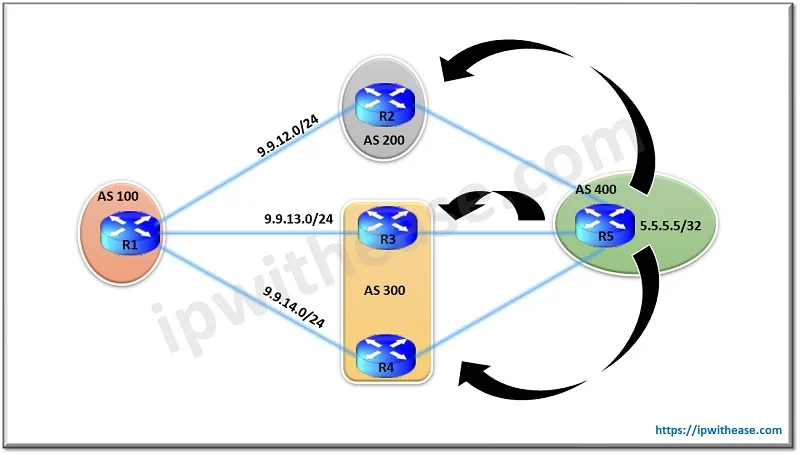
show ip bgp 5.5.5.5
BGP routing table entry for 5.5.5.5/32, version 29
Paths: (3 available, best #3, table Default-IP-Routing-Table)

Flag: 0x4842
Advertised to update-groups:
1

300 400
9.9.13.3 from 9.9.13.3
Origin IGP, metric 100, localpref 100, valid, external

200 400
9.9.12.2 from 9.9.12.2
Origin IGP, metric 150, localpref 100, valid, external

300 400
9.9.14.4 from 9.9.14.4
Origin IGP, metric 200, localpref 100, valid, external, best <<<
N
WLLA
OMNI
MAR-CL N

Next hop - Valid
Weight - Higher weight
Local preference - Highest preference
Locally originated - locally originated preferred over learned from neighbors
AS Path - shorter AS Path

Origin - origin codes i over ?
MED - lower MED from same AS                    <<<
Neighbor type - ebgp over ibgp
IGP metric - lower IGP metric of next hop

Multipath - if configured then BGP will keep both
Age - oldest route that was learned             <<<
Router ID - lower RID

CL - shorter Cluster list length

Neighbor address - lower
Between the Route from R3 and R2 , R2 is chosen as the best path. This is so because the MED isn’t compared for BGP updates from R2 & R3 as they are part of different AS and as per BGP algorithms working the older route is preferred one which here is from R2 (because if you look at the output everything else is same)
Now comparing routes from R2 with route from R4 again MED isn’t compared as they are both from different AS. R4 being the older route here is preferred over the route from R2 and hence is selected as the best. So we see in this scenario how the MED working of preferring the lower MED updates hasn’t taken effect in this scenario.
To overcome this situation we use BGP deterministic-med
Deterministic-med groups all routes for a prefix from same AS under a same group in BGP table and then compare against each other, Then the best of the group is compared against the next group down
R1(config)#router bgp 100
R1(config-router)#bgp deterministic-med
show ip bgp 5.5.5.5
BGP routing table entry for 5.5.5.5/32, version 29
Paths: (3 available, best #3, table Default-IP-Routing-Table)
Flag: 0x4842
Advertised to update-groups:
1
200 400
9.9.12.2 from 9.9.12.2
Origin IGP, metric 100, localpref 100, valid, external
300 400
9.9.13.3 from 9.9.13.3
Origin IGP, metric 150, localpref 100, valid, external best <<<
300 400
9.9.14.4 from 9.9.14.4
Origin IGP, metric 200, localpref 100, valid, external,Now we see the table has been restructured and the routes with same AS path are grouped together.
Routes from R3 and R4 are compared because they are from same AS 300 and since route from R3 has lower MED it is best out of the group.
Now R3’s route is compared with the only route of other group i.e. from R2 and since both routes are from different AS, MED comparison will be skipped again, the route from R3 is older and it wins as best despite R2 having lower MED, this comparison still takes place because of belonging to same prefix
Dynamic BGP Neighbors
https://ipwithease.com/dynamic-bgp-peering/
we use the concept of BGP peer Group, where we can group the BGP Neighbors who are sharing the same outbound policies but with peer groups alone we need to manually configure 100 Peers and then add to the peer group so we need to combine it with another feature
Configuration step of iBGP Peer Group
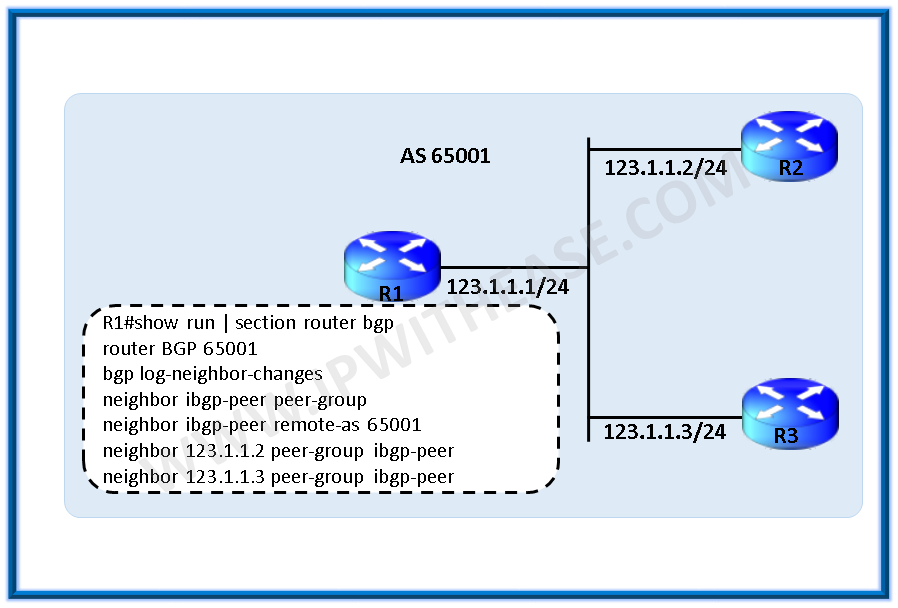
router bgp 65001
bgp log-neighbor-changes
neighbor ibgp-peers peer-group
neighbor ibgp-peers remote-as 65001
neighbor 123.1.1.2 peer-group ibgp-peers
neighbor 123.1.1.3 peer-group ibgp-peers
Configuration step of eBGP peer Group

ip route 1.1.1.2 255.255.255.255 123.1.1.2
ip route 1.1.1.3 255.255.255.255 123.1.1.3

router bgp 65001
bgp log-neighbor-changes
neighbor ebgp-peers peer-group
neighbor ebgp-peers ebgp-multihop 2
neighbor ebgp-peers update-source loopback0
neighbor 123.1.1.2 remote-as 65002
neighbor 123.1.1.2 peer-group ebgp-peers
neighbor 123.1.1.3 remote-as 65003
neighbor 123.1.1.3 peer-group ebgp-peers
With the Dynamic BGP peering feature, BGP router dynamically establishes peering with a group of remote neighbors that are configured using a range of IP addresses + BGP peer group.

R1(config-router)# neighbor dynamic-peers peer-groupCreate a global limit of BGP dynamic subnet range neighbors. The value ranges from 1 to 5000.
R1(config-router)# bgp listen limit 100define IP range for this peer-group
R1(config-router)# bgp listen range 172.16.0.0/16 peer-group dynamic-peersDefine the remote-as for the peer group, optionally, define the list of AS numbers that can be accepted to form neighborship with, max limit of alternate-as numbers is 5
R1(config-router)# neighbor dynamic-peers remote-as 65002 alternate-as 65003 65004Activate the peer group under ipv4 address-family, just like we activate a neighbor
R1(config-router)#address-family ipv4
R1(config-router-af)# neighbor dynamic-peers activate.
Full configuration
R1
router bgp 65001
bgp log-neighbor-changes
bgp listen range 172.16.0.0/16 peer-group dynamic-peers
neighbor dynamic-peers peer-group
neighbor dynamic-peers remote-as 65002 alternate-as 65003 65004

!
address-family ipv4
neighbor dynamic-peers activate
exit-address-family
R2
router bgp 65002
bgp log-neighbor-changes
!
neighbor 172.16.1.1 remote-as 65001R3
router bgp 65003
bgp log-neighbor-changes
!
neighbor 172.16.2.1 remote-as 65001BGP router identifier 10.10.10.1, local AS number 65001
BGP table version is 1, main routing table version 1
Neighbor V AS MsgRcvd MsgSent TblVer InQ OutQ Up/Down State/PfxRcd
*172.16.1.2 4 65002 4 4 1 0 0 00:00:38 0
*172.16.2.2 4 65003 4 2 1 0 0 00:00:29 0
! Dynamically created based on a listen range command
Dynamically created neighbors: 2, Subnet ranges: 1
BGP peer group Dynamic-peer listen range group members:
172.16.0.0/16
Total dynamically created neighbors: 2/(100 max), Subnet ranges: 1show tcp brief all
TCB Local Address Foreign Address (state)
A2B61B90 172.16.1.1.179 172.16.1.2.64321 ESTAB
A2B62F48 172.16.2.1.179 172.16.2.2.17764 ESTAB
A2B19B20 0.0.0.0.179 *.* LISTENThe output illustrates that the router is listening on port 179 but with foreign address of *.*
BGP Allowas-in
https://ipwithease.com/allowas-in-configuration-in-bgp-2/
BGP allowas-in feature allows a router to accept BGP routes that contain its own AS number in the AS path
R2(config)#router bgp 200
R2(config-router)#neighbor 192.168.23.2 allowas-in
BGP local-AS
https://journey2theccie.wordpress.com/2020/06/15/bgp-as-path-manipulations/
The local-AS feature allows a router to fool its neighbor to have a different AS then real AS at “router bgp ” configuration, but only for neighborship, the real AS still appears in AS Path and then the faked AS
R1#sh run | s router bgp
router bgp 65000
 bgp log-neighbor-changes
 network 1.1.1.0 mask 255.255.255.0
 neighbor 12.0.0.2 remote-as 2
 neighbor 12.0.0.2 local-as 1 <<<
R2#sh run | s router bgp
router bgp 2
bgp log-neighbor-changes
network 2.2.2.0 mask 255.255.255.0
neighbor 12.0.0.1 remote-as 1 <<<R2#show bgp | b Network
Network Next Hop Metric LocPrf Weight Path
*> 1.1.1.0/24 12.0.0.1 0 0 1 65000 iAs you can see, both AS numbers are there in the path. They also are there on routes that R1 is learning from R2, this fake AS really acts as another AS inserted in topology:
R1#sh ip bgp | b Network
     Network          Next Hop            Metric LocPrf Weight Path
 *>  2.2.2.0/24       12.0.0.2                 0             0 1 2 i
There are a couple of ways to change this. First, if we want to stop the alternate ASN from being prepended when receiving routes, we can use no-prepend:
R1(config-router)#neighbor 12.0.0.2 local-as 1 no-prepend
R1#sh bgp | b Network
     Network          Next Hop            Metric LocPrf Weight Path
 *>  1.1.1.0/24       0.0.0.0                  0         32768 i
 *>  2.2.2.0/24       12.0.0.2                 0             0 2 i
We can see that the routes learned from R2 no longer are showing 1 in the path. However, if we look at R2….
R2#sh bgp | b Network
     Network          Next Hop            Metric LocPrf Weight Path
 *>  1.1.1.0/24       12.0.0.1                 0             0 1 65000 i
 *>  2.2.2.0/24       0.0.0.0                  0         32768 i
Both of our ASNs are in the path. So to stop the alternate ASN from being prepended when sending routes, we can use the following:
R1(config-router)#neighbor 12.0.0.2 local-as 1 no-prepend replace-asNow if we look at R2:
R2#sh bgp | b Network
     Network          Next Hop            Metric LocPrf Weight Path
 *>  1.1.1.0/24       12.0.0.1                 0             0 1 i
 *>  2.2.2.0/24       0.0.0.0                  0         32768 i
We can see that only 1 is in the path. Using both the no-prepend replace-as keywords allow all routers to see the BGP advertisements as if they were running AS 1 in the BGP process.
There is still one more keyword for this command, and it is the dual-as keyword:
R1(config-router)#neighbor 12.0.0.2 local-as 1 no-prepend replace-as ?
  dual-as  Accept either real AS or local AS from the ebgp peer
  <cr>
This allows the remote peer to use either ASN for the BGP session. This feature is useful during migrations.
BGP remove-private-as
https://journey2theccie.wordpress.com/2020/06/15/bgp-as-path-manipulations/
There are situations where a customer with a single ISP may use a private ASN on the internet connection. In these cases, when the ISP forwards the customer’s prefix(s) out it will remove the private ASN in the process.
This is where Cisco router’s use the remove-private-as command. However, there are certain restrictions:
EBGP neighbors only
The private ASNs are removed from outbound updates
This only works if the path has only private ASNs in the AS_PATH. If there is a mix of public and private this will not work, however there is a way to fix this
If the AS_PATH contains the ASN of the EBGP neighbor, it won’t be removed
R1#sh run | s bgp
router bgp 65000
 bgp log-neighbor-changes
 network 1.1.1.0 mask 255.255.255.0
 neighbor 12.0.0.2 remote-as 2
R2#sh run | s bgp
router bgp 2
bgp log-neighbor-changes
neighbor 12.0.0.1 remote-as 65000
neighbor 24.0.0.4 remote-as 4R4#sh run | s router bgp
router bgp 4
bgp log-neighbor-changes
neighbor 24.0.0.2 remote-as 2If we look at R2 & R4, we can see they have learned the route with the private AS in the path:
R2#show ip bgp | b Network
     Network          Next Hop            Metric LocPrf Weight Path
 *>  1.1.1.0/24       12.0.0.1                 0             0 65000 i
!
R4#sh bgp | b Network
     Network          Next Hop            Metric LocPrf Weight Path
 *>  1.1.1.0/24       24.0.0.2                               0 2 65000 i
So let’s enable that command on R2 and see how it shows up on R4:
R2(config-router)#neighbor 24.0.0.4 remove-private-as
!
R4#sh bgp | b Network
     Network          Next Hop            Metric LocPrf Weight Path
 *>  1.1.1.0/24       24.0.0.2                               0 2 i
That worked easily enough.
So remember what I said about not being able to do it when there are public and private AS numbers in the AS path? Let’s test that by adding a bunch of AS numbers to the path and see if it still works.
R1(config)#route-map PREPEND permit 10
R1(config-route-map)#set as-path prepend 1 10 100
R1(config-route-map)#exit
R1(config)#router bgp 65000
R1(config-router)#neighbor 12.0.0.2 route-map PREPEND out
Let’s check the route back on R4:
R4#sh bgp | b Network
     Network          Next Hop            Metric LocPrf Weight Path
 *>  1.1.1.0/24       24.0.0.2                               0 2 65000 1 10 100 i
As you can see, the private AS is still in the path because there are public AS numbers there and Cisco IOS assumes that the remote-private-as command was a misconfiguration. We can override this with the all keyword:
R2(config-router)#neighbor 24.0.0.4 remove-private-as allThis will remove private AS numbers regardless of what else is in the path. Let’s check R4:
R4#sh bgp | b Network
     Network          Next Hop            Metric LocPrf Weight Path
 *>  1.1.1.0/24       24.0.0.2                               0 2 1 10 100 i
Perfect, now the private AS is gone, but the rest of the ASNs remain.
Removal of AS shortens the path unintentionally so sometimes it is important to keep the ASN entries to equal number, instead of removing them, so instead we can use replace-as with remove-private-as
R2(config-router)#neighbor 24.0.0.4 remove-private-as all replace-as
!
R4#sh bgp | b Network
     Network          Next Hop            Metric LocPrf Weight Path
 *>  1.1.1.0/24       24.0.0.2                               0 2 2 1 10 100 i
Now we can see our AS (2) in the path instead of the private AS of 65000.
BGP Conditional Advertisement
https://ipwithease.com/bgp-conditional-route-advertisement-using-non-exist-map-advertise-map/
By default BGP router advertises all best path routes from Loc-RIB to all its neighbors.
Using conditional advertisement some prefixes are advertised to one of the providers only if information from the other provider is not present. This will help keep routing symmetric
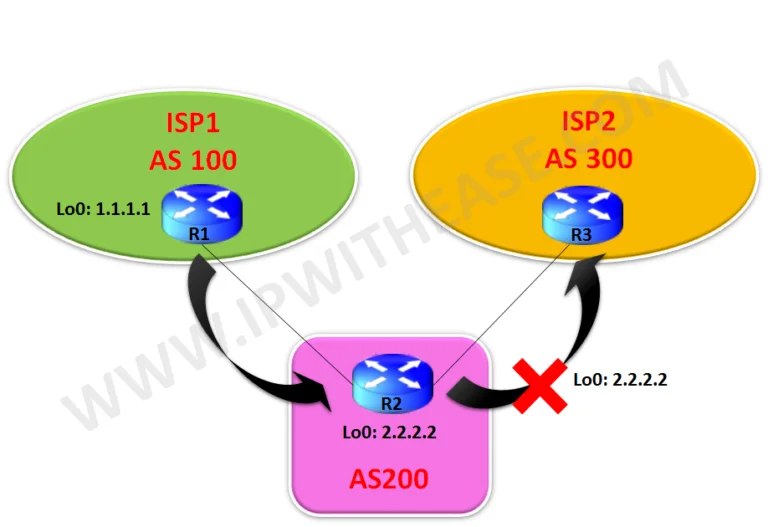
With the BGP conditional advertisement feature, you can now accomplish these tasks on R2:
- If 1.1.1.1/32 exists in R2’s BGP table, then do not advertise the 2.2.2.2/32 network to R3.
- If 1.1.1.1/32 does not exist in R2’s BGP table, then advertise the 2.2.2.2/32 network to R3.
R1
router bgp 100
bgp log-neighbor-changes
network 1.1.1.1 mask 255.255.255.255

neighbor 9.9.12.2 remote-as 200
R2
router bgp 200
bgp log-neighbor-changes
network 2.2.2.2 mask 255.255.255.255
neighbor 9.9.12.1 remote-as 100
neighbor 9.9.23.3 remote-as 300
neighbor 9.9.23.3 advertise-map Advertise non-exist-map Non-Exist
!
access-list 10 permit 2.2.2.2
access-list 20 permit 1.1.1.1
!
route-map Non-Exist permit 10
match ip address 20
!
route-map Advertise permit 10
match ip address 10R3
router bgp 300
bgp log-neighbor-changes
neighbor 9.9.23.2 remote-as 200R2#sh ip bgp
BGP table version is 3, local router ID is 2.2.2.2Status codes: s suppressed, d damped, h history, * valid, > best, i – internal,
r RIB-failure, S Stale, m multipath, b backup-path, f RT-Filter,
x best-external, a additional-path, c RIB-compressed,
Origin codes: i – IGP, e – EGP, ? – incomplete
RPKI validation codes: V valid, I invalid, N Not found
Network Next Hop Metric LocPrf Weight Path
*> 1.1.1.1/32 9.9.12.1 0 0 100 i
*> 2.2.2.2/32 0.0.0.0 0 32768 iR2#sh ip bgp neighbors 9.9.23.3 advertised-routes
BGP table version is 3, local router ID is 2.2.2.2Status codes: s suppressed, d damped, h history, * valid, > best, i – internal,
r RIB-failure, S Stale, m multipath, b backup-path, f RT-Filter,
x best-external, a additional-path, c RIB-compressed,
Origin codes: i – IGP, e – EGP, ? – incomplete
RPKI validation codes: V valid, I invalid, N Not found
Network Next Hop Metric LocPrf Weight Path
*> 1.1.1.1/32 9.9.12.1 0 0 100 i
Total number of prefixes 1R3#sh ip bgp
BGP table version is 8, local router ID is 9.9.23.3Status codes: s suppressed, d damped, h history, * valid, > best, i – internal,
r RIB-failure, S Stale, m multipath, b backup-path, f RT-Filter,
x best-external, a additional-path, c RIB-compressed,
Origin codes: i – IGP, e – EGP, ? – incomplete
RPKI validation codes: V valid, I invalid, N Not found
Network Next Hop Metric LocPrf Weight Path
*> 1.1.1.1/32 9.9.23.2 0 200 100 i <<<
! Only 1.1.1.1/32 is received and not 2.2.2.2Now we will shut down Lo0 interface on R1 to stop the advertisement of 1.1.1.1 to R2 and hence will see 2.2.2.2 is received on R3 now from R2.
R1(config)#int loop 0
R1(config-if)#shutdown
R2#sh ip bgp neighbors 9.9.23.3 advertised-routes
BGP table version is 5, local router ID is 2.2.2.2Status codes: s suppressed, d damped, h history, * valid, > best, i – internal,
r RIB-failure, S Stale, m multipath, b backup-path, f RT-Filter,
x best-external, a additional-path, c RIB-compressed,
Origin codes: i – IGP, e – EGP, ? – incomplete
RPKI validation codes: V valid, I invalid, N Not found
Network Next Hop Metric LocPrf Weight Path
*> 2.2.2.2/32 0.0.0.0 0 32768 i
Total number of prefixes 1R3#sh ip bgp
BGP table version is 10, local router ID is 9.9.23.3Status codes: s suppressed, d damped, h history, * valid, > best, i – internal,
r RIB-failure, S Stale, m multipath, b backup-path, f RT-Filter,
x best-external, a additional-path, c RIB-compressed,
Origin codes: i – IGP, e – EGP, ? – incomplete
RPKI validation codes: V valid, I invalid, N Not found
Network Next Hop Metric LocPrf Weight Path
*> 2.2.2.2/32 9.9.23.2 0 0 200 iBGP Multipath
https://ipwithease.com/bgp-multipath-scenario/

R1(config)#router bgp 100
R1(config-router)#maximum-paths 2
R1#sh ip bgp
BGP table version is 3, local router ID is 1.1.1.1
Status codes: s suppressed, d damped, h history, * valid, > best, i – internal,
r RIB-failure, S Stale, m multipath, b backup-path, f RT-Filter,
x best-external, a additional-path, c RIB-compressed,
Origin codes: i – IGP, e – EGP, ? – incomplete
RPKI validation codes: V valid, I invalid, N Not found
Network Next Hop Metric LocPrf Weight Path
*m 4.4.4.4/32 9.9.12.2 0 200 i <<< ‘m’ means multipath enabled #
*> 9.9.13.3 0 200 iBGP Route Dampening
A route is considered to be flapping when its availability changes repeatedly. Route Dampening is a way to suppress flapping routes so that they are “suppressed” instead of being advertised.
Since BGP routing tables are huge, it’s not practical to send route flaps to neighbors, This could affect the performance of the network as well as consume more routers resources like CPU, As a best practice most ISPs use route dampening regularly.
https://ipwithease.com/bgp-route-dampening-configuration/
router bgp 1
no synchronization
bgp log-neighbor-changes
bgp dampening 10 750 2000 40 <<<
network 1.1.1.0 mask 255.255.255.0
network 192.168.12.0
neighbor 192.168.12.2 remote-as 2
no auto-summary- Penalty should be reduced by half after 10 minutes
- The dampened route must be reused when it reaches value of 750.
- Route should not be used when it reaches 2000 points.
- The routes experiencing Route flaps should not be suppressed for more than 40 minutes
R1#show ip bgp dampening parameters
dampening 10 750 2000 40
Half-life time : 10 mins Decay Time : 1550 secs
Max suppress penalty: 12000 Max suppress time: 40 mins
Suppress penalty : 2000 Reuse penalty : 750
BGP backdoor
https://ipwithease.com/understanding-bgp-backdoor/
….The “Backdoor Feature” can be used to up the administrative distance of eBGP to 200 to make sure that IGP learned routes are given priority. This feature means that a backdoor network will be treated like a local one….
R1#
router bgp 100
network 9.9.0.2 mask 255.255.255.255 backdoor
neighbor 9.9.13.3 remote-as 300
Impact of Load balancing due neighborship to loopbacks
+ difference between nexthop and advertising router
+ Multipathing to multiple paths through 1 neighbor vs 2 or more neighbors
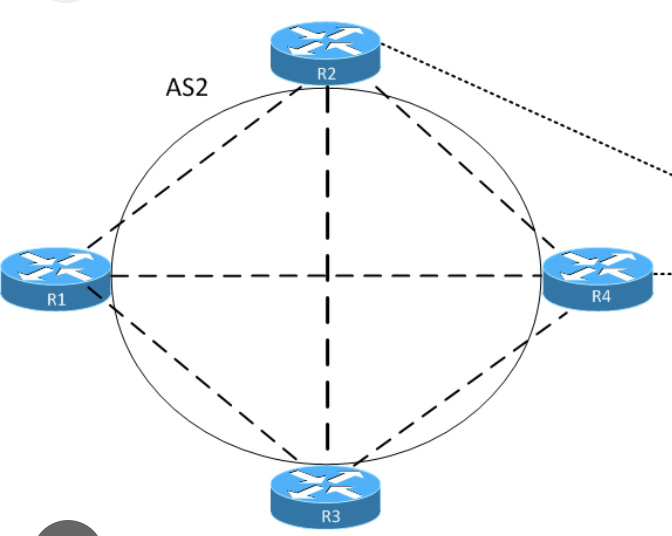
R3 has connected network 192.168.4.0/24 which is advertised in BGP
ibgp peering is only between R2 and R3,
while R1 and R4 are not participating in BGP
If direct link between R2 and R3 is lost
peering is reestablished via R1 and R4 because of peering using loopbacks
All loopbacks are advertised in IGP Multipath is enabled on R2
1. Given that R2 sees loopback of R3 from R1 and R4, how will bgp packets travel to R3?
2. Will it load balance traffic over both R1 and R4?
3. what will be “BGP” next hop for 192.168.4.0/24 on R2?
BGP control-plane traffic (the TCP session itself)
Usually: no per-packet balancing. Most routers do per-flow hashing for ECMP.
A single BGP session is typically:
- One TCP flow (same src/dst IPs + ports)
- So it gets hashed onto one of the ECMP paths (either via R1 or via R4)
It will only switch if:
- the chosen path fails, or
- the hash outcome changes
Data-plane traffic toward 192.168.4.0/24
Because not true next hop or non connected next hop is always recursively resolved, if the next-hop of ibgp in IGP is ECMP then data will be load balanced per flow.
R2 will forward traffic to the BGP next hop (R3 loopback), and if the IGP has ECMP to that loopback, then traffic to 192.168.4.0/24 can be load-balanced over R1 and R4 (again, typically per-flow hashing).
Important: “maximum-paths / BGP multipath on R2”
That only helps if R2 learns multiple BGP paths for 192.168.4.0/24 (different BGP next-hops, etc.).
Here R2 has only one iBGP neighbor (R3), so it only learns one BGP path. Multipath doesn’t create extra BGP paths; ECMP here comes from the IGP to the BGP next hop.
In case R1 and R4 are running bgp then next hop for 192.168.4.0/24 will be different and advertising router will be R3’s loopback address?
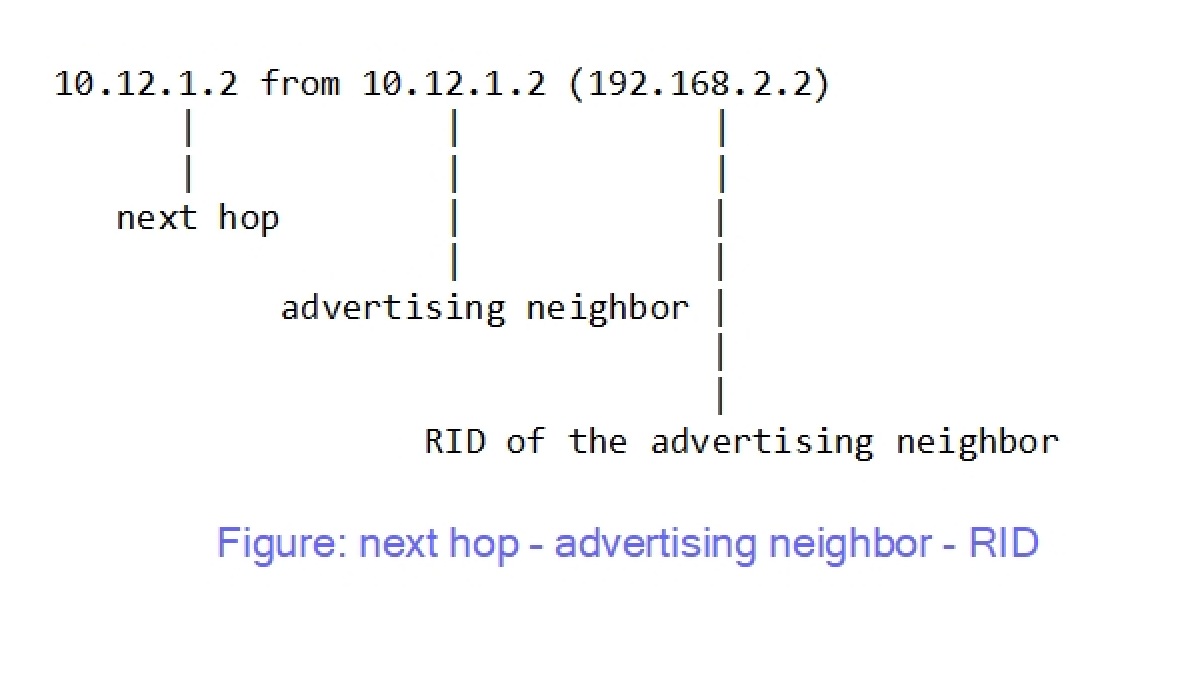
On R2, you will see:
- Next hop: ✅ R3’s loopback
- Advertising neighbor: not R3 but R1 or R4 (whoever sent the update) & RID: RID of R1 or R4
So:
✔ Advertising router ≠ next hop
✔ Next hop still points to R3 unless we use next-hop-self all on ibgp neighbor
✔ Traffic recursively follows IGP to R3 (possibly ECMP via R1/R4)
instances where you will see different next hop compared to advertising router is when route is coming from ebgp to ibgp network, on internal ibgp routes next hop is usually same as advertising router because ibgp never changes next hop when advertising to neighbor