Channel Utilization, Noise levels, Interference Data – contains Rogue
CNI
Channel utilization
Noise levels
Interference data – contains Rogue
Rogue
A Cisco Wireless LAN Controller (WLC) classifies a MAC address as rogue when it detects a wireless device that is not part of your authorized infrastructure but is visible to your access points.
-Unknown Access Point Detected by Your APs
If your access points hear another AP’s beacon frames and that AP is not registered on the WLC, it’s classified as a rogue AP.
-Device Connected to the Wired Network but Advertising Wi-Fi
If the WLC detects that a wireless device’s MAC address also appears on the wired network, it may flag it as a rogue-on-wire device (higher risk)
-Unauthorized AP Using Your SSID
If another AP broadcasts your organisation’s SSID, the WLC treats it as Evil twin attack.
-Client Device Associated with a Rogue AP
client connected to a rogue AP, not the AP itself. The controller still flags it because it’s interacting with an untrusted wireless source
-Temporary Classification During Discovery
A device may briefly appear rogue simply because It hasn’t yet been classified
Co-channel interference vs Adjacent channel interference
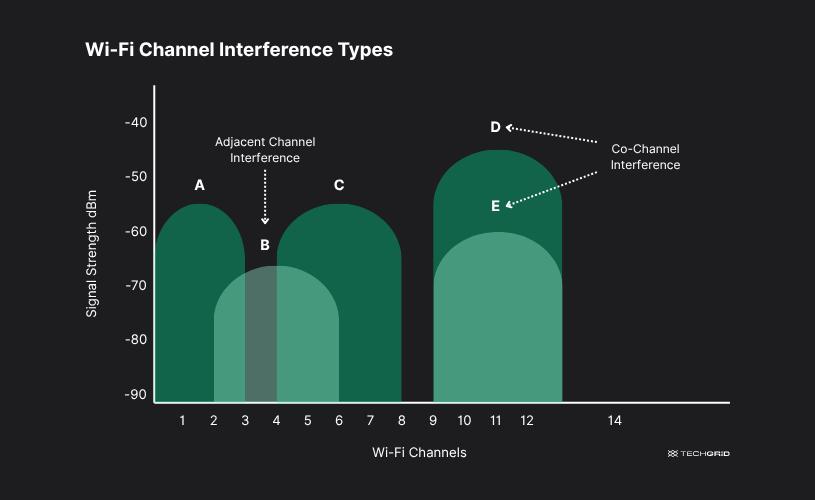
Co-channel Interference
Co-channel interference occurs when two transmitters use the same frequency channel in different cells and their signals overlap at a receiver.
Example: Two base stations far apart reuse Channel A, but a user near the edge of a cell receives signals from both → interference.
Adjacent channel Interference
Adjacent channel interference occurs when signals from nearby frequency channels spill over into each other.
Example:Channel A and Channel B sit next to each other in frequency. A strong Channel A signal leaks into Channel B’s receiver.
Why it happens:
Imperfect transmitter filtering
Different but nearby frequencies
Leave a Reply