⊹ 99. CCIE PMTUD ⊹
CCIE PMTUD
PMTUD
Although the maximum length of an IPv4 datagram is 65535, most transmission links enforce a smaller maximum packet length limit, called an MTU. The MTU size can even differ from link to link
IPv4 fragmentation breaks a datagram into pieces that are reassembled later on the end station , broken by network devices but assembled later on end device
Some headers in IPv4 header that are of significance are “do not fragment” DF bit, fragment offset fields, along with “more fragments” (MF)
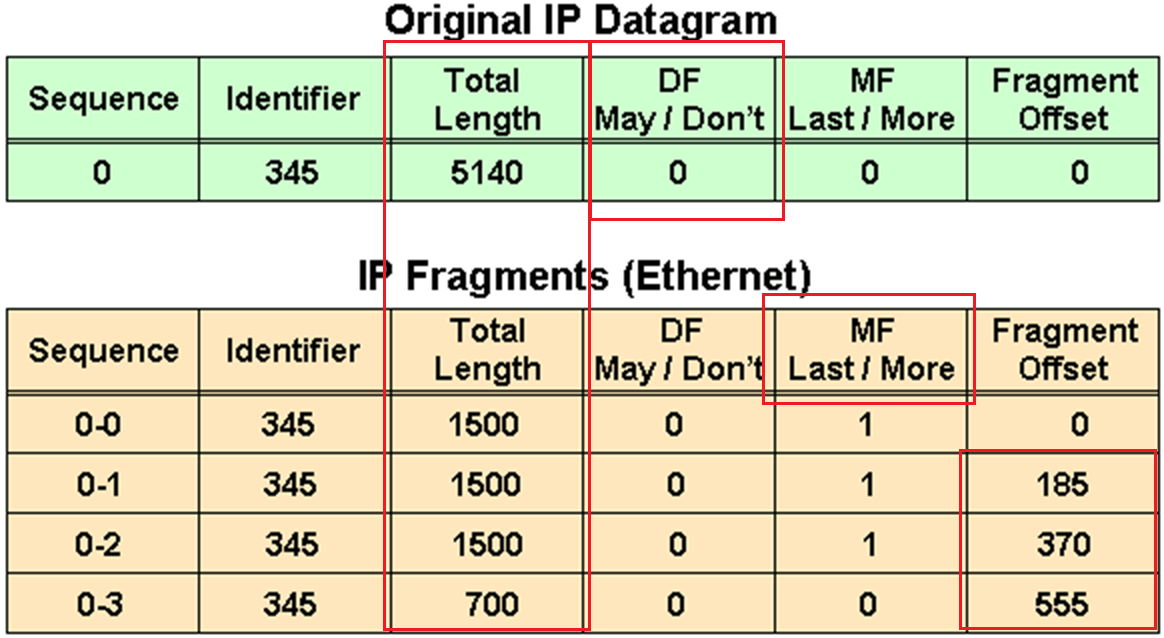
in above figure because DF bit or Do not fragment is not set that is why IP packet was fragmented and not discarded upon the need for fragmentation, determines whether or not a packet is “allowed” to be fragmented.
Identifier is the identifier of the packet, which helps receiver make sure it is assembling the same packet back
offset
The fragment offset is 13 bits and indicates where a fragment belongs in the original IPv4 datagram. This value is a multiple of 8 bytes, like a puzzle where the puzzle fits in the IPv4 packet to make it whole or complete,
The second fragment has an offset of 185 (185 x 8 = 1480); the data portion of this fragment starts 1480 bytes into the original IPv4 datagram,
The third fragment has an offset of 370 (370 x 8 = 2960); the data portion of this fragment starts 2960 bytes into the original IPv4 datagram.
The fourth fragment has an offset of 555 (555 x 8 = 4440), which means that the data portion of this fragment starts 4440 bytes into the original IPv4 datagram.
It is only when the last fragment is received that the size of the original IPv4 datagram can be determined.
Issues with IPv4 Fragmentation
IPv4 fragmentation results in a small increase in CPU and memory overhead to fragment an IPv4 datagram. This is true for the sender and for a router in the path between a sender and a receiver.
The creation of fragments involves the creation of fragment headers and copies the original datagram into the fragments.
Fragmentation causes more overhead for the receiver when reassembling the fragments because the receiver must allocate memory for the arriving fragments and coalesce them back into one datagram after all of the fragments are received.
Reassembly on a host is not considered a problem because the host has the time and memory resources to devote to this task.
Reassembly, however, is inefficient on a router or firewall whose primary job is to forward packets as quickly as possible.
A router is not designed to hold on to packets for any length of time.
A router that does the reassembly chooses the largest buffer available (18K), because it has no way to determine the size of the original IPv4 packet until the last fragment is received.
Another fragmentation issue involves how dropped fragments are handled.
If one fragment of an IPv4 datagram is dropped, then the entire original IPv4 datagram must be present and it is also fragmented.
This is seen with Network File System (NFS). NFS has a read and write block size of 8192.
Therefore, a NFS IPv4/UDP datagram is approximately 8500 bytes (which includes NFS, UDP, and IPv4 headers).
A sending station connected to an Ethernet (MTU 1500) has to fragment the 8500-byte datagram into six (6) pieces; Five (5) 1500 byte fragments and one (1) 1100 byte fragment.
If any of the six fragments are dropped because of a congested link, the complete original datagram has to be retransmitted. This results in six more fragments to be created.
If this link drops one in six packets, then no NFS data are transferred over this link
Firewalls that filter or manipulate packets based on Layer 4 (L4) through Layer 7 (L7) information have trouble processing IPv4 fragments correctly
If the IPv4 fragments are out of order, a firewall blocks the non-initial fragments because they do not carry the information that match the packet filter.
Firewalls nowadays should virtually reassemble packets (which does not actually reassembles packets but only locally in its memory to be able to inspect packet)
PMTUD
TCP MSS addresses fragmentation at the two endpoints of a TCP connection, but it does not handle cases where there is a smaller MTU link in the middle between these two endpoints and UDP traffic.
PMTUD is a mechanism to dynamically determine the true lowest MTU (Maximum Transmission Unit) on the path between a sender and a receiver
If PMTUD is enabled on a host, all TCP and UDP packets from the host have the DF bit set.
so that intermediate routers won’t fragment but if there is a need for fragmentation and network devices drop the packet but still let the sender know that fragmentation is needed
PMTUD Steps
A host sends an IPv4 packet (or a TCP/UDP segment) with the DF bit set.
That packet traverses the network toward its destination. At some point there may be a link with smaller MTU than the packet size.
When a router along the path encounters a packet that it cannot forward without fragmentation (because the packet size > the outgoing link’s MTU) and the packet has the DF bit set, then:
- The router drops the packet.
- The router sends an ICMP “Destination Unreachable – fragmentation needed and DF set” (Type 3, Code 4) message back to the sender. This ICMP message includes the MTU of the next‐hop link in the “unused” field if the router supports it (per RFC 1191). If intermediate routers don’t support including the MTU in the ICMP message or the host ignores the message, then the path MTU may not be found correctly
The sender receives that ICMP message and then reduces its packet size (or the MSS for TCP) for that destination, using the newly discovered path MTU value.
The host updates its send size and retries with smaller size, now the packet goes through successfully. A host records the MTU value for a destination because it creates a host (/32) entry in its routing table with this MTU value.
Because the path can change for same destination on internetwork, PMTUD is an ongoing process: if things change, new ICMP messages may cause further reductions.
For PMTUD to work properly, the ICMP “fragmentation needed” messages must actually reach the sender. If those ICMP messages are blocked by firewalls, routers, or filtered, PMTUD will fail silently
On Cisco routers the command tunnel path-mtu‐discovery (when applied to the tunnel interface) allows the router to participate in PMTUD for encapsulated traffic, to copy DF bit from inner to outer packet, and to dynamically adjust the tunnel MTU
With Cisco routers and switches we can perform extended ping to determine the biggest size possible through the path
ping
Protocol [ip]:
Target IP address: 172.31.176.164
Repeat count [5]:
Datagram size [100]:
Timeout in seconds [2]:
Extended commands [n]: y
Ingress ping [n]:
Source address or interface:
DSCP Value [0]:
Type of service [0]:
Set DF bit in IP header? [no]: y
Validate reply data? [no]:
Data pattern [0x0000ABCD]:
Loose, Strict, Record, Timestamp, Verbose[none]: V
Loose, Strict, Record, Timestamp, Verbose[V]:
Sweep range of sizes [n]: y
Sweep min size [36]: 1400
Sweep max size [20000]: 1600
Sweep interval [1]:
Type escape sequence to abort.
Sending 1005, [1400..1600]-byte ICMP Echos to 172.31.176.164, timeout is 2 seconds:
Packet sent with the DF bit set
Reply to request 0 (7 ms) (size 1400)
Reply to request 1 (10 ms) (size 1401)
Reply to request 2 (8 ms) (size 1402)
Reply to request 3 (7 ms) (size 1403)
Reply to request 4 (4 ms) (size 1404)
Reply to request 5 (4 ms) (size 1405)
Reply to request 6 (3 ms) (size 1406)
Reply to request 7 (4 ms) (size 1407)
Reply to request 8 (4 ms) (size 1408)
Reply to request 9 (4 ms) (size 1409)
Reply to request 10 (5 ms) (size 1410)
Reply to request 11 (6 ms) (size 1411)
Reply to request 12 (3 ms) (size 1412)
Reply to request 13 (4 ms) (size 1413)
Reply to request 14 (3 ms) (size 1414)
Reply to request 15 (3 ms) (size 1415)
Reply to request 16 (5 ms) (size 1416)
Reply to request 17 (3 ms) (size 1417)
Reply to request 18 (3 ms) (size 1418)
Reply to request 19 (3 ms) (size 1419)
Reply to request 20 (5 ms) (size 1420)
Reply to request 21 (7 ms) (size 1421)
Reply to request 22 (3 ms) (size 1422)
Reply to request 23 (3 ms) (size 1423)
Reply to request 24 (4 ms) (size 1424)
Reply to request 25 (6 ms) (size 1425)
Reply to request 26 (4 ms) (size 1426)
Reply to request 27 (3 ms) (size 1427)
Reply to request 28 (4 ms) (size 1428)
Reply to request 29 (3 ms) (size 1429)
Reply to request 30 (4 ms) (size 1430)
Reply to request 31 (4 ms) (size 1431)
Reply to request 32 (3 ms) (size 1432)
Reply to request 33 (3 ms) (size 1433)
Reply to request 34 (4 ms) (size 1434)
Unreachable from 172.31.203.21, maximum MTU 1434 (size 1435)
Request 36 timed out (size 1436)
Request 37 timed out (size 1437)
Request 38 timed out (size 1438)
Request 39 timed out (size 1439)
Request 40 timed out (size 1440)
Request 41 timed out (size 1441)
Unreachable from 172.31.203.21, maximum MTU 1434 (size 1442)
Request 43 timed out (size 1443)
Unreachable from 172.31.203.21, maximum MTU 1434 (size 1444)
Request 45 timed out (size 1445)
Unreachable from 172.31.203.21, maximum MTU 1434 (size 1446)
Request 47 timed out (size 1447)
Unreachable from 172.31.203.21, maximum MTU 1434 (size 1448)
Request 49 timed out (size 1449)
Unreachable from 172.31.203.21, maximum MTU 1434 (size 1450)
Request 51 timed out (size 1451)
Success rate is 67 percent (35/52), round-trip min/avg/max = 3/4/10 ms
but this is also possible with windows, although windows does not increment automatically
ping 8.8.8.8 -f -l 1500-f → Sets the DF (Don’t Fragment) bit.
-l <size> → Sets the ICMP payload packet size.
If network or firewall in path is not filtering ICMP packets returning from remote device then on CLI and packet capture we should see
Packet needs to be fragmented but DF set.So, if ping -f -l works at 1472 bytes, then the actual Path MTU is:
1472 + 28 = 1500 bytesIf we are using powershell then
$target = "8.8.8.8"
for ($size=1300; $size -le 2000; $size+=10) {
    Write-Host "Testing $size bytes"
    ping $target -f -l $size -n 1 | findstr /i "fragment"
}

Read-Host "Press Enter to exit..."
To test PMTUD in real-life:
ping <destination> -f -l 1472
If it passes → Path MTU is likely 1500.
If not → lower the size until it passes.
Further reading: https://www.cisco.com/c/en/us/support/docs/ip/generic-routing-encapsulation-gre/25885-pmtud-ipfrag.html