⊹ 98. CCIE DHCP ⊹
CCIE DHCP
DHCP
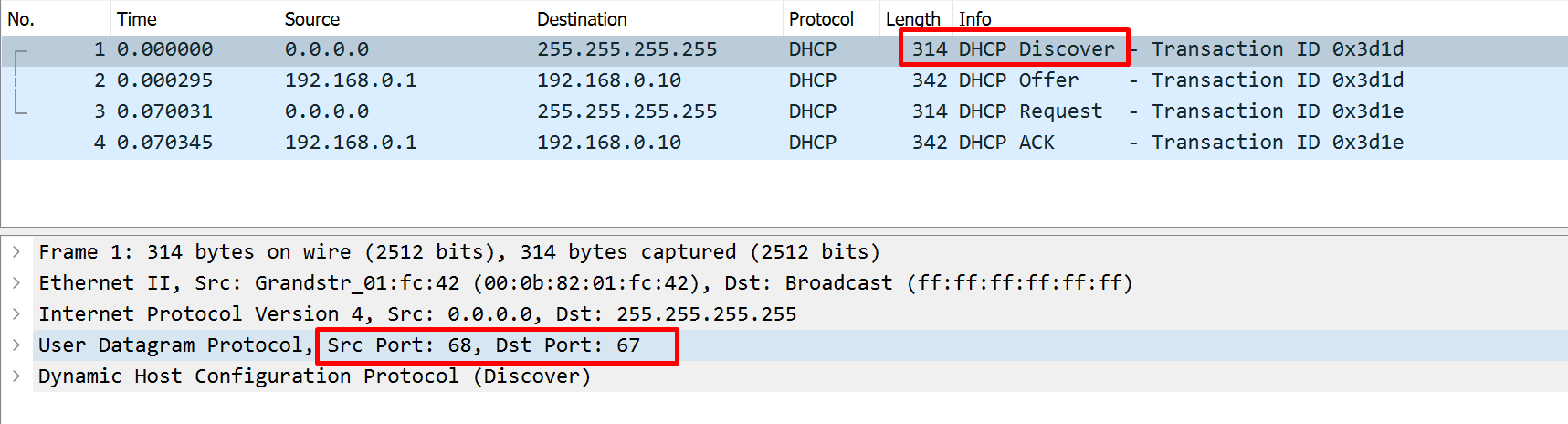
DHCP Client uses source port 68 and destination UDP port 67

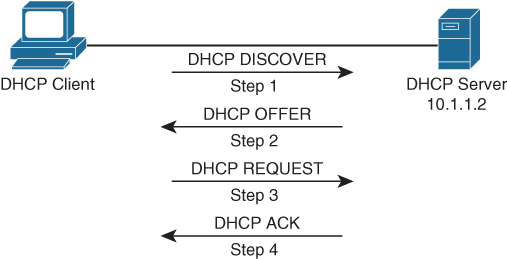
DHCPDISCOVER
DHCPDISCOVER is a broadcast message to 255.255.255.255 and MAC address FFFF:FFFF:FFFF, The source IP address is 0.0.0.0, and the source MAC address is the MAC address of the sending device
DHCPOFFER
DHCP server if on subnet or remote, responds with DHCPOFFER, if more than one DHCP servers respond then client typically selects the server that sent the first DHCPOFFER response it received
DHCPREQUEST
DHCP client selects a server and responds by sending a broadcasted DHCPREQUEST message indicating that it will be using the address provided in the DHCPOFFER
DHCPDECLINE
This message is sent from a client to a DHCP server to inform the server that an IP address is already in use on the network.
DHCPACK
DHCP server responds to the client with a DHCPACK message indicating that the IP address is leased to the client and includes any additional DHCP options
DHCPNAK
A DHCP server sends this message to a client and informs the client that the DHCP server declines to provide the client with the requested IP configuration information.
DHCPRELEASE
A client sends this message to a DHCP server and informs the DHCP server that the client has released its DHCP lease, thus allowing the DHCP server to reassign the client IP address to another client.
DHCPINFORM
A client sends this message to a DHCP server and requests IP configuration parameters. Such a message might be sent from an access server requesting IP configuration information for a remote client attaching to the access server.
DHCP relay
If DHCP server is located in remote subnet then it gateway on client’s subnet need to have DHCP relay agent configured in order to forward the broadcast packets as unicast packets to the server
Routers dont just relay DHCP but can also relay following protocols to remote servers
- TFTP
- Domain Name System (DNS)
- Internet Time Service (ITS)
- NetBIOS name server
- NetBIOS datagram server
- BootP
- TACACS
Router interface as DHCP client
Router or switch can act as DHCP client to obtain IP address on its own interface “ip address dhcp”
Router interface as DHCP server
When router or switch is configured as a DHCP and pool is configured, excluding IP address with “ip dhcp excluded-address 10.8.8.1 10.8.8.10”, command prevents DHCP from assigning those IP addresses to a client. Note that you do not have to include the IP address of the router interface in this exclusion because the router never hands out its own interface IP address.
Potential DHCP issues
Helper address not configured: Router not configured with helper address under the interface facing clients – dhcp relay not configured
Incorrect Server configured: Incorrect DHCP server IP configured under helper address
Pool missing from DHCP server: Request originating from VLAN does not exist on DHCP server as pool, that VLAN or interface must also have IP address and helper configured
Pool exhaustion: DHCP pool could be out of IP addresses – pool exhaustion
High lease duration can cause pool exhaustion: A too high lease duration may cause pool exhaustion if you have more clients than the pool can support
Consider a wireless network at an airport. Let’s say there are 4096 addresses in the pool with a lease duration of 12 hours. Since users are typically not in an airport for more than 4 hours, this lease duration is too long, and the IP address will still be leased to that user until the lease expires, even if the user is no longer in the airport. Therefore, as the day progresses, more addresses are leased, until the pool is exhausted. So, setting a lower lease duration, such as 3 hours, would ensure that the lease expires sooner rather than later and helps prevent pool exhaustion.
Duplicate IP addresses: A DHCP server might hand out an IP address to a client that is already statically assigned to another host on the network. These duplicate IP addresses can cause connectivity issues for both the DHCP client and the host that was statically configured for the IP address.