PAT Pool settings
Enable PAT Pool
Turns on Port Address Translation (PAT) using a pool of IP addresses instead of a single interface IP
- Spread outbound traffic across multiple public IPs
- Avoid port exhaustion
- Improve performance for large user bases
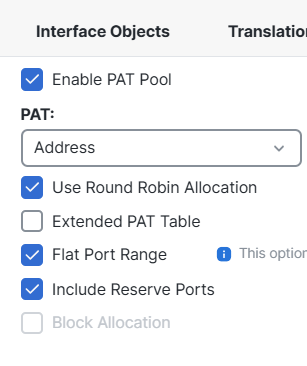
Use Round Robin Allocation:
Distributes sessions evenly across IPs in the PAT pool. Firewall may keep using the same IP until ports fill up, Connections rotate across pool addresses evenly, this is recommended for medium / large environments
Extended PAT Table:
“Usually fine disabled unless scaling issues exist”
Allows multiple translations using the same IP:port combination under certain conditions.
Supports higher connection density
Useful in high-volume NAT environments
Flat Port Range:
Allows PAT to use the entire available port range equally instead of reserving segments
From v6.7+, it’s always enabled automatically
Improves port utilization efficiency
Include Reserve Ports:
Allows firewall to use ports normally reserved for special services if needed
Prevents port exhaustion
Leave a Reply